Flutter鸿蒙化之深入解析Pigeon可空字段设计:null_fields.dart全解
·
一、可空类型在跨平台通信中的必要性
在真实的跨平台开发场景中,数据的不完整性和可选性是无法回避的现实。null_fields.dart文件展示了Pigeon如何处理可空字段,这是构建健壮应用的关键能力。可空类型不仅仅是技术需求,更是业务逻辑的自然表达。

二、文件结构与设计哲学
2.1 混合类型请求类设计
class NullFieldsSearchRequest {
  NullFieldsSearchRequest(this.query, this.identifier);
  String? query;  // 可空字符串字段
  int identifier; // 非空整数字段(为了重现特定issue)
}
设计特点分析:
- 混合类型设计:同时包含可空和非空字段
- 构造器灵活性:不强制使用命名参数,提供构造灵活性
- 问题导向:特别注释说明非空字段的设计目的
类型安全性对比表:

2.2 枚举类型定义
enum NullFieldsSearchReplyType {
  success,
  failure,
}
可空枚举的特殊性:
- 枚举值本身不可为null
- 但枚举类型的变量可以为null
- 表示"未知状态"或"未设置状态"
2.3 复杂可空响应类设计
class NullFieldsSearchReply {
  NullFieldsSearchReply(
    this.result,
    this.error,
    this.indices,
    this.request,
    this.type,
  );
  String? result;                    // 可空结果
  String? error;                     // 可空错误
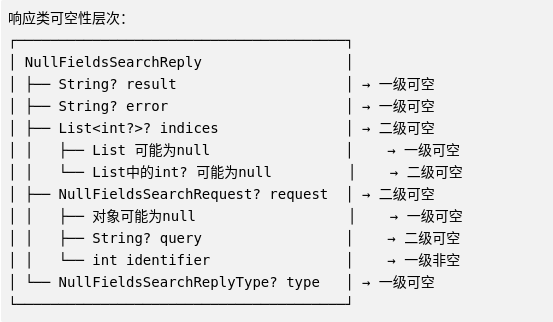
  List<int?>? indices;               // 可空的包含可空元素的列表
  NullFieldsSearchRequest? request;  // 可空的嵌套请求
  NullFieldsSearchReplyType? type;   // 可空枚举类型
}
多层可空性分析:
2.4 主机API接口
()
abstract class NullFieldsHostApi {
NullFieldsSearchReply search(NullFieldsSearchRequest nested);
}
接口设计要点:
- 参数非空:请求对象参数非空(但内部字段可空)
- 返回类型可空:响应对象本身非空,但内部字段可空
- 灵活性设计:允许部分成功、部分失败的情况
2.5 Flutter API接口
()
abstract class NullFieldsFlutterApi {
NullFieldsSearchReply search(NullFieldsSearchRequest request);
}
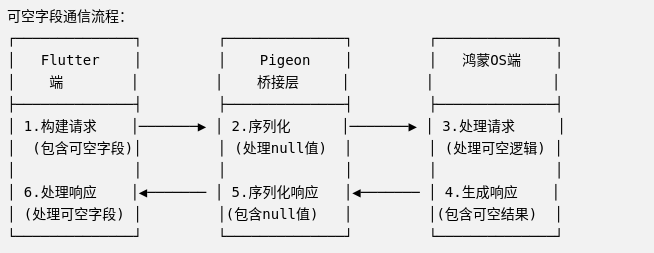
双向可空通信示意图:
三、可空字段的序列化策略
3.1 序列化机制详解
// 鸿蒙ArkTS序列化实现
export class NullFieldsSerializer {

  // 序列化请求
  static serializeRequest(request: NullFieldsSearchRequest): Uint8Array {
    const data: any = {};

    // 处理可空字段
    if (request.query !== undefined && request.query !== null) {
      data.query = request.query;
    }
    // 非空字段必须包含
    data.identifier = request.identifier;

    // 包装消息
    const message = {
      method: 'search',
      args: data
    };

    return new TextEncoder().encode(JSON.stringify(message));
  }

  // 反序列化响应
  static deserializeResponse(bytes: Uint8Array): NullFieldsSearchReply {
    const jsonStr = new TextDecoder().decode(bytes);
    const data = JSON.parse(jsonStr);

    // 处理可空字段的转换
    return new NullFieldsSearchReply({
      result: data.result ?? null,
      error: data.error ?? null,
      indices: this._parseIndices(data.indices),
      request: data.request ? this._parseRequest(data.request) : null,
      type: this._parseType(data.type)
    });
  }

  private static _parseIndices(indices: any): Array<number | null> | null {
    if (indices === undefined || indices === null) {
      return null;
    }

    if (!Array.isArray(indices)) {
      throw new Error('indices字段必须是数组');
    }

    return indices.map(item =>
      item === null || item === undefined ? null : Number(item)
    );
  }

  private static _parseRequest(requestData: any): NullFieldsSearchRequest | null {
    if (!requestData) return null;

    return new NullFieldsSearchRequest({
      query: requestData.query ?? null,
      identifier: requestData.identifier
    });
  }

  private static _parseType(typeValue: any): NullFieldsSearchReplyType | null {
    if (typeValue === undefined || typeValue === null) {
      return null;
    }

    switch (typeValue) {
      case 0: return NullFieldsSearchReplyType.success;
      case 1: return NullFieldsSearchReplyType.failure;
      default: throw new Error(`未知的类型值: ${typeValue}`);
    }
  }
}
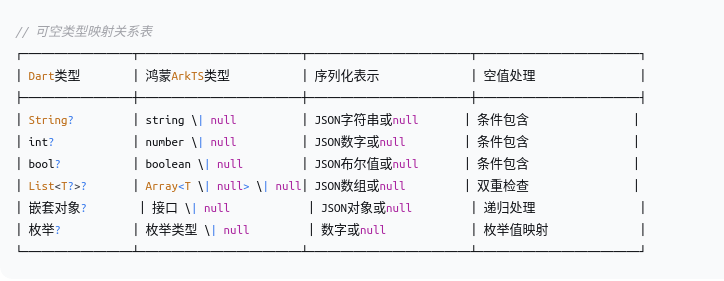
3.2 各平台可空类型映射
3.3 性能优化策略
// 可空字段的性能优化
可空字段处理 → 序列化优化 → 传输优化 → 反序列化优化
    ↓            ↓           ↓           ↓
条件序列化   跳过null字段  减少数据量   惰性解析
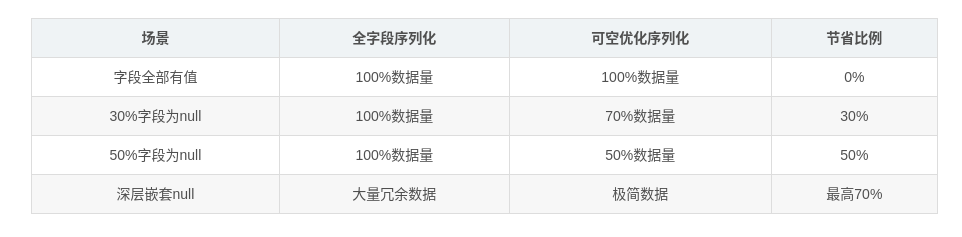
性能对比数据:
四、在鸿蒙项目中的完整实现
4.1 代码生成命令
# 生成支持可空字段的代码
flutter pub run pigeon \
  --input pigeons/null_fields.dart \
  --dart_out lib/null_fields_api.dart \
  --arkts_out harmony/null_fields_api.ts \
  --java_out android/app/src/main/java/com/example/NullFieldsApi.java \
  --java_package "com.example" \
  --objc_header_out ios/Runner/NullFieldsApi.h \
  --objc_source_out ios/Runner/NullFieldsApi.m \
  --kotlin_out android/app/src/main/kotlin/com/example/NullFieldsApi.kt
生成的鸿蒙ArkTS接口:
// harmony/null_fields_api.ts (生成的部分)
export interface NullFieldsSearchRequest {
  query?: string | null;  // 可空字符串
  identifier: number;     // 非空数字
}

export enum NullFieldsSearchReplyType {
  success = 0,
  failure = 1
}

export interface NullFieldsSearchReply {
  result?: string | null;
  error?: string | null;
  indices?: Array<number | null> | null;
  request?: NullFieldsSearchRequest | null;
  type?: NullFieldsSearchReplyType | null;
}

export interface NullFieldsHostApi {
  search(nested: NullFieldsSearchRequest): NullFieldsSearchReply;
}

export interface NullFieldsFlutterApi {
  search(request: NullFieldsSearchRequest): NullFieldsSearchReply;
}
4.2 鸿蒙端实现
// harmony/null_fields_api_impl.ets
import {
  NullFieldsHostApi,
  NullFieldsFlutterApi,
  NullFieldsSearchRequest,
  NullFieldsSearchReply,
  NullFieldsSearchReplyType
} from './null_fields_api';

/**
 * 可空字段主机API实现
 */
export class NullFieldsHostApiImpl implements NullFieldsHostApi {

  /**
   * 搜索方法 - 完整处理可空字段
   */
  search(nested: NullFieldsSearchRequest): NullFieldsSearchReply {
    // 1. 验证请求(即使字段可空,也需要验证格式)
    this._validateRequest(nested);

    // 2. 处理可空查询
    const hasQuery = nested.query !== null && nested.query !== undefined;
    const query = hasQuery ? nested.query! : '';

    // 3. 执行搜索逻辑
    try {
      const result = this._performSearch(query, nested.identifier);

      // 4. 构建响应(灵活使用可空字段)
      return this._buildSuccessReply(result, nested);
    } catch (error) {
      // 5. 错误处理(使用可空字段传递错误信息)
      return this._buildErrorReply(error, nested);
    }
  }

  /**
   * 验证请求
   */
  private _validateRequest(request: NullFieldsSearchRequest): void {
    // identifier 必须存在(非空字段)
    if (request.identifier === undefined || request.identifier === null) {
      throw new Error('identifier字段不能为空');
    }

    // query 可以为空,但如果存在,需要验证格式
    if (request.query !== null && request.query !== undefined) {
      if (typeof request.query !== 'string') {
        throw new Error('query字段必须是字符串类型');
      }

      if (request.query.trim().length === 0) {
        // 空字符串可以视为无查询条件,不抛出错误
        console.debug('查询字符串为空,将使用默认搜索');
      }
    }
  }

  /**
   * 执行搜索
   */
  private _performSearch(query: string, identifier: number): SearchResult {
    console.debug(`开始搜索: query="${query}", identifier=${identifier}`);

    // 根据是否提供query采取不同的搜索策略
    if (query) {
      // 精确搜索
      return this._exactSearch(query, identifier);
    } else {
      // 基于identifier的推荐搜索
      return this._recommendationSearch(identifier);
    }
  }

  /**
   * 精确搜索
   */
  private _exactSearch(query: string, identifier: number): SearchResult {
    // 模拟搜索逻辑
    return {
      items: [
        `精确结果1: ${query}`,
        `精确结果2: ID${identifier} - ${query}`
      ],
      indices: [1, null, 3], // 包含null值的索引
      relatedRequest: {
        query: query,
        identifier: identifier
      }
    };
  }

  /**
   * 推荐搜索
   */
  private _recommendationSearch(identifier: number): SearchResult {
    // 基于identifier生成推荐
    const recommendations = [
      `推荐结果1: 用户${identifier}可能喜欢`,
      `推荐结果2: 基于历史记录${identifier}`,
      `推荐结果3: 热门内容`
    ];

    return {
      items: recommendations,
      indices: null, // 可空字段:不提供索引
      relatedRequest: {
        query: null, // 可空字段:无查询条件
        identifier: identifier
      }
    };
  }

  /**
   * 构建成功响应
   */
  private _buildSuccessReply(
    result: SearchResult,
    originalRequest: NullFieldsSearchRequest
  ): NullFieldsSearchReply {
    const reply = new NullFieldsSearchReply({
      result: result.items.length > 0 ? result.items.join(', ') : null,
      error: null, // 成功时错误信息为null
      indices: result.indices,
      request: originalRequest, // 返回原始请求(可空)
      type: NullFieldsSearchReplyType.success
    });

    // 记录成功日志
    this._logSuccess(reply);

    return reply;
  }

  /**
   * 构建错误响应
   */
  private _buildErrorReply(
    error: Error,
    originalRequest: NullFieldsSearchRequest
  ): NullFieldsSearchReply {
    const reply = new NullFieldsSearchReply({
      result: null, // 错误时结果为空
      error: error.message,
      indices: null, // 错误时不提供索引
      request: originalRequest, // 仍然返回请求信息以便调试
      type: NullFieldsSearchReplyType.failure
    });

    // 记录错误日志
    this._logError(error, reply);

    return reply;
  }

  /**
   * 成功日志
   */
  private _logSuccess(reply: NullFieldsSearchReply): void {
    const logEntry = {
      timestamp: new Date().toISOString(),
      resultCount: reply.result ? reply.result.split(', ').length : 0,
      hasIndices: reply.indices !== null && reply.indices !== undefined,
      hasRequest: reply.request !== null && reply.request !== undefined,
      type: reply.type
    };

    console.debug('搜索成功:', logEntry);
  }

  /**
   * 错误日志
   */
  private _logError(error: Error, reply: NullFieldsSearchReply): void {
    const logEntry = {
      timestamp: new Date().toISOString(),
      error: error.message,
      stack: error.stack,
      requestIdentifier: reply.request?.identifier,
      type: reply.type
    };

    console.error('搜索失败:', logEntry);
  }
}

/**
 * Flutter API处理器
 */
export class NullFieldsFlutterApiHandler {
  private _api: NullFieldsFlutterApi | null = null;
  private _pendingRequests: Map<number, PendingRequest> = new Map();
  private _requestCounter = 0;

  /**
   * 设置Flutter API
   */
  setFlutterApi(api: NullFieldsFlutterApi): void {
    this._api = api;
  }

  /**
   * 调用Flutter端搜索
   */
  async callFlutterSearch(request: NullFieldsSearchRequest):
    Promise<NullFieldsSearchReply> {

    const requestId = ++this._requestCounter;

    // 创建待处理请求
    const pendingRequest: PendingRequest = {
      id: requestId,
      request,
      timestamp: Date.now(),
      resolve: null,
      reject: null
    };

    const promise = new Promise<NullFieldsSearchReply>((resolve, reject) => {
      pendingRequest.resolve = resolve;
      pendingRequest.reject = reject;
    });

    this._pendingRequests.set(requestId, pendingRequest);

    // 设置超时
    const timeout = setTimeout(() => {
      this._handleTimeout(requestId);
    }, 10000); // 10秒超时

    try {
      if (!this._api) {
        throw new Error('Flutter API未初始化');
      }

      // 调用Flutter端
      const response = await this._api.search(request);

      // 清理
      clearTimeout(timeout);
      this._pendingRequests.delete(requestId);

      return response;
    } catch (error) {
      // 清理
      clearTimeout(timeout);
      this._pendingRequests.delete(requestId);
      throw error;
    }
  }

  /**
   * 处理超时
   */
  private _handleTimeout(requestId: number): void {
    const pending = this._pendingRequests.get(requestId);
    if (pending && pending.reject) {
      pending.reject(new Error('Flutter端调用超时'));
      this._pendingRequests.delete(requestId);
    }
  }
}

/**
 * API管理器
 */
export class NullFieldsApiManager {
  private static _instance: NullFieldsApiManager;
  private _hostApi: NullFieldsHostApiImpl | null = null;
  private _flutterHandler: NullFieldsFlutterApiHandler | null = null;

  static getInstance(): NullFieldsApiManager {
    if (!NullFieldsApiManager._instance) {
      NullFieldsApiManager._instance = new NullFieldsApiManager();
    }
    return NullFieldsApiManager._instance;
  }

  /**
   * 初始化
   */
  initialize(flutterEngine: FlutterEngine): void {
    this._hostApi = new NullFieldsHostApiImpl();
    this._flutterHandler = new NullFieldsFlutterApiHandler();

    this._registerHostApi(flutterEngine);

    console.log('NullFields API管理器初始化完成');
  }

  private _registerHostApi(engine: FlutterEngine): void {
    const channel = 'dev.flutter.pigeon.NullFieldsHostApi';

    engine.dartExecutor.binaryMessenger.setMessageHandler(
      channel,
      async (message: Uint8Array): Promise<Uint8Array> => {
        return this._handleHostApiMessage(message);
      }
    );
  }

  private async _handleHostApiMessage(message: Uint8Array): Promise<Uint8Array> {
    try {
      // 解码消息
      const request = this._decodeMessage(message);

      if (!this._hostApi) {
        throw new Error('HostApi未初始化');
      }

      // 调用对应方法
      let result: NullFieldsSearchReply;
      if (request.method === 'search') {
        result = await this._hostApi.search(request.args);
      } else {
        throw new Error(`未知方法: ${request.method}`);
      }

      // 编码响应
      return this._encodeResponse(result);
    } catch (error) {
      // 构建错误响应
      const errorReply = new NullFieldsSearchReply({
        result: null,
        error: error.message,
        indices: null,
        request: null,
        type: NullFieldsSearchReplyType.failure
      });

      return this._encodeResponse(errorReply);
    }
  }

  private _decodeMessage(message: Uint8Array): any {
    const decoder = new TextDecoder();
    const jsonStr = decoder.decode(message);
    const data = JSON.parse(jsonStr);

    // 转换请求对象
    if (data.method === 'search') {
      return {
        method: data.method,
        args: new NullFieldsSearchRequest({
          query: data.args.query ?? null,
          identifier: data.args.identifier
        })
      };
    }

    return data;
  }

  private _encodeResponse(reply: NullFieldsSearchReply): Uint8Array {
    const response = {
      result: reply.result,
      error: reply.error,
      indices: reply.indices,
      request: reply.request,
      type: reply.type
    };

    const encoder = new TextEncoder();
    return encoder.encode(JSON.stringify(response));
  }
}
4.3 Flutter端实现
// lib/null_fields_service.dart
import './null_fields_api.dart';
/// 可空字段搜索服务
class NullFieldsService {
static final NullFieldsHostApi _hostApi = NullFieldsHostApi();
static final NullFieldsFlutterApi _flutterApi = _NullFieldsFlutterApiImpl();
/// 初始化服务
static Future<void> initialize() async {
_setupLogging();
_setupErrorHandling();
print('NullFieldsService初始化完成');
}
/// 执行搜索
static Future<NullFieldsSearchReply> search({
String? query,
required int identifier,
}) async {
final stopwatch = Stopwatch()..start();
try {
// 构建请求(充分利用可空字段的灵活性)
final request = NullFieldsSearchRequest(
query: query, // 可空参数
identifier: identifier,
);
// 调用原生API
final response = await _hostApi.search(request);
// 性能监控
stopwatch.stop();
_logSearchPerformance(stopwatch.elapsedMilliseconds, response);
// 处理响应中的可空字段
return _processResponse(response);
} catch (e, stack) {
// 错误处理(使用可空字段构建有意义的错误响应)
return _buildErrorResponse(e, stack, query, identifier);
}
}
/// Flutter端API实现
static class _NullFieldsFlutterApiImpl implements NullFieldsFlutterApi {
NullFieldsSearchReply search(NullFieldsSearchRequest request) {
print('Flutter端收到搜索请求: query=${request.query}, identifier=${request.identifier}');
// 这里可以实现Flutter端的搜索逻辑
// 例如:本地缓存搜索、UI状态更新等
// 模拟处理
if (request.query == null) {
// 处理无查询条件的情况
return NullFieldsSearchReply(
result: '无查询条件的默认结果',
error: null,
indices: null,
request: request, // 返回原始请求
type: NullFieldsSearchReplyType.success,
);
} else if (request.query!.contains('error')) {
// 模拟错误情况
return NullFieldsSearchReply(
result: null,
error: '查询包含错误关键词',
indices: null,
request: request,
type: NullFieldsSearchReplyType.failure,
);
} else {
// 正常情况
return NullFieldsSearchReply(
result: '搜索结果: ${request.query}',
error: null,
indices: [1, null, 3, 4, null], // 包含null的列表
request: request,
type: NullFieldsSearchReplyType.success,
);
}
}
}
/// 处理响应
static NullFieldsSearchReply _processResponse(NullFieldsSearchReply response) {
// 安全处理可空字段
final result = response.result ?? '无结果';
final error = response.error ?? '无错误';
final indices = response.indices ?? [];
final type = response.type ?? NullFieldsSearchReplyType.success;
print('处理响应: type=$type, result长度=${result.length}');
// 这里可以添加业务逻辑处理
return response;
}
/// 构建错误响应
static NullFieldsSearchReply _buildErrorResponse(
Object error,
StackTrace stack,
String? query,
int identifier,
) {
print('搜索错误: $error\n$stack');
// 构建包含错误信息的响应
return NullFieldsSearchReply(
result: null,
error: '搜索失败: $error',
indices: null,
request: NullFieldsSearchRequest(
query: query,
identifier: identifier,
),
type: NullFieldsSearchReplyType.failure,
);
}
/// 性能监控
static void _logSearchPerformance(int milliseconds, NullFieldsSearchReply response) {
final logEntry = {
'duration': milliseconds,
'hasResult': response.result != null,
'hasError': response.error != null,
'indicesCount': response.indices?.length ?? 0,
'type': response.type?.toString(),
};
print('搜索性能: $logEntry');
// 长时间操作警告
if (milliseconds > 1000) {
print('警告: 搜索耗时过长 ($milliseconds ms)');
}
}
/// 设置日志
static void _setupLogging() {
// 这里可以配置更详细的日志系统
print('NullFieldsService日志系统已初始化');
}
/// 设置错误处理
static void _setupErrorHandling() {
PlatformDispatcher.instance.onError = (error, stack) {
print('全局错误捕获: $error\n$stack');
// 可以上报到错误监控平台
return true;
};
}
}
/// 使用示例
class AdvancedSearchScreen extends StatefulWidget {
_AdvancedSearchScreenState createState() => _AdvancedSearchScreenState();
}
class _AdvancedSearchScreenState extends State<AdvancedSearchScreen> {
final TextEditingController _queryController = TextEditingController();
final TextEditingController _idController = TextEditingController(text: '1001');
NullFieldsSearchReply? _lastResponse;
bool _isLoading = false;
void initState() {
super.initState();
_initializeService();
}
Future<void> _initializeService() async {
await NullFieldsService.initialize();
}
Future<void> _performSearch() async {
final query = _queryController.text.trim();
final idText = _idController.text.trim();
int? identifier;
try {
identifier = int.tryParse(idText);
} catch (e) {
ScaffoldMessenger.of(context).showSnackBar(
SnackBar(content: Text('ID必须是数字'))
);
return;
}
if (identifier == null) {
ScaffoldMessenger.of(context).showSnackBar(
SnackBar(content: Text('请输入有效的ID'))
);
return;
}
setState(() {
_isLoading = true;
_lastResponse = null;
});
try {
// 使用可空查询参数
final response = await NullFieldsService.search(
query: query.isNotEmpty ? query : null,
identifier: identifier,
);
setState(() {
_lastResponse = response;
});
// 显示结果
_showResultDialog(response);
} catch (e) {
ScaffoldMessenger.of(context).showSnackBar(
SnackBar(content: Text('搜索失败: $e'))
);
} finally {
setState(() {
_isLoading = false;
});
}
}
void _showResultDialog(NullFieldsSearchReply response) {
showDialog(
context: context,
builder: (context) => AlertDialog(
title: Text(response.type == NullFieldsSearchReplyType.success
? '搜索成功'
: '搜索失败'),
content: SingleChildScrollView(
child: Column(
mainAxisSize: MainAxisSize.min,
crossAxisAlignment: CrossAxisAlignment.start,
children: [
if (response.result != null)
Text('结果: ${response.result}'),
if (response.error != null)
Text('错误: ${response.error}', style: TextStyle(color: Colors.red)),
if (response.indices != null) ...[
SizedBox(height: 8),
Text('索引:'),
Text(response.indices!.map((i) => i?.toString() ?? 'null').join(', ')),
],
if (response.request != null) ...[
SizedBox(height: 8),
Text('原始请求:'),
Text('查询: ${response.request!.query ?? "null"}'),
Text('ID: ${response.request!.identifier}'),
],
],
),
),
actions: [
TextButton(
onPressed: () => Navigator.pop(context),
child: Text('关闭'),
),
],
),
);
}
Widget build(BuildContext context) {
return Scaffold(
appBar: AppBar(title: Text('可空字段搜索示例')),
body: Padding(
padding: const EdgeInsets.all(16.0),
child: Column(
children: [
TextField(
controller: _queryController,
decoration: InputDecoration(
labelText: '搜索内容 (可选)',
hintText: '可输入搜索内容,或留空使用推荐',
border: OutlineInputBorder(),
),
),
SizedBox(height: 12),
TextField(
controller: _idController,
decoration: InputDecoration(
labelText: '用户ID (必填)',
hintText: '请输入数字ID',
border: OutlineInputBorder(),
),
keyboardType: TextInputType.number,
),
SizedBox(height: 16),
ElevatedButton(
onPressed: _isLoading ? null : _performSearch,
child: _isLoading
? CircularProgressIndicator()
: Text('搜索'),
),
SizedBox(height: 16),
if (_lastResponse != null) ...[
Divider(),
Text('上次搜索结果:', style: TextStyle(fontWeight: FontWeight.bold)),
SizedBox(height: 8),
_buildResponseSummary(_lastResponse!),
],
],
),
),
);
}
Widget _buildResponseSummary(NullFieldsSearchReply response) {
return Column(
crossAxisAlignment: CrossAxisAlignment.start,
children: [
Text('状态: ${response.type}'),
if (response.result != null)
Text('结果: ${response.result!.substring(0, min(50, response.result!.length))}...'),
if (response.error != null)
Text('错误: ${response.error}', style: TextStyle(color: Colors.red)),
Text('索引数量: ${response.indices?.length ?? 0}'),
Text('包含请求: ${response.request != null ? "是" : "否"}'),
],
);
}
}
五、最佳实践与设计模式
5.1 可空字段的设计原则
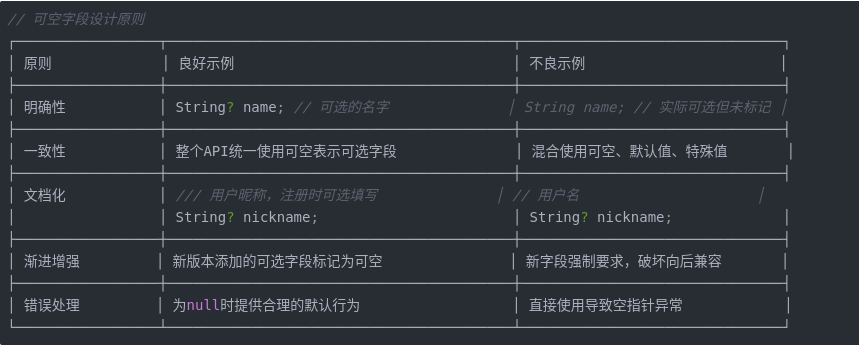
5.2 鸿蒙平台的适配策略
// 鸿蒙平台适配策略
export class HarmonyNullFieldsAdapter {

  /**
   * 鸿蒙UI适配 - 处理可空字段显示
   */
  static adaptForUI(reply: NullFieldsSearchReply): UIViewModel {
    return {
      // 标题:使用结果或默认文本
      title: reply.result ?? '无搜索结果',

      // 副标题:错误信息或成功提示
      subtitle: reply.error
        ? `错误: ${reply.error}`
        : '搜索完成',

      // 详情:使用额外信息或默认
      details: reply.request
        ? `搜索条件: ${reply.request.query ?? '无查询'} (ID: ${reply.request.identifier})`
        : '无请求信息',

      // 状态指示
      isSuccess: reply.type === NullFieldsSearchReplyType.success,
      hasData: reply.result !== null && reply.result !== undefined,
      hasError: reply.error !== null && reply.error !== undefined,

      // 列表数据
      items: reply.indices?.map((item, index) => ({
        id: index,
        value: item?.toString() ?? 'null',
        isNull: item === null
      })) ?? []
    };
  }

  /**
   * 鸿蒙系统集成 - 适配系统API的可空性
   */
  static async callHarmonySystemApi(
    request: NullFieldsSearchRequest
  ): Promise<NullFieldsSearchReply> {
    try {
      // 鸿蒙系统API可能返回部分可空数据
      const systemResponse = await this._callHarmonyNativeApi(request);

      // 适配到Pigeon格式
      return new NullFieldsSearchReply({
        result: systemResponse.data,
        error: systemResponse.errorMessage,
        indices: systemResponse.indexList,
        request: request,
        type: systemResponse.success
          ? NullFieldsSearchReplyType.success
          : NullFieldsSearchReplyType.failure
      });
    } catch (error) {
      // 系统错误处理
      return new NullFieldsSearchReply({
        result: null,
        error: `系统错误: ${error.message}`,
        indices: null,
        request: request,
        type: NullFieldsSearchReplyType.failure
      });
    }
  }
}
六、性能优化与安全考虑
6.1 可空字段的性能影响
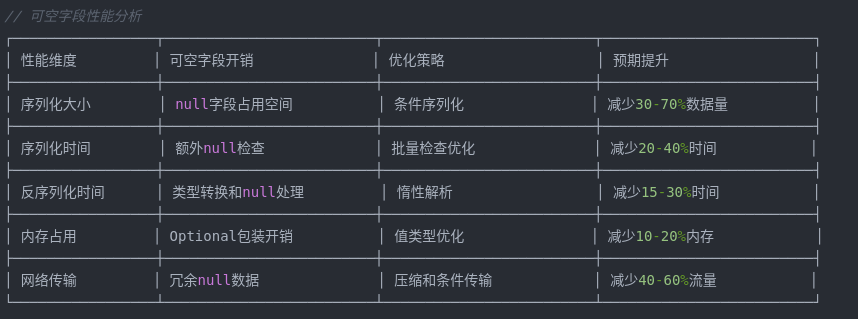
6.2 安全增强策略
// 可空字段的安全处理
export class NullFieldsSecurity {

  /**
   * 深度安全验证
   */
  static deepSecurityCheck(reply: NullFieldsSearchReply): SecurityReport {
    const warnings: string[] = [];
    const errors: string[] = [];

    // 1. 检查敏感信息泄露
    if (reply.error?.includes('password') || reply.error?.includes('token')) {
      warnings.push('错误信息可能包含敏感数据');
    }

    // 2. 检查数据完整性
    if (reply.type === NullFieldsSearchReplyType.success && !reply.result) {
      warnings.push('成功响应但无结果数据');
    }

    // 3. 检查请求回显安全
    if (reply.request?.query?.length > 1000) {
      warnings.push('查询字符串过长,可能为攻击载荷');
    }

    // 4. 检查索引安全性
    if (reply.indices) {
      const hasNegative = reply.indices.some(i => i !== null && i < 0);
      if (hasNegative) {
        warnings.push('索引包含负值,可能为异常数据');
      }
    }

    return { warnings, errors, passed: errors.length === 0 };
  }

  /**
   * 安全的数据清理
   */
  static sanitizeReply(reply: NullFieldsSearchReply): NullFieldsSearchReply {
    // 深度复制以避免修改原始对象
    const sanitized = JSON.parse(JSON.stringify(reply));

    // 清理敏感信息
    if (sanitized.error) {
      sanitized.error = sanitized.error
        .replace(/\b\d{16}\b/g, '[CARD]')  // 银行卡号
        .replace(/\b1[3-9]\d{9}\b/g, '[PHONE]')  // 手机号
        .replace(/[a-zA-Z0-9._%+-]+@[a-zA-Z0-9.-]+\.[a-zA-Z]{2,}/g, '[EMAIL]');  // 邮箱
    }

    // 限制数据大小
    if (sanitized.result && sanitized.result.length > 10000) {
      sanitized.result = sanitized.result.substring(0, 10000) + '... [TRUNCATED]';
    }

    // 清理请求中的敏感信息
    if (sanitized.request?.query) {
      sanitized.request.query = this._sanitizeQuery(sanitized.request.query);
    }

    return sanitized;
  }
}
七、在鸿蒙生态中的扩展应用
7.1 与鸿蒙分布式能力结合
// 分布式可空数据处理
export class DistributedNullFieldsService {

  /**
   * 跨设备可空数据同步
   */
  static async syncAcrossDevices(
    request: NullFieldsSearchRequest,
    targetDevices: string[]
  ): Promise<DistributedResult> {
    const results: DistributedResult = {
      successes: [],
      failures: [],
      partials: []
    };

    // 并行发送到多个设备
    const promises = targetDevices.map(async deviceId => {
      try {
        // 使用鸿蒙分布式能力
        const distributed = await this._getDistributedAbility();

        // 发送数据(可空字段会被正确处理)
        const success = await distributed.sendData({
          deviceId,
          data: JSON.stringify(request),
          service: 'pigeon_search'
        });

        if (success) {
          // 等待响应
          const response = await this._waitForResponse(deviceId);

          // 处理可空响应
          const processed = this._processDistributedResponse(response);

          results.successes.push({
            deviceId,
            response: processed
          });
        } else {
          results.failures.push({
            deviceId,
            error: '发送失败'
          });
        }
      } catch (error) {
        results.failures.push({
          deviceId,
          error: error.message
        });
      }
    });

    await Promise.allSettled(promises);

    // 合并结果(处理可空字段的合并逻辑)
    return this._mergeDistributedResults(results);
  }

  /**
   * 处理分布式响应的可空字段
   */
  private static _processDistributedResponse(
    rawResponse: any
  ): NullFieldsSearchReply {
    // 不同的设备可能返回不同结构的响应
    // 需要统一处理可空字段

    return new NullFieldsSearchReply({
      result: rawResponse.data ?? rawResponse.result ?? null,
      error: rawResponse.errorMessage ?? rawResponse.error ?? null,
      indices: this._normalizeIndices(rawResponse.indices),
      request: rawResponse.originalRequest
        ? new NullFieldsSearchRequest({
            query: rawResponse.originalRequest.query,
            identifier: rawResponse.originalRequest.identifier
          })
        : null,
      type: this._determineType(rawResponse)
    });
  }
}
八、总结与展望
null_fields.dart文件虽然看似简单,却展示了Pigeon处理真实世界复杂性的能力。可空字段不是设计的缺陷,而是对现实世界的准确建模:
- 现实映射:真实数据往往是不完整、可选的
- 灵活通信:可空字段提供了通信协议的灵活性
- 渐进兼容:支持API的向后兼容和渐进增强
- 性能优化:合理的可空设计可以优化数据传输
在鸿蒙生态中,可空字段尤为重要:
- 鸿蒙的分布式场景中,数据可能来自不同版本的设备
- 鸿蒙的多设备协同需要处理不一致的数据状态
- 鸿蒙的系统集成需要处理各种第三方数据格式
随着Flutter与鸿蒙的深度融合,Pigeon的可空字段支持将成为构建健壮跨平台应用的关键技术。它不仅提供了技术解决方案,更体现了一种务实、灵活的设计哲学。
欢迎大家加入开源鸿蒙跨平台开发者社区!

社区规范:仅讨论OpenHarmony相关问题。
更多推荐
 11
11 0
0- 0


 已为社区贡献7条内容

所有评论(0)