MaterialSpinner:HarmonyOS风格下拉控件
MaterialSpinner是一个基于OpenHarmony的第三方组件移植项目,实现了Material风格的下拉列表控件。当前版本在SDK6和DevEco Studio 2.2 Beta1环境下运行良好,支持通过Maven仓库快速集成。组件由Text控件和PopupDialog形式的ListContainer组成,提供丰富的自定义属性设置,包括箭头颜色、背景选择器、文本颜色等。使用示例展示了如
·
项目介绍
- 项目名称:MaterialSpinner
- 所属系列:openharmony的第三方组件适配移植
- 功能:实现Material风格的可下拉列表控件
- 项目移植状态:选中下拉框时无水波纹效果;下拉框展示选项内容无阴影边框
- 调用差异:无
- 开发版本:sdk6,DevEco Studio 2.2 Beta1
- 基线版本:Release 1.0.8
效果演示
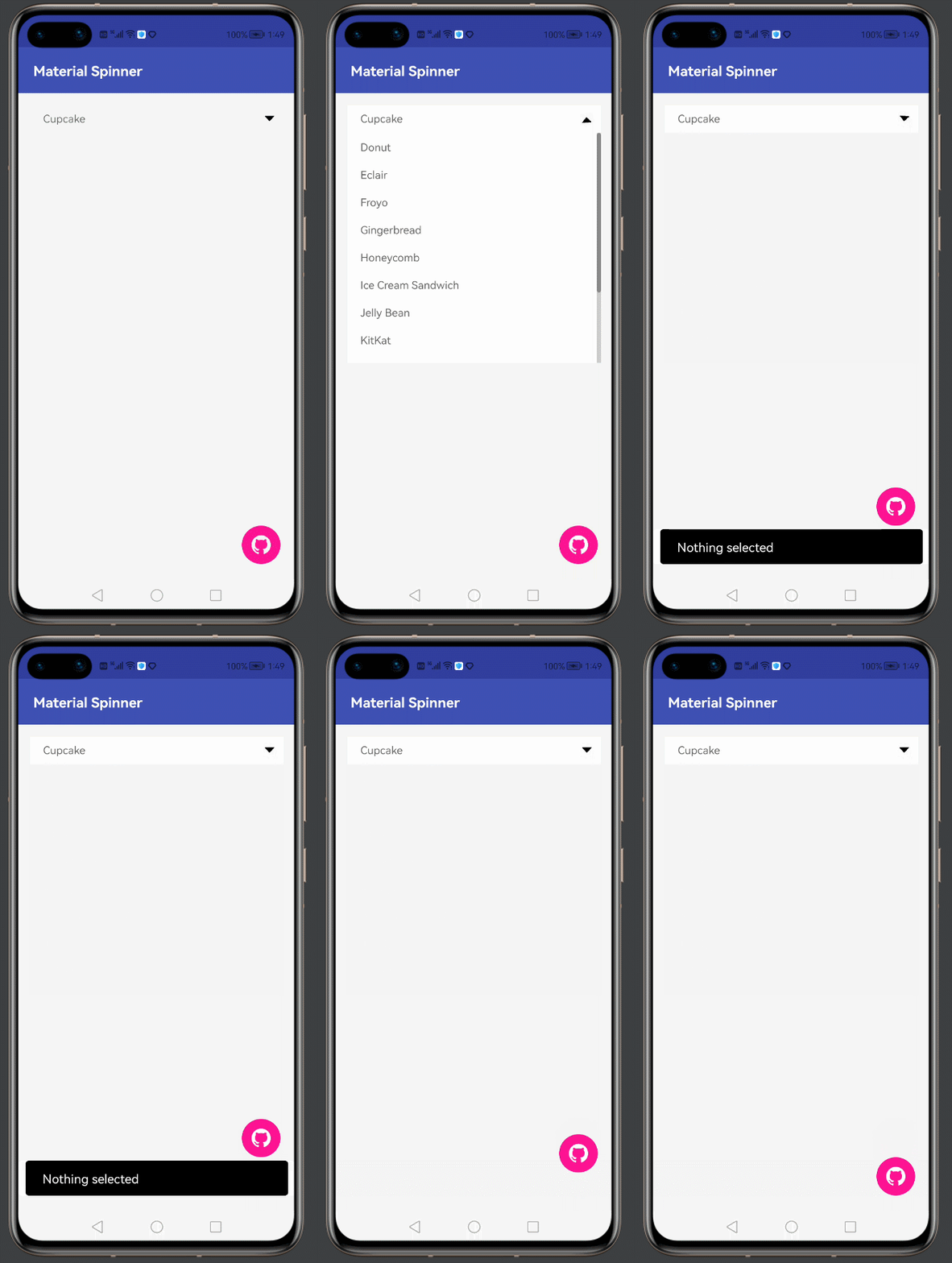
安装教程
1、在项目根目录下的build.gradle文件中
allprojects {
   repositories {
       maven {
           url 'https://s01.oss.sonatype.org/content/repositories/releases/'
       }
   }
}
2.在entry模块的build.gradle文件中
dependencies {
   implementation 'com.gitee.chinasoft_ohos:MaterialSpinner:1.0.0'
   ......
}
在sdk6,DevEco Studio 2.2 Beta1下项目可直接运行 如无法运行,删除项目.gradle,.idea,build,gradle,build.gradle文件, 并依据自己的版本创建新项目,将新项目的对应文件复制到根目录下
使用说明
组件主要由Text控件和PopupDialog形式的ListContainer组成。
原开源项目重写Text,现在openharmony项目重写DependentLayout包含Text的组合控件。
XML中添加下拉框控件:
<com.jaredrummler.materialspinner.MaterialSpinner
    ohos:id="$+id:spinner"
    ohos:width="match_parent"
    ohos:height="match_content"
    ohos:min_height="36vp"
    ohos:bottom_margin="$float:fab_margin"
    ohos:left_margin="$float:fab_margin"
    ohos:end_margin="$float:fab_margin"
    ohos:top_margin="$float:fab_margin"
    app:ms_dropdown_max_height="360vp"
    app:ms_dropdown_height="360vp"
    app:ms_background_selector_press="#FF0000"
    app:ms_background_selector_normal="#00FF00"
    app:ms_background_color="#FFFFFF"
    app:ms_text_color="$color:black"
    app:ms_hint_color="$color:black"
    app:ms_arrow_tint="#000000"
    app:ms_hide_arrow="false"
    app:ms_hint=""
    app:ms_padding_top="22"
    app:ms_padding_left="50"
    app:ms_padding_bottom="22"
    app:ms_padding_right="30"
    app:ms_popup_padding_top="0"
    app:ms_popup_padding_left="26"
    app:ms_popup_padding_bottom="0"
    app:ms_popup_padding_right="0" />
下拉控件加入列表项,并且在点击后触发显示:
    MaterialSpinner spinner = (MaterialSpinner) findComponentById(ResourceTable.Id_spinner);
    spinner.setItems("Ice Cream Sandwich", "Jelly Bean", "KitKat", "Lollipop", "Marshmallow");
    spinner.setOnItemSelectedListener(new MaterialSpinner.OnItemSelectedListener<String>() {

        @Override
        public void onItemSelected(MaterialSpinner view, int position, long id, String item) {
            DirectionalLayout toastLayout = (DirectionalLayout) LayoutScatter.getInstance(MainAbilitySlice.this)
                    .parse(ResourceTable.Layout_layout_toast, null, false);
            Text text = (Text) toastLayout.findComponentById(ResourceTable.Id_msg_toast);
            text.setText("Clicked " + item);
            text.setTextAlignment(TextAlignment.LEFT);
            text.setMultipleLine(true);
            text.setMaxTextLines(2);
            text.setTruncationMode(Text.TruncationMode.ELLIPSIS_AT_END);
            new ToastDialog(MainAbilitySlice.this)
                    .setComponent(toastLayout)
                    .setSize(DirectionalLayout.LayoutConfig.MATCH_CONTENT, DirectionalLayout.LayoutConfig.MATCH_CONTENT)
                    .setAlignment(LayoutAlignment.BOTTOM | LayoutAlignment.HORIZONTAL_CENTER)
                    .setDuration(5000)
                    .setOffset(0, 60)
                    .show();
        }
    });
自定义MaterialSpinner控件,可以添加自定义属性,具体可用属性如下:
| name | type | info |
|---|---|---|
| ms_arrow_tint | color | sets the color on the drop-down arrow |
| ms_hide_arrow | boolean | set to true to hide the arrow drawable |
| ms_background_color | color | set the background color for the spinner and drop-down |
| ms_background_selector | integer | set the background resource for the dropdown items |
| ms_text_color | color | set the text color |
| ms_dropdown_max_height | dimension | set the max height of the drop-down |
| ms_dropdown_height | dimension | set the height of the drop-down |
| ms_padding_top | dimension | set the top padding of the drop-down |
| ms_padding_left | dimension | set the left padding of the drop-down |
| ms_padding_bottom | dimension | set the bottom padding of the drop-down |
| ms_padding_right | dimension | set the right padding of the drop-down |
| ms_popup_padding_top | dimension | set the top padding of the drop-down items |
| ms_popup_padding_left | dimension | set the left padding of the drop-down items |
| ms_popup_padding_bottom | dimension | set the bottom padding of the drop-down items |
| ms_popup_padding_right | dimension | set the right padding of the drop-down items |
测试信息
CodeCheck代码测试无异常
CloudTest代码测试无异常
病毒安全检测通过
当前版本demo功能与原组件基本无差异
版本迭代
- 1.0.0
版权和许可信息
Copyright (C) 2016 Jared Rummler

Licensed under the Apache License, Version 2.0 (the "License");
you may not use this file except in compliance with the License.
You may obtain a copy of the License at

   http://www.apache.org/licenses/LICENSE-2.0

Unless required by applicable law or agreed to in writing, software
distributed under the License is distributed on an "AS IS" BASIS,
WITHOUT WARRANTIES OR CONDITIONS OF ANY KIND, either express or implied.
See the License for the specific language governing permissions and
limitations under the License.
社区规范:仅讨论OpenHarmony相关问题。
更多推荐
 19
19 0
0- 0


 已为社区贡献1条内容

所有评论(0)