OpenHarmony系统应用安装报错快速解决:ErrorCode: 00401004
详细报错:
ErrorCode: 00401004
ErrorDescription: Please try to match the API version of the device and the app. The current device does not contain the following SysCap attributes in the rpcid.json file: SystemCapability.Resourceschedule.BackgroundProcessManager. Make sure the device supports all the SysCap attributes required for running the app.
报错分析:
api版本与系统版本不太匹配,有些系统能力没有,但方便快速开发,可以直接修改系统能力相关的配置文件。
解决步骤:
1、缺乏能力 SystemCapability.Resourceschedule.BackgroundProcessManager,可以直接在系统中grep一下该能力的前缀,会发现有几个关于系统能力的配置文件:
# grep -rn "SystemCapability.Resourceschedule" system/

2、将这三个系统能力配置文件都导出
D:\devCodeApp\VNC>hdc file recv system/etc/param/syscap.para
[I][2026-08-06 14:50:22] HdcFile::TransferSummary success
FileTransfer finish, Size:15523, File count = 1, time:7ms rate:2217.57kB/s
D:\devCodeApp\VNC>hdc file recv system/etc/SystemCapability.json
[I][2026-08-06 14:50:30] HdcFile::TransferSummary success
FileTransfer finish, Size:15118, File count = 1, time:7ms rate:2159.71kB/s
D:\devCodeApp\VNC>hdc file recv system/etc/syscap.json
[I][2026-08-06 14:50:35] HdcFile::TransferSummary success
FileTransfer finish, Size:24665, File count = 1, time:7ms rate:3523.57kB/s
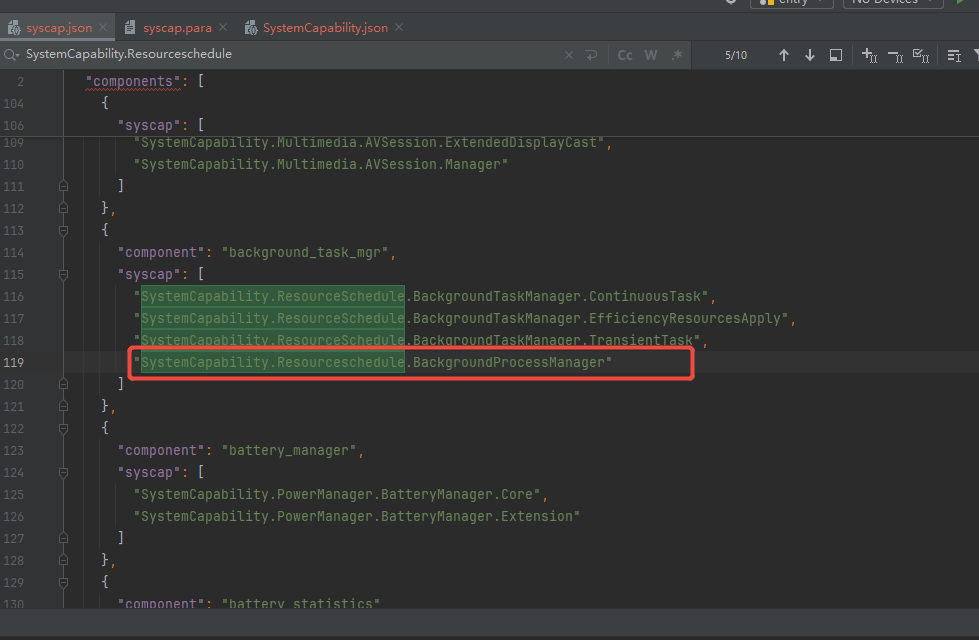
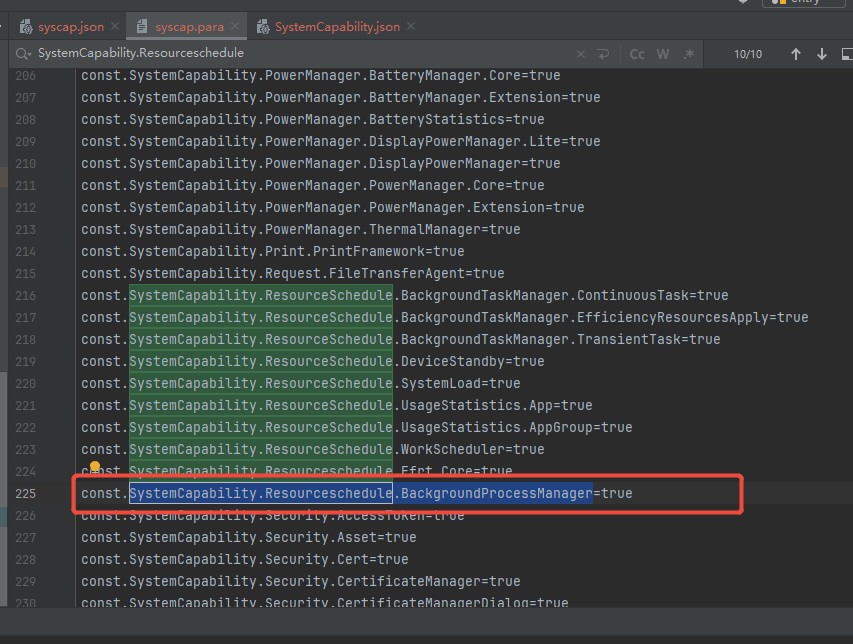
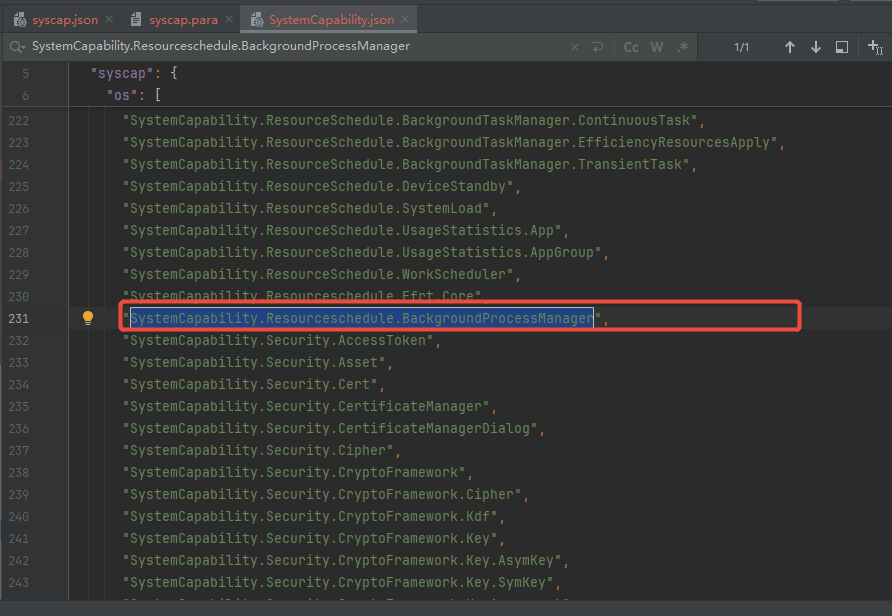
3、修改系统配置文件,搜索SystemCapability.Resourceschedule.,按照其他的系统能力格式添加能力 SystemCapability.Resourceschedule.BackgroundProcessManager
4、修改完后将文件重新推进系统对应目录下:
D:\devCodeApp\VNC>hdc file send syscap.json system/etc/syscap.json
FileTransfer finish, Size:24735, File count = 1, time:10ms rate:2473.50kB/s
D:\devCodeApp\VNC>hdc file send SystemCapability.json system/etc/SystemCapability.json
FileTransfer finish, Size:15186, File count = 1, time:9ms rate:1687.33kB/s
D:\devCodeApp\VNC>hdc file send syscap.para system/etc/param/syscap.para
FileTransfer finish, Size:15593, File count = 1, time:16ms rate:974.56kB/s
5、最后最重要的一步,就是要重启设备!!!!
6、再安装就成功了

社区规范:仅讨论OpenHarmony相关问题。
更多推荐
 0
0 0
0- 0


 已为社区贡献7条内容

所有评论(0)