React Native for OpenHarmony 实战:最大公约数实现
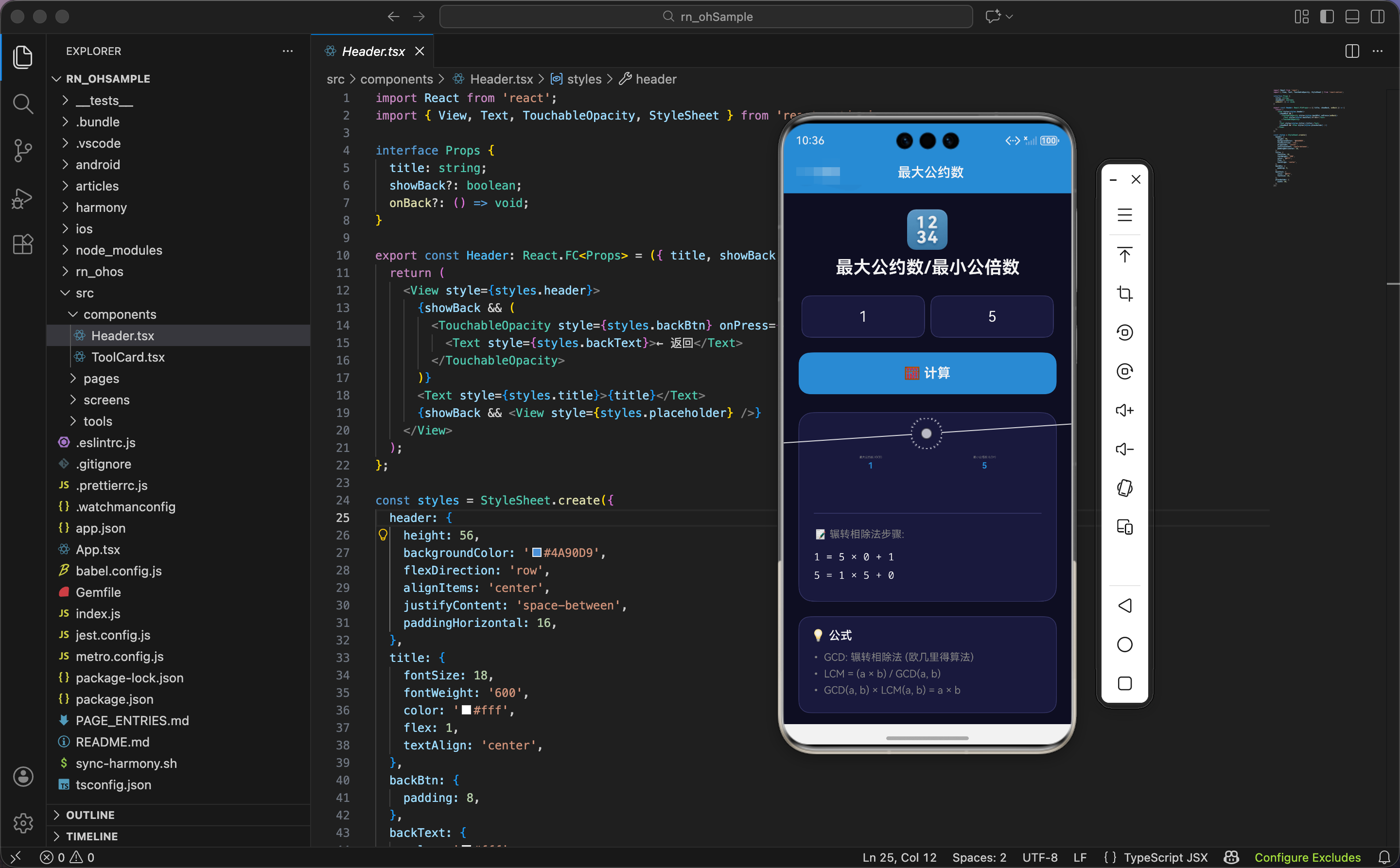
今天我们用 React Native 实现一个最大公约数和最小公倍数计算工具,使用辗转相除法,显示计算步骤。
状态设计
import React, { useState, useRef } from 'react';
import { View, Text, TextInput, TouchableOpacity, StyleSheet, ScrollView, Animated } from 'react-native';

export const GcdLcm: React.FC = () => {
  const [num1, setNum1] = useState('');
  const [num2, setNum2] = useState('');
  const [result, setResult] = useState<{ gcd: number; lcm: number; steps: string[] } | null>(null);

  const buttonAnim = useRef(new Animated.Value(1)).current;
  const resultAnim = useRef(new Animated.Value(0)).current;
  const gcdAnim = useRef(new Animated.Value(0)).current;
  const lcmAnim = useRef(new Animated.Value(0)).current;
状态设计包含两个输入数字、计算结果、动画值。
两个输入数字:num1 和 num2 都是字符串类型,存储用户输入的数字。
计算结果:result 是一个对象或 null:
gcd:最大公约数(Greatest Common Divisor)lcm:最小公倍数(Least Common Multiple)steps:计算步骤数组
四个动画值:
buttonAnim:按钮的缩放动画resultAnim:结果卡片的缩放和透明度动画gcdAnim:最大公约数的缩放动画lcmAnim:最小公倍数的缩放动画
为什么 GCD 和 LCM 分别有动画值?因为要让它们依次出现,先显示结果卡片,再同时显示 GCD 和 LCM,营造"计算完成"的效果。
最大公约数算法
  const gcd = (a: number, b: number): number => {
    return b === 0 ? a : gcd(b, a % b);
  };
递归实现辗转相除法(欧几里得算法)。
递归终止条件:如果 b === 0,返回 a。
递归计算:gcd(b, a % b),用 b 和 a 除以 b 的余数继续计算。
为什么用辗转相除法?因为辗转相除法是计算最大公约数最高效的算法,时间复杂度 O(log n)。比暴力枚举(从小到大试除)快得多。
算法原理:如果 d 是 a 和 b 的公约数,那么 d 也是 b 和 a%b 的公约数。反之亦然。所以 gcd(a, b) = gcd(b, a%b)。不断递归,直到 b 为 0,此时 a 就是最大公约数。
举例:计算 gcd(48, 18)
gcd(48, 18)=gcd(18, 48 % 18)=gcd(18, 12)gcd(18, 12)=gcd(12, 18 % 12)=gcd(12, 6)gcd(12, 6)=gcd(6, 12 % 6)=gcd(6, 0)gcd(6, 0)= 6
计算函数
  const calculate = () => {
    Animated.sequence([
      Animated.timing(buttonAnim, { toValue: 0.9, duration: 100, useNativeDriver: true }),
      Animated.spring(buttonAnim, { toValue: 1, friction: 3, useNativeDriver: true }),
    ]).start();

    const a = parseInt(num1);
    const b = parseInt(num2);
    if (isNaN(a) || isNaN(b) || a <= 0 || b <= 0) return;
计算按钮点击时,触发动画,验证输入。
按钮动画:序列动画,先缩小到 90%(100ms),再弹回到 100%。营造"按下"的感觉。
解析数字:parseInt() 把字符串转成整数。
验证输入:
isNaN(a)或isNaN(b):不是数字a <= 0或b <= 0:不是正整数
如果验证失败,直接返回,不执行计算。
为什么要求正整数?因为最大公约数和最小公倍数只对正整数有意义。负数、0、小数的最大公约数定义不明确。
生成计算步骤
    const steps: string[] = [];
    let x = a, y = b;
    while (y !== 0) {
      steps.push(`${x} = ${y} × ${Math.floor(x / y)} + ${x % y}`);
      const temp = y;
      y = x % y;
      x = temp;
    }
用循环模拟辗转相除法,记录每一步。
初始化:x = a, y = b,复制输入的两个数。
循环条件:y !== 0,当 y 为 0 时停止。
记录步骤:
${x} = ${y} × ${Math.floor(x / y)} + ${x % y}- 表示"x = y × 商 + 余数"
- 比如 48 = 18 × 2 + 12
更新变量:
temp = y:保存 yy = x % y:y 变成余数x = temp:x 变成原来的 y
为什么要记录步骤?因为步骤能帮助用户理解算法。很多人知道辗转相除法,但不知道具体怎么算。显示步骤让用户看到"每一步做了什么",增加工具的教育价值。
举例:计算 gcd(48, 18)
- 第 1 步:48 = 18 × 2 + 12,x = 18, y = 12
- 第 2 步:18 = 12 × 1 + 6,x = 12, y = 6
- 第 3 步:12 = 6 × 2 + 0,x = 6, y = 0
- 循环结束,x = 6 就是最大公约数
计算结果和动画
    const gcdResult = gcd(a, b);
    const lcmResult = (a * b) / gcdResult;

    resultAnim.setValue(0);
    gcdAnim.setValue(0);
    lcmAnim.setValue(0);

    Animated.sequence([
      Animated.spring(resultAnim, { toValue: 1, friction: 5, useNativeDriver: true }),
      Animated.parallel([
        Animated.spring(gcdAnim, { toValue: 1, friction: 4, useNativeDriver: true }),
        Animated.spring(lcmAnim, { toValue: 1, friction: 4, useNativeDriver: true }),
      ]),
    ]).start();

    setResult({ gcd: gcdResult, lcm: lcmResult, steps });
  };
计算最大公约数和最小公倍数,触发动画。
计算最大公约数:调用 gcd(a, b) 函数。
计算最小公倍数:用公式 LCM = (a × b) / GCD。
为什么用这个公式?因为 GCD × LCM = a × b。这是数学定理,可以推导出 LCM = (a × b) / GCD。比如 gcd(12, 18) = 6,lcm(12, 18) = 12 × 18 / 6 = 36。
重置动画值:把三个动画值都设为 0。
序列动画:
- 结果卡片从 0 到 1(弹簧动画)
- GCD 和 LCM 同时从 0 到 1(并行弹簧动画)
为什么用序列 + 并行动画?因为要先显示结果卡片,再显示 GCD 和 LCM。如果全部并行,会同时出现,没有层次感。如果全部序列,会依次出现,太慢。序列 + 并行结合,先显示卡片,再同时显示两个结果,节奏刚好。
界面渲染:头部和输入
  return (
    <ScrollView style={styles.container}>
      <View style={styles.header}>
        <Text style={styles.headerIcon}>🔢</Text>
        <Text style={styles.headerTitle}>最大公约数/最小公倍数</Text>
      </View>

      <View style={styles.inputSection}>
        <View style={styles.inputWrapper}>
          <TextInput style={styles.input} value={num1} onChangeText={setNum1} keyboardType="numeric" placeholder="第一个数" placeholderTextColor="#666" />
        </View>
        <View style={styles.inputWrapper}>
          <TextInput style={styles.input} value={num2} onChangeText={setNum2} keyboardType="numeric" placeholder="第二个数" placeholderTextColor="#666" />
        </View>
      </View>

      <Animated.View style={{ transform: [{ scale: buttonAnim }] }}>
        <TouchableOpacity style={styles.btn} onPress={calculate} activeOpacity={0.8}>
          <Text style={styles.btnText}>🧮 计算</Text>
        </TouchableOpacity>
      </Animated.View>
头部显示标题,输入区域包含两个输入框,按钮触发计算。
头部:
- 图标:🔢 数字
- 标题:最大公约数/最小公倍数
输入区域:
- 两个输入框并排,各占 50% 宽度
keyboardType="numeric":弹出数字键盘textAlign: 'center':居中对齐- 占位符:“第一个数”、“第二个数”
按钮:
- 应用缩放动画,点击时缩小再弹回
- 图标:🧮 算盘
- 文字:计算
为什么两个输入框并排?因为要输入两个数字,并排布局让用户一眼看出"需要输入两个数"。如果上下排列,用户可能以为只需要输入一个数。
结果显示
      {result && (
        <Animated.View style={[styles.result, { transform: [{ scale: resultAnim }], opacity: resultAnim }]}>
          <View style={styles.resultRow}>
            <Animated.View style={[styles.resultItem, { transform: [{ scale: gcdAnim }] }]}>
              <Text style={styles.resultLabel}>最大公约数 (GCD)</Text>
              <Text style={styles.resultValue}>{result.gcd}</Text>
            </Animated.View>
            <Animated.View style={[styles.resultItem, { transform: [{ scale: lcmAnim }] }]}>
              <Text style={styles.resultLabel}>最小公倍数 (LCM)</Text>
              <Text style={styles.resultValue}>{result.lcm}</Text>
            </Animated.View>
          </View>
结果卡片显示最大公约数和最小公倍数。
条件渲染:只有 result 不为 null 时才显示。
结果卡片动画:
- 缩放:从 0 到 1
- 透明度:从 0 到 1
结果行:横向布局,两个结果项并排。
结果项:
- 标签:灰色小字,“最大公约数 (GCD)” 或 “最小公倍数 (LCM)”
- 数值:蓝色大字,字号 36,加粗
- 应用缩放动画
为什么两个结果并排?因为 GCD 和 LCM 是对等的,并排布局让用户一眼看出"这是两个结果"。如果上下排列,用户可能以为只有一个结果。
计算步骤
          {result.steps.length > 0 && (
            <View style={styles.steps}>
              <Text style={styles.stepsTitle}>📝 辗转相除法步骤:</Text>
              {result.steps.map((step, i) => (
                <Text key={i} style={styles.stepText}>{step}</Text>
              ))}
            </View>
          )}
        </Animated.View>
      )}
计算步骤显示辗转相除法的每一步。
条件渲染:只有 steps 数组不为空时才显示。
标题:📝 辗转相除法步骤
遍历步骤:用 map 遍历 steps 数组,生成步骤文本。
步骤文本:
- 白色文字
fontFamily: 'monospace':等宽字体,让数字对齐
为什么用等宽字体?因为步骤是数学公式,用等宽字体让数字对齐,更容易阅读。比如:
48 = 18 × 2 + 12
18 = 12 × 1 + 6
12 =  6 × 2 + 0
等宽字体让等号对齐,看起来更整齐。
公式说明
      <View style={styles.info}>
        <Text style={styles.infoTitle}>💡 公式</Text>
        <Text style={styles.infoText}>• GCD: 辗转相除法 (欧几里得算法)</Text>
        <Text style={styles.infoText}>• LCM = (a × b) / GCD(a, b)</Text>
        <Text style={styles.infoText}>• GCD(a, b) × LCM(a, b) = a × b</Text>
      </View>
    </ScrollView>
  );
};
公式说明区域显示算法和公式。
三条公式:
- GCD 用辗转相除法(欧几里得算法)
- LCM = (a × b) / GCD(a, b)
- GCD(a, b) × LCM(a, b) = a × b
为什么显示公式?因为公式能帮助用户理解算法。很多人知道最大公约数和最小公倍数,但不知道怎么计算。显示公式让用户学习数学知识,增加工具的教育价值。
鸿蒙 ArkTS 对比:辗转相除法
@State num1: string = ''
@State num2: string = ''
@State result: { gcd: number, lcm: number, steps: string[] } | null = null

gcd(a: number, b: number): number {
  return b === 0 ? a : this.gcd(b, a % b)
}

calculate() {
  const a = parseInt(this.num1)
  const b = parseInt(this.num2)
  if (isNaN(a) || isNaN(b) || a <= 0 || b <= 0) return

  const steps: string[] = []
  let x = a, y = b
  while (y !== 0) {
    steps.push(`${x} = ${y} × ${Math.floor(x / y)} + ${x % y}`)
    const temp = y
    y = x % y
    x = temp
  }

  const gcdResult = this.gcd(a, b)
  const lcmResult = (a * b) / gcdResult
  this.result = { gcd: gcdResult, lcm: lcmResult, steps }
}
ArkTS 中的辗转相除法逻辑完全一样。核心是递归计算 GCD,用公式计算 LCM,用循环记录步骤。parseInt()、isNaN()、Math.floor() 都是标准 JavaScript API,跨平台通用。
为什么算法跨平台通用?因为辗转相除法是纯数学算法,不涉及 UI、动画、平台 API。只要语言支持递归和取余运算,就能实现辗转相除法。
样式定义
const styles = StyleSheet.create({
  container: { flex: 1, backgroundColor: '#0f0f23', padding: 20 },
  header: { alignItems: 'center', marginBottom: 24 },
  headerIcon: { fontSize: 50, marginBottom: 8 },
  headerTitle: { fontSize: 24, fontWeight: '700', color: '#fff', textAlign: 'center' },
  inputSection: { flexDirection: 'row', marginBottom: 20 },
  inputWrapper: { flex: 1, backgroundColor: '#1a1a3e', borderRadius: 12, marginHorizontal: 4, borderWidth: 1, borderColor: '#3a3a6a' },
  input: { padding: 16, fontSize: 20, color: '#fff', textAlign: 'center' },
  btn: { backgroundColor: '#4A90D9', padding: 18, borderRadius: 16, alignItems: 'center', marginBottom: 24 },
  btnText: { color: '#fff', fontSize: 18, fontWeight: '700' },
  result: { backgroundColor: '#1a1a3e', padding: 20, borderRadius: 20, marginBottom: 20, borderWidth: 1, borderColor: '#3a3a6a' },
  resultRow: { flexDirection: 'row' },
  resultItem: { flex: 1, alignItems: 'center', padding: 16 },
  resultLabel: { fontSize: 12, color: '#888', marginBottom: 8, textAlign: 'center' },
  resultValue: { fontSize: 36, fontWeight: '700', color: '#4A90D9' },
  steps: { marginTop: 20, paddingTop: 20, borderTopWidth: 1, borderTopColor: '#3a3a6a' },
  stepsTitle: { fontSize: 14, color: '#888', marginBottom: 12 },
  stepText: { fontSize: 14, color: '#fff', fontFamily: 'monospace', marginBottom: 6 },
  info: { backgroundColor: '#1a1a3e', padding: 16, borderRadius: 16, borderWidth: 1, borderColor: '#3a3a6a' },
  infoTitle: { fontSize: 16, fontWeight: '600', marginBottom: 12, color: '#fff' },
  infoText: { fontSize: 14, color: '#888', marginBottom: 6 },
});
容器用深蓝黑色背景。输入区域横向布局,两个输入框各占 50%。结果行横向布局,两个结果项各占 50%。结果数值字号 36,蓝色加粗。步骤用等宽字体,让数字对齐。
小结
这个最大公约数工具展示了辗转相除法的实现。用递归计算 GCD,用公式计算 LCM,用循环记录步骤。序列 + 并行动画让结果依次出现,营造计算完成的效果。
欢迎加入开源鸿蒙跨平台社区:https://openharmonycrossplatform.csdn.net

社区规范:仅讨论OpenHarmony相关问题。
更多推荐
 19
19 0
0- 0


 已为社区贡献7条内容

所有评论(0)