OpenHarmony 应用组件的动态属性设置
动态设置组件的属性,支持开发者在属性设置时使用 if/else 语法,且根据需要使用多态样式设置属性。
·
简介:
动态设置组件的属性,支持开发者在属性设置时使用 if/else 语法,且根据需要使用多态样式设置属性。
文档环境:
- 开发环境:Windows 10 专业版
- DevEco Studio 版本:DevEco Studio 4.0Release (4.0.0.600)
- SDK 版本:4.1.6.1 Beta1 (full sdk)
- API 版本:Version 11
- 开发板型号:DAYU200(RK3568)
- 系统版本:OpenHarmony 4.1.6.1
演示 demo:
- 通过自定义实现 AttributeModifier 接口,在 applyNormalAttribute、applyPressedAttribute、applyDisabledAttribute、applySelectedAttribute、applyFocusedAttribute 方法中实现自定义组件在不同状态时的样式。下面代码为实现 AttributeModifier 接口的自定义实现类。
demo 运行效果:
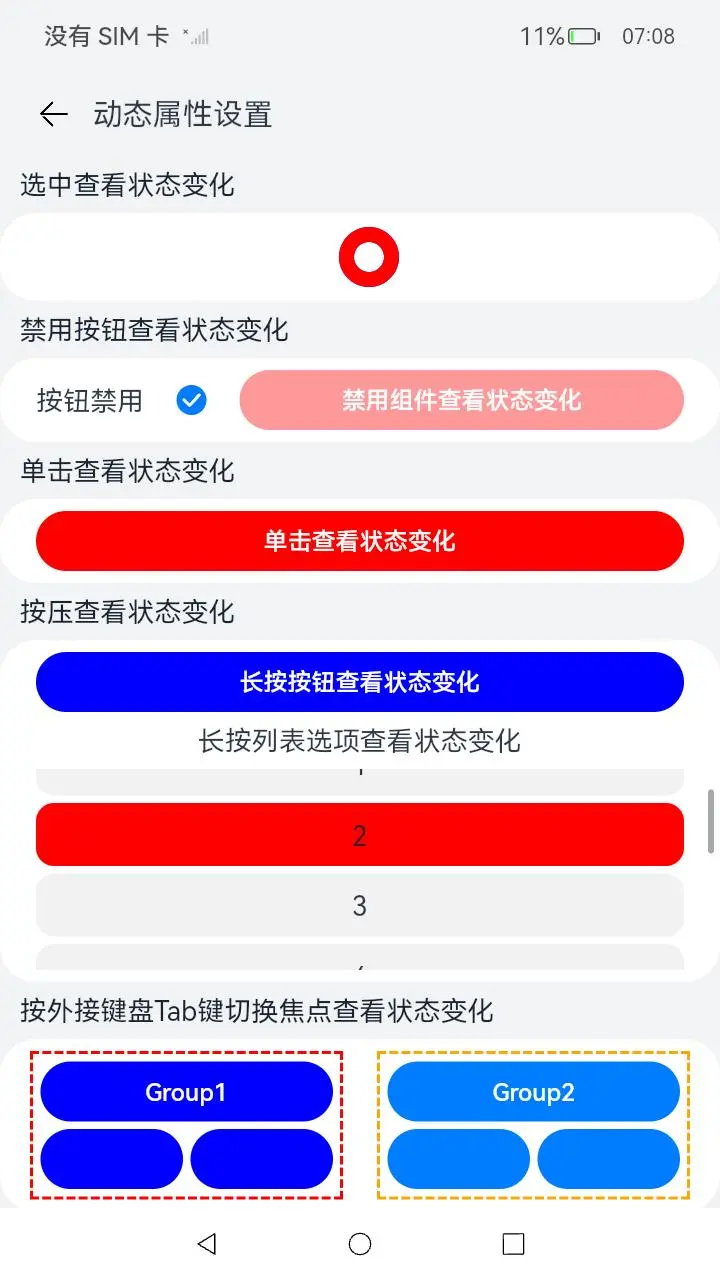
核心代码如下:
    class MyButtonNormalModifier implements AttributeModifier<ButtonAttribute> {
      isBlue: boolean = false
      applyNormalAttribute(instance: ButtonAttribute): void {
        if (this.isBlue) {
          instance.backgroundColor(Color.Red);
        } else {
          instance.backgroundColor(Color.Blue);
        }
      }
    }
    class MyButtonPressedModifier implements AttributeModifier<ButtonAttribute> {
      applyNormalAttribute(instance: ButtonAttribute): void {
        instance.backgroundColor(Color.Blue);
      }
      applyPressedAttribute(instance: ButtonAttribute): void {
        instance.backgroundColor(Color.Red);
      }
    }

    class MyListItemPressedModifier implements AttributeModifier<ListItemAttribute> {
      applyNormalAttribute(instance: ListItemAttribute): void {
        instance.backgroundColor(\$r('app.color.background\_grey'));
      }
      applyPressedAttribute(instance: ListItemAttribute): void {
        instance.backgroundColor(Color.Red);
      }
    }

    class MyButtonDisableModifier implements AttributeModifier<ButtonAttribute> {
      applyNormalAttribute(instance: ButtonAttribute): void {
        instance.backgroundColor(Color.Blue);
      }
      applyDisabledAttribute(instance: ButtonAttribute): void {
        instance.backgroundColor(Color.Red);
      }
    }

    class MyRadioSelectModifier implements AttributeModifier<RadioAttribute> {
      applyNormalAttribute(instance: RadioAttribute): void {
        instance.backgroundColor(Color.Blue);
      }
      applySelectedAttribute(instance: RadioAttribute): void {
        instance.radioStyle({
          checkedBackgroundColor: Color.Red
        })
      }
    }

    class MyButtonFocusModifier implements AttributeModifier<ButtonAttribute> {
      applyNormalAttribute(instance: ButtonAttribute): void {
        instance.backgroundColor(Color.Blue);
      }
      applyFocusedAttribute(instance: ButtonAttribute): void {
        instance.backgroundColor(Color.Red);
      }
    }
基于 AttributeModifier 实现了自定义的组件属性后,就可以使用了,例如:
@Entry
@Component
struct AttributeModifierSample {
@State normalModifier: MyButtonNormalModifier = new MyButtonNormalModifier();
@State buttonPressModifier: MyButtonPressedModifier = new MyButtonPressedModifier();
build() {
Column() {
TitleBar({ title: \$r('app.string.attribute\_modifier') })
Row() {
Column() {
IntroductionTitle({ introduction: \$r('app.string.click\_to\_see\_status') })
Row({ space: 10 }) {
Button(\$r('app.string.component\_id\_click\_to\_see\_attributeModifier'))
.MyButtonStyle()
.id('clickButton')
.attributeModifier(this.normalModifier)
.onClick(() => {
this.normalModifier.isBlue = !this.normalModifier.isBlue;
})
}
.justifyContent(FlexAlign.Center)
.borderRadius(24)
.width('100%')
.backgroundColor(Color.White)
.margin({ left: 12, right: 12 })
      IntroductionTitle({ introduction: \$r('app.string.press\_to\_see\_status') })
      Column({ space: 8 }) {
        Button(\$r('app.string.component\_id\_press\_to\_see\_attributeModifier'))
          .MyButtonStyle()
          .attributeModifier(this.buttonPressModifier)
          .id('longClickButton')

        Row(){
          Text(\$r('app.string.component\_id\_press\_list\_to\_see\_attributeModifier'))
            .fontSize(18)
        }
}
.height('100%')
.width('100%')
.backgroundColor(\$r('app.color.background\_shallow\_grey'))
}
}
为了能让大家更好的学习鸿蒙(HarmonyOS NEXT)开发技术,这边特意整理了《鸿蒙开发学习手册》(共计890页),希望对大家有所帮助:https://qr21.cn/FV7h05
《鸿蒙开发学习手册》:
如何快速入门:https://qr21.cn/FV7h05
- 基本概念
- 构建第一个ArkTS应用
- ……

开发基础知识:https://qr21.cn/FV7h05
- 应用基础知识
- 配置文件
- 应用数据管理
- 应用安全管理
- 应用隐私保护
- 三方应用调用管控机制
- 资源分类与访问
- 学习ArkTS语言
- ……

基于ArkTS 开发:https://qr21.cn/FV7h05
- Ability开发
- UI开发
- 公共事件与通知
- 窗口管理
- 媒体
- 安全
- 网络与链接
- 电话服务
- 数据管理
- 后台任务(Background Task)管理
- 设备管理
- 设备使用信息统计
- DFX
- 国际化开发
- 折叠屏系列
- ……

鸿蒙开发面试真题(含参考答案):https://qr18.cn/F781PH

鸿蒙开发面试大盘集篇(共计319页):https://qr18.cn/F781PH
1.项目开发必备面试题
2.性能优化方向
3.架构方向
4.鸿蒙开发系统底层方向
5.鸿蒙音视频开发方向
6.鸿蒙车载开发方向
7.鸿蒙南向开发方向


社区规范:仅讨论OpenHarmony相关问题。
更多推荐
 3
3 0
0- 0


 已为社区贡献88条内容

所有评论(0)