【入门到实战】OpenHarmony开发:Loading加载
·
往期鸿蒙5.0全套实战文章必看:(文中附带全栈鸿蒙5.0学习资料)
介绍
用于表示加载中的过渡状态
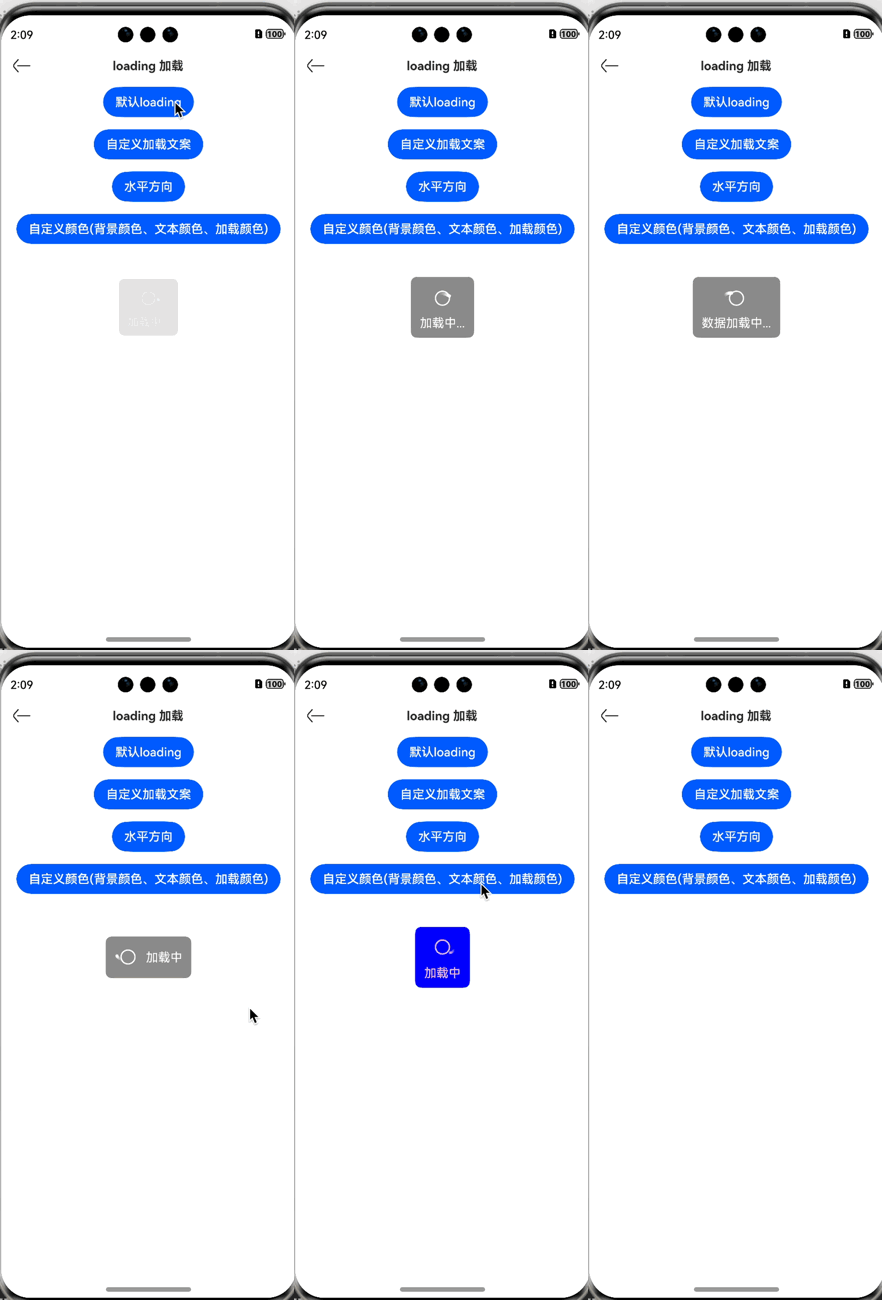
导入依赖
import { PkLoading } from '@peakmain/library/Index';
构造参数
| 参数名 | 参数类型 | 名称 |
|---|---|---|
| title | string | 设置加载文本内容,默认值为"加载中..." |
| isVertical | boolean | 是否是垂直方向,默认是true,表示文本和Loading处于垂直方向 |
| loadingColor | ResourceColor | 设置loading颜色,默认值为 Color.White |
| textColor | ResourceColor | 设置字体文本颜色,默认值为 Color.White |
| backgroundResourceColor | ResourceColor | 设置背景颜色,默认值为"rgba(0,0,0,0.46)" |
方法参数
| 方法名 | 参数 | 名称 |
|---|---|---|
| setTitle | string | 设置加载文本内容 |
| setVertical | boolean | 是否是垂直方向 |
| setLoadingColor | ResourceColor | 设置loading颜色 |
| setTextColor | ResourceColor | 设置字体文本颜色 |
| setBackgroundResourceColor | ResourceColor | 设置背景颜色 |
| setLoadingTextBackgroundResourceColor | loadingColor: ResourceColor, textColor: ResourceColor, |
backgroundResourceColor: ResourceColor|loadingColor设置loading颜色;textColor:设置字体文本颜色;backgroundResourceColor:设置背景颜色|
示例
import { NavBar, PkLoadingManager, STATUS_BAR_HEIGHT } from '@peakmain/library';

@Entry
@Component
struct LoadingPage {
  title: string = "加载中..."
  isVertical: boolean = true
  loadingColor: ResourceColor = Color.White
  textColor: ResourceColor = Color.White
  backgroundResourceColor: ResourceColor = "rgba(0,0,0,0.46)"
  @StorageProp(STATUS_BAR_HEIGHT)
  statusBarHeight: number = 0
  loading = new PkLoadingManager(this.getUIContext())

  resetData() {
    this.title = "加载中"
    this.isVertical = true
    this.loadingColor = Color.White
    this.textColor = Color.White
    this.backgroundResourceColor = "rgba(0, 0, 0, 0.46)"
  }

  build() {
    Column() {
      NavBar({
        title: "loading 加载"
      })
      Column({ space: 16 }) {
        Button("默认loading")
          .onClick(() => {
            this.title = "默认加载..."
            this.loading.setTitle(this.title).open()
          })
        Button("自定义加载文案")
          .onClick(() => {
            this.title = "自定义数据加载中..."
            this.loading.setTitle(this.title).open()
          })
        Button("水平方向")
          .onClick(() => {
            this.isVertical = false
            this.loading.setVertical(this.isVertical).open()
          })
        Button("自定义颜色(背景颜色、文本颜色、加载颜色)")
          .onClick(() => {
            this.loadingColor = Color.Pink
            this.textColor = Color.Pink
            this.backgroundResourceColor = Color.Blue
            this.loading.setLoadingTextBackgroundResourceColor(this.loadingColor, this.textColor,
              this.backgroundResourceColor)
              .open()
          })
      }
      .height("100%")
    }.height("100%")
    .padding({
      top: this.statusBarHeight
    })

  }
}

社区规范:仅讨论OpenHarmony相关问题。
更多推荐
 5
 0
- 0


 已为社区贡献197条内容

所有评论(0)