【入门到实战】OpenHarmony开发:List列表
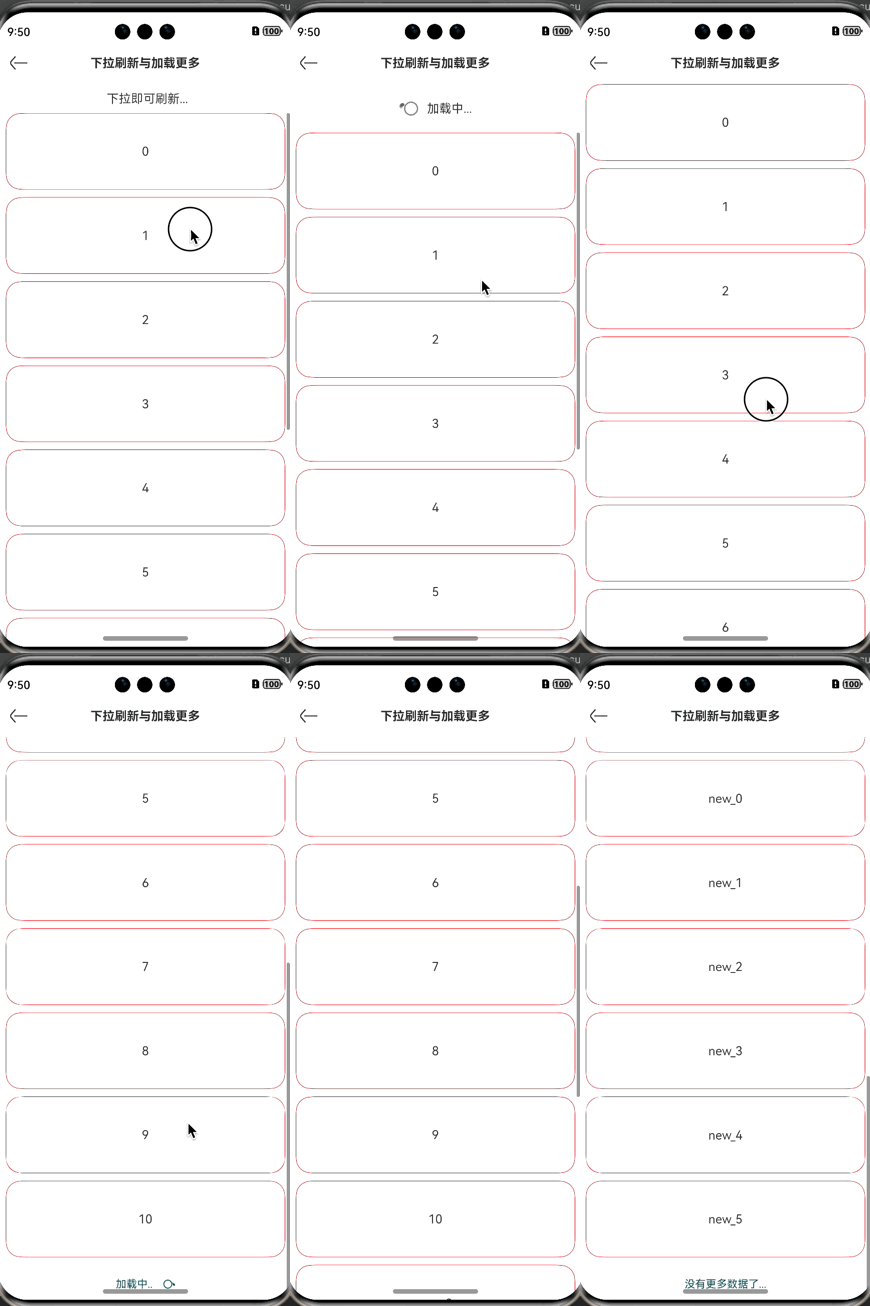
支持下拉刷新和加载更多....
·
往期鸿蒙5.0全套实战文章必看:(文中附带全栈鸿蒙5.0学习资料)
介绍
支持下拉刷新和加载更多
导入依赖
import { PkList } from '@peakmain/library/Index'
参数
| 参数名 | 参数类型 | 名称 |
|---|---|---|
| dataSource | object[] | 数据源 |
| renderItem | (item: object) => void | 每个子布局item |
| bottomItem | () => void | 底部组件item |
| finished | boolean | 是否已加载完成,默认值为false |
| loading | boolean | 是否正在加载中,默认值为 false |
| loadingText | string | 加载中的文本,默认值为 "加载中.." |
| finishText | string | 所有数据加载完成的文本,默认值为"没有更多数据了..." |
| onLoad | () => Promise | 上拉加载更多事件 |
| onRefresh | () => Promise | 下拉刷新事件 |
| stickStyle | StickyStyle | ListItemGroup吸顶或吸底效果。 默认值:StickyStyle.None |
| scrollBar | BarState | 滚动条状态。 默认值:BarState.Off |
| edgeEffect | EdgeEffect | List组件的边缘滑动效果,支持弹簧效果和阴影效果。 默认值:EdgeEffect.Spring |
| nestedScrollOptions | NestedScrollOptions | null | 设置向前向后两个方向上的嵌套滚动模式,实现与父组件的滚动联动。 默认值为null |
示例
import { NavBar, PkList } from '@peakmain/library/Index'

@Entry
@Component
struct ListPage{
  @State
  arr: String[] = ['0', '1', '2', '3', '4', '5', '6', '7', '8', '9', '10']
  @State
  page: number = 1 // 第几页
  pageSize: number = 2 //共几页

  async getNewData(isRefresh:boolean){
    console.log("执行了getNewData..." + isRefresh)
    const tmp = await this.getData(isRefresh)
    if (isRefresh) {
      this.arr = tmp
    } else {
      this.arr.push(...tmp)
    }
  }

  getData(isRefresh:boolean){
    console.log("执行了getData..." + isRefresh)
    return new Promise<String[]>((resolve) => {
      let tmp: String[]
      setTimeout(() => {
        if (!isRefresh) {
          this.page++
          tmp = ['new_0', 'new_1', 'new_2', 'new_3', 'new_4', 'new_5']
        } else {
          this.page = 1
          tmp = ['0', '1', '2', '3', '4', '5', '6', '7', '8', '9', '10']
        }
        console.log("当前页数:" + this.page)
        resolve(tmp); // 执行完成后调用 resolve
      }, 2000);
    });
  }

  @Builder
  renderItem(item: object){
    Column(){
      Text('' + item)
        .width('100%')
        .height(100)
        .fontSize(16)
        .textAlign(TextAlign.Center)
        .borderRadius(10)
        .backgroundColor(Color.White)
    }
    .
    margin({
      bottom: 10,
      left: 10, right: 10
    })
      .border({
        width: 0.5,
        color: Color.Red
      })
      .borderRadius(20)
  }

  build(){
    Column()
    {
      NavBar({
        title: "下拉刷新与加载更多"
      })
      PkList({
        dataSource: this.arr,
        finished: this.page >= this.pageSize,
        onRefresh: async () => {
          await this.getNewData(true)
        },
        renderItem: (item) => {
          this.renderItem(item)
        },
        onLoad: async () => {
          await this.getNewData(false)
        }
      }).margin({
        bottom: 20
      })
    }
  }
}

社区规范:仅讨论OpenHarmony相关问题。
更多推荐
 3
3 0
0- 0


 已为社区贡献199条内容

所有评论(0)