Flutter&OpenHarmony商城App支付方式选择组件开发
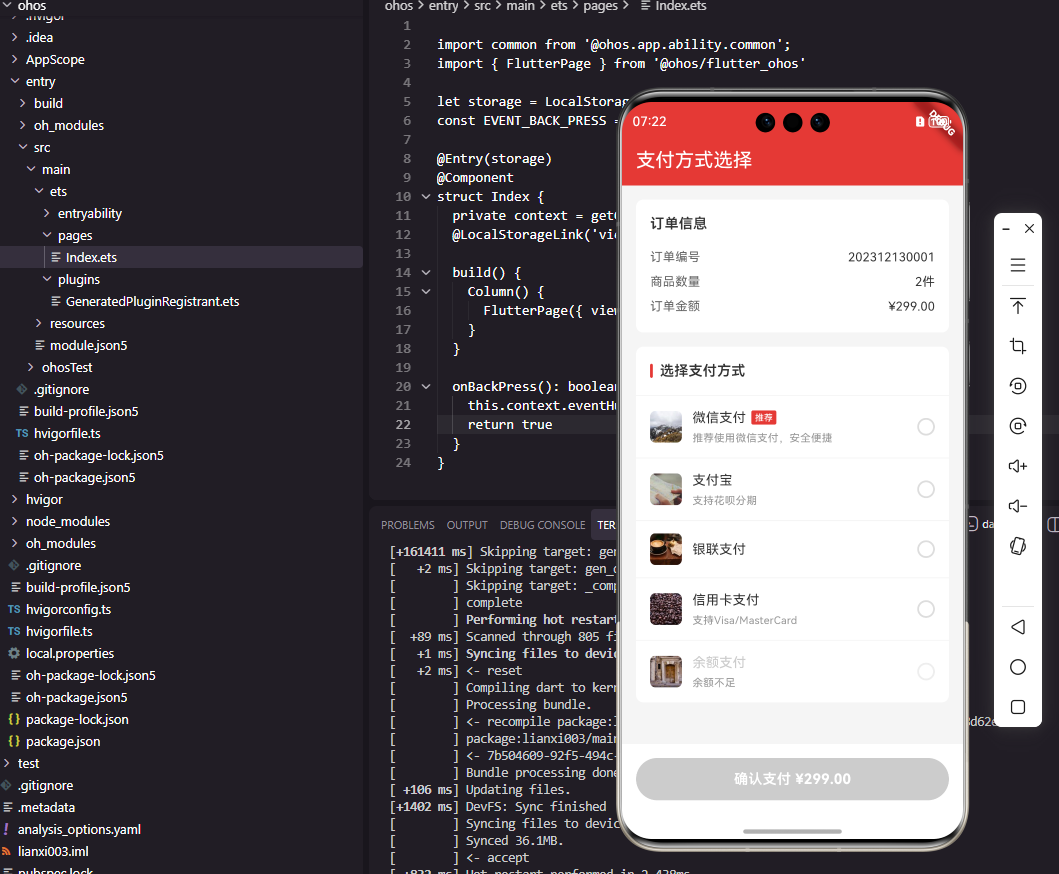
本文介绍了如何在Flutter和OpenHarmony平台上开发支付方式选择组件。首先定义了包含ID、名称、图标等属性的支付方式数据模型,然后构建了支付方式列表组件,采用垂直布局展示各支付方式项。每个支付方式项包含图标、信息区和单选按钮,通过状态管理实现选择交互。文章详细说明了组件的布局结构、视觉设计及错误处理机制,强调简洁明了的界面设计对提升支付体验的重要性。这种组件设计能够有效减少用户操作步骤
#
前言
支付方式选择是商城应用下单流程中的关键环节,用户需要在多种支付方式中选择一种完成付款。一个设计良好的支付方式选择组件需要清晰地展示各种支付方式的图标和名称,并提供流畅的选择交互体验。本文将详细介绍如何在Flutter和OpenHarmony平台上开发支付方式选择组件,帮助开发者构建安全便捷的支付体验。
支付环节是用户完成购买的最后一步,也是最容易产生流失的环节。因此,支付方式选择组件的设计需要尽可能简洁明了,减少用户的认知负担和操作步骤。同时,还需要考虑支付安全提示、优惠信息展示等细节,增强用户的支付信心。
Flutter支付方式数据模型
首先定义支付方式的数据模型:
class PaymentMethod {
  final String id;
  final String name;
  final String iconUrl;
  final String? description;
  final bool isRecommended;
  final bool isAvailable;

  const PaymentMethod({
    required this.id,
    required this.name,
    required this.iconUrl,
    this.description,
    this.isRecommended = false,
    this.isAvailable = true,
  });
}
PaymentMethod类定义了支付方式的基本属性。id是支付方式的唯一标识符,用于提交订单时标识用户选择的支付方式。name是支付方式名称,如"微信支付"、"支付宝"等。iconUrl是支付方式的图标地址,帮助用户快速识别。description是可选的描述信息,可以展示优惠活动等。isRecommended标记是否为推荐支付方式,isAvailable标记该支付方式是否可用。这种数据模型的设计考虑了实际业务场景的各种需求。
支付方式列表组件
class PaymentMethodList extends StatelessWidget {
final List<PaymentMethod> methods;
final String? selectedId;
final ValueChanged<PaymentMethod>? onSelect;
const PaymentMethodList({
Key? key,
required this.methods,
this.selectedId,
this.onSelect,
}) : super(key: key);
Widget build(BuildContext context) {
return Container(
decoration: BoxDecoration(
color: Colors.white,
borderRadius: BorderRadius.circular(8),
),
child: Column(
crossAxisAlignment: CrossAxisAlignment.start,
children: [
_buildTitle(),
...methods.map((method) => _buildMethodItem(method)),
],
),
);
}
}
PaymentMethodList组件展示所有可用的支付方式供用户选择。selectedId记录当前选中的支付方式ID,onSelect回调在用户选择时触发。Container设置白色背景和圆角,Column垂直排列标题和支付方式列表。使用展开运算符将支付方式列表映射为Widget列表并展开到Column的children中。这种设计将选择状态的管理交给父组件,组件本身保持无状态,便于测试和复用。
标题栏实现:
Widget _buildTitle() {
  return Padding(
    padding: const EdgeInsets.all(16),
    child: Row(
      children: [
        Container(
          width: 3,
          height: 16,
          decoration: BoxDecoration(
            color: const Color(0xFFE53935),
            borderRadius: BorderRadius.circular(1.5),
          ),
        ),
        const SizedBox(width: 8),
        const Text(
          '选择支付方式',
          style: TextStyle(
            fontSize: 16,
            fontWeight: FontWeight.w600,
            color: Color(0xFF333333),
          ),
        ),
      ],
    ),
  );
}
标题栏使用红色竖条作为视觉装饰,增强标题的辨识度。竖条宽3像素高16像素,圆角处理使其外观更加柔和。标题文字使用16像素字号和中等字重,清晰标识当前区域的功能。Padding设置16像素的内边距,使标题与容器边缘保持适当距离。这种设计风格在电商应用中非常常见,用户已经形成了认知习惯。
支付方式项组件
Widget _buildMethodItem(PaymentMethod method) {
  final isSelected = method.id == selectedId;

  return GestureDetector(
    onTap: method.isAvailable ? () => onSelect?.call(method) : null,
    child: Container(
      padding: const EdgeInsets.symmetric(
        horizontal: 16,
        vertical: 14,
      ),
      decoration: BoxDecoration(
        border: Border(
          top: BorderSide(
            color: const Color(0xFFF5F5F5),
            width: 1,
          ),
        ),
      ),
      child: Row(
        children: [
          _buildIcon(method),
          const SizedBox(width: 12),
          Expanded(child: _buildInfo(method)),
          _buildRadio(isSelected, method.isAvailable),
        ],
      ),
    ),
  );
}
支付方式项采用水平布局,从左到右依次是图标、信息区和单选按钮。Container设置顶部边框作为分隔线,与上一项形成视觉分隔。GestureDetector处理点击事件,不可用的支付方式点击无响应。Row使用Expanded包裹信息区使其占据中间的剩余空间。这种布局结构清晰,各元素职责明确,用户可以快速识别和选择支付方式。
支付方式图标:
Widget _buildIcon(PaymentMethod method) {
  return Container(
    width: 36,
    height: 36,
    decoration: BoxDecoration(
      borderRadius: BorderRadius.circular(6),
    ),
    clipBehavior: Clip.antiAlias,
    child: Image.network(
      method.iconUrl,
      fit: BoxFit.cover,
      errorBuilder: (_, __, ___) => Container(
        color: const Color(0xFFF5F5F5),
        child: const Icon(
          Icons.payment,
          size: 20,
          color: Color(0xFF999999),
        ),
      ),
    ),
  );
}
支付方式图标使用36像素的正方形尺寸,圆角裁剪使外观更加柔和。Image.network加载网络图标,errorBuilder处理加载失败的情况,显示一个默认的支付图标作为占位。这种错误处理确保即使图标加载失败,界面也不会出现空白或错误,保持良好的用户体验。图标是用户识别支付方式的重要视觉元素,需要保证清晰可见。
支付方式信息区
Widget _buildInfo(PaymentMethod method) {
  return Column(
    crossAxisAlignment: CrossAxisAlignment.start,
    children: [
      Row(
        children: [
          Text(
            method.name,
            style: TextStyle(
              fontSize: 15,
              color: method.isAvailable
                ? const Color(0xFF333333)
                : const Color(0xFFCCCCCC),
            ),
          ),
          if (method.isRecommended)
            Container(
              margin: const EdgeInsets.only(left: 6),
              padding: const EdgeInsets.symmetric(
                horizontal: 4,
                vertical: 1,
              ),
              decoration: BoxDecoration(
                color: const Color(0xFFE53935),
                borderRadius: BorderRadius.circular(2),
              ),
              child: const Text(
                '推荐',
                style: TextStyle(
                  fontSize: 10,
                  color: Colors.white,
                ),
              ),
            ),
        ],
      ),
      if (method.description != null)
        Padding(
          padding: const EdgeInsets.only(top: 4),
          child: Text(
            method.description!,
            style: const TextStyle(
              fontSize: 12,
              color: Color(0xFF999999),
            ),
          ),
        ),
    ],
  );
}
信息区包含支付方式名称、推荐标签和描述信息。名称根据可用状态显示不同颜色,不可用时显示灰色。推荐标签使用红色背景白色文字,在视觉上突出显示。描述信息使用灰色小字号,展示优惠活动等附加信息。Column垂直排列这些元素,条件渲染确保只有存在的信息才会显示。这种设计在有限空间内展示了支付方式的完整信息。
单选按钮组件
Widget _buildRadio(bool isSelected, bool isAvailable) {
  return Container(
    width: 20,
    height: 20,
    decoration: BoxDecoration(
      shape: BoxShape.circle,
      border: Border.all(
        color: isSelected
          ? const Color(0xFFE53935)
          : (isAvailable
            ? const Color(0xFFDDDDDD)
            : const Color(0xFFEEEEEE)),
        width: 2,
      ),
    ),
    child: isSelected
      ? Center(
          child: Container(
            width: 10,
            height: 10,
            decoration: const BoxDecoration(
              shape: BoxShape.circle,
              color: Color(0xFFE53935),
            ),
          ),
        )
      : null,
  );
}
单选按钮使用自定义实现而非系统Radio组件,以获得更好的视觉控制。外层Container绘制圆形边框,选中时边框为红色,未选中时为灰色。选中状态下内部显示一个红色实心圆点,形成经典的单选按钮外观。不可用状态使用更浅的灰色边框,视觉上表明该选项不可选择。这种自定义实现使单选按钮的样式与整体设计风格保持一致。
OpenHarmony支付方式选择实现
@Component
struct PaymentMethodList {
  @Prop methods: PaymentMethodInfo[] = []
  @Prop selectedId: string = ''
  private onSelect: (method: PaymentMethodInfo) => void = () => {}

  build() {
    Column() {
      this.Title()

      ForEach(this.methods, (method: PaymentMethodInfo) => {
        this.MethodItem(method)
      })
    }
    .width('100%')
    .backgroundColor(Color.White)
    .borderRadius(8)
  }
}
OpenHarmony的支付方式列表使用Column垂直排列标题和支付方式项。@Prop装饰的属性从父组件接收数据,包括支付方式列表和选中ID。ForEach遍历支付方式数组,为每个支付方式生成MethodItem组件。样式设置包括白色背景和圆角,与Flutter版本保持一致。这种实现方式简洁高效,代码结构清晰。
支付方式数据接口:
interface PaymentMethodInfo {
  id: string
  name: string
  iconUrl: string
  description?: string
  isRecommended: boolean
  isAvailable: boolean
}
TypeScript接口定义了支付方式的数据结构。description使用可选标记,表示该字段可以不存在。isRecommended和isAvailable使用boolean类型,分别标记推荐状态和可用状态。接口定义为组件提供了类型安全保障,在编译时就能发现类型错误。
支付方式项ArkUI实现
@Builder
MethodItem(method: PaymentMethodInfo) {
  Row() {
    Image(method.iconUrl)
      .width(36)
      .height(36)
      .borderRadius(6)
      .objectFit(ImageFit.Cover)

    Column() {
      Row() {
        Text(method.name)
          .fontSize(15)
          .fontColor(method.isAvailable ? '#333333' : '#CCCCCC')

        if (method.isRecommended) {
          Text('推荐')
            .fontSize(10)
            .fontColor(Color.White)
            .backgroundColor('#E53935')
            .borderRadius(2)
            .padding({ left: 4, right: 4, top: 1, bottom: 1 })
            .margin({ left: 6 })
        }
      }

      if (method.description) {
        Text(method.description)
          .fontSize(12)
          .fontColor('#999999')
          .margin({ top: 4 })
      }
    }
    .layoutWeight(1)
    .alignItems(HorizontalAlign.Start)
    .margin({ left: 12 })

    this.RadioButton(method)
  }
  .width('100%')
  .padding({ left: 16, right: 16, top: 14, bottom: 14 })
  .border({ width: { top: 1 }, color: '#F5F5F5' })
  .onClick(() => {
    if (method.isAvailable) {
      this.onSelect(method)
    }
  })
}
@Builder装饰器定义了支付方式项的构建方法。Row水平排列图标、信息区和单选按钮。Image加载支付方式图标,设置固定尺寸和圆角。Column垂直排列名称和描述,layoutWeight(1)使其占据剩余空间。条件渲染使用if语句,只有当isRecommended为true时显示推荐标签,只有当description存在时显示描述文字。onClick事件在支付方式可用时触发选择回调。
单选按钮ArkUI实现
@Builder
RadioButton(method: PaymentMethodInfo) {
  Stack() {
    Circle()
      .width(20)
      .height(20)
      .fill(Color.Transparent)
      .stroke(this.selectedId === method.id
        ? '#E53935'
        : (method.isAvailable ? '#DDDDDD' : '#EEEEEE'))
      .strokeWidth(2)

    if (this.selectedId === method.id) {
      Circle()
        .width(10)
        .height(10)
        .fill('#E53935')
    }
  }
}
单选按钮使用Stack层叠两个Circle组件实现。外层Circle绘制边框,fill设为透明只显示描边,stroke根据选中状态和可用状态设置不同颜色。内层Circle只在选中状态下显示,作为选中指示的实心圆点。这种实现方式与Flutter版本的视觉效果完全一致,确保跨平台的用户体验统一。
支付确认按钮
class PaymentButton extends StatelessWidget {
final double amount;
final bool isEnabled;
final VoidCallback? onPressed;
const PaymentButton({
Key? key,
required this.amount,
this.isEnabled = true,
this.onPressed,
}) : super(key: key);
Widget build(BuildContext context) {
return GestureDetector(
onTap: isEnabled ? onPressed : null,
child: Container(
height: 48,
margin: const EdgeInsets.all(16),
decoration: BoxDecoration(
color: isEnabled
? const Color(0xFFE53935)
: const Color(0xFFCCCCCC),
borderRadius: BorderRadius.circular(24),
),
alignment: Alignment.center,
child: Text(
'确认支付 ¥${amount.toStringAsFixed(2)}',
style: const TextStyle(
fontSize: 16,
fontWeight: FontWeight.w600,
color: Colors.white,
),
),
),
);
}
}
支付确认按钮是支付流程的最终操作入口,需要在视觉上足够突出。按钮显示支付金额,让用户在点击前再次确认。Container设置48像素高度和圆角胶囊形状,红色背景使按钮醒目。isEnabled控制按钮的可用状态,不可用时显示灰色背景且点击无响应。这种设计确保用户在选择支付方式后才能进行支付操作,避免误操作。
总结
本文详细介绍了Flutter和OpenHarmony平台上支付方式选择组件的开发过程。支付方式选择作为下单流程的关键环节,其设计质量直接影响用户的支付转化率。通过支付方式列表、单选按钮、支付确认按钮等组件的合理设计,我们为用户提供了清晰便捷的支付方式选择体验。在实际项目中,还需要考虑支付安全、支付结果回调等技术细节。
欢迎加入开源鸿蒙跨平台社区:https://openharmonycrossplatform.csdn.net

社区规范:仅讨论OpenHarmony相关问题。
更多推荐
 17
17 0
0- 0


 已为社区贡献26条内容

所有评论(0)