OpenHarmony Flutter 分布式安全实战:全场景可信交互与数据防护体系构建
分布式安全是开源鸿蒙针对全场景分布式协同场景设计的全链路安全防护体系设备可信:确保参与分布式协同的所有设备均为合法设备,杜绝伪造设备接入;数据安全:跨设备传输的数据全程加密,存储数据分级防护,防止窃取与篡改;交互可信:用户操作行为可追溯,跨设备权限申请需明确授权,避免恶意调用;生态合规:满足隐私保护法规要求,用户数据可管可控,保障全场景交互的合规性。在开源鸿蒙全场景生态中,分布式安全并非 “额外添
引言:分布式安全 —— 开源鸿蒙生态的 “信任基石”
当手机通过分布式软总线向车机同步导航数据、平板与智慧屏共享家庭相册、多设备协同完成在线支付时,“数据在设备间流转”“能力跨终端调用” 的全场景体验,背后隐藏着 “身份伪造”“数据窃取”“恶意调用” 等安全风险。开源鸿蒙(OpenHarmony)的分布式安全技术,正是抵御这些风险的核心屏障,而 Flutter 作为跨端开发框架,其与分布式安全能力的深度融合,直接决定了全场景应用的信任底线。
分布式安全并非传统设备安全的 “简单叠加”,而是基于 “分布式软总线 + 可信执行环境 + 统一身份认证” 的全链路防护体系,核心在于 “设备可信、数据可信、交互可信”。本文以 “场景化安全防护” 为核心,跳出 “单一设备安全” 的局限,聚焦 “Flutter 跨端应用 + 鸿蒙分布式安全底座” 的深度融合,通过 “分布式身份认证、跨设备数据加密传输、可信协同授权” 三大实战场景,用 “原理 + 架构设计 + 核心代码” 的方式,带你掌握开源鸿蒙 Flutter 分布式安全的全流程开发,构建 “端到端可信、全链路加密、细粒度授权” 的全场景安全防护体系。
一、分布式安全核心原理与技术架构
1.1 核心定义与核心价值
分布式安全是开源鸿蒙针对全场景分布式协同场景设计的全链路安全防护体系,通过 “统一身份认证、设备可信接入、数据加密传输、细粒度权限控制” 等技术,保障多设备协同过程中的设备可信、数据安全、交互合规,核心价值:
- 设备可信:确保参与分布式协同的所有设备均为合法设备,杜绝伪造设备接入;
- 数据安全:跨设备传输的数据全程加密,存储数据分级防护,防止窃取与篡改;
- 交互可信:用户操作行为可追溯,跨设备权限申请需明确授权,避免恶意调用;
- 生态合规:满足隐私保护法规要求,用户数据可管可控,保障全场景交互的合规性。
1.2 分布式安全与传统设备安全的核心差异
| 特性 | 分布式安全(开源鸿蒙 + Flutter) | 传统设备安全 |
|---|---|---|
| 防护范围 | 多设备协同全链路(设备接入、数据传输、交互授权、存储) | 单一设备本地(本地存储、应用权限、系统安全) |
| 身份认证 | 分布式统一身份(多设备共用一个可信身份) | 单设备独立身份(设备内账号密码、生物识别) |
| 数据防护 | 跨设备传输加密 + 分级存储加密 + 访问权限细粒度控制 | 本地存储加密 + 简单传输加密(如 HTTPS) |
| 权限管理 | 跨设备权限协同(如 A 设备授权后,B 设备可有限使用) | 单设备权限独立控制(设备内应用权限申请) |
| 可信基础 | 基于 TEE(可信执行环境)+ 分布式软总线安全通道 | 基于设备本地安全芯片 + 系统层防护 |
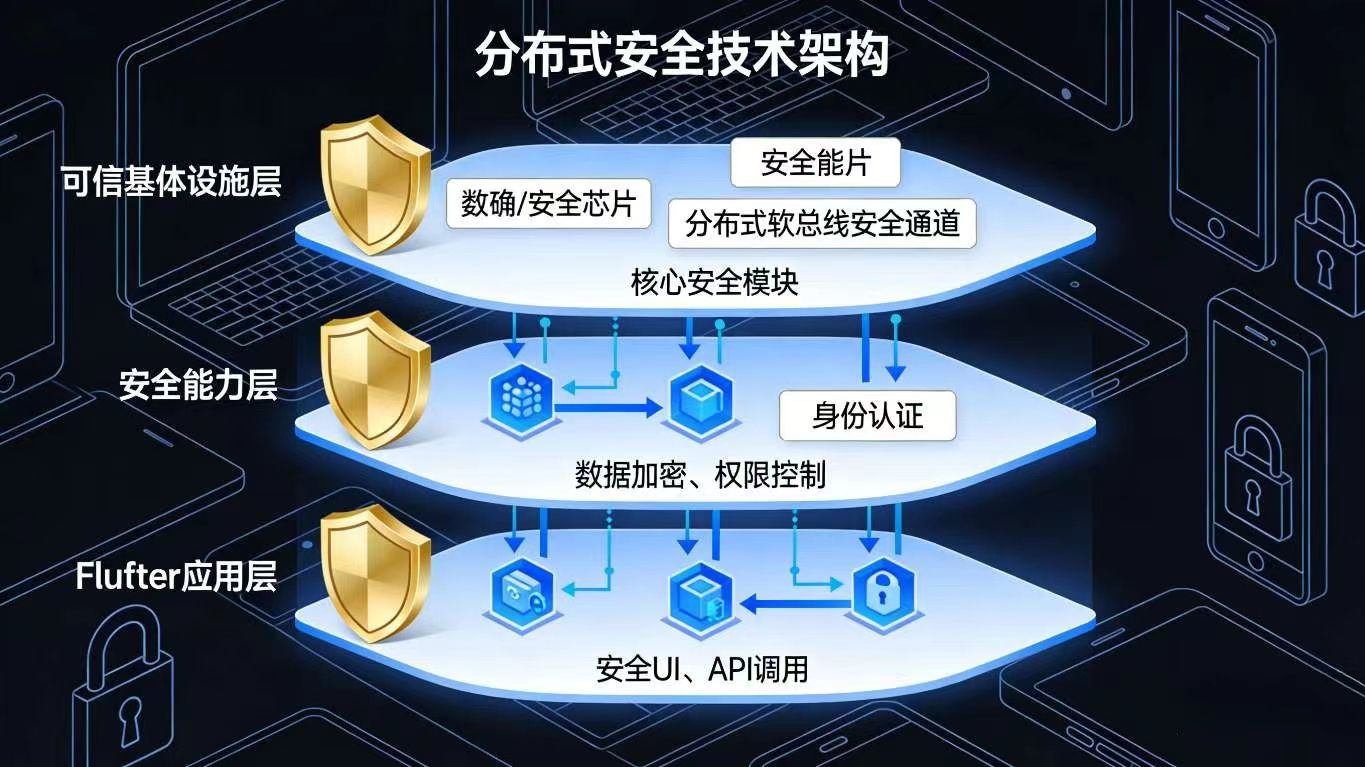
1.3 核心技术架构:“可信基础设施层 + 安全能力层 + Flutter 应用层”
已生成代码
- Flutter 应用层:负责安全相关的 UI 呈现(如身份认证界面、权限授权弹窗)、安全 API 调用(加密、签名、权限申请),并根据业务场景适配安全逻辑;
- 安全能力层:鸿蒙系统提供的核心安全能力集合,是分布式安全的 “核心引擎”,包括身份认证、数据加密、权限控制、安全审计等;
- 可信基础设施层:分布式安全的 “硬件 + 底层软件” 基础,提供可信执行环境、安全传输通道、可信证书管理、加密存储等底层支撑,确保安全能力的不可篡改性。
二、实战 1:分布式统一身份认证 —— 多设备可信身份打通
2.1 核心场景:跨设备免重复认证
用户在手机上完成 “生物识别 + 密码” 双重认证后,平板、智慧屏、车机等关联设备无需重复认证,即可通过分布式统一身份获得可信访问权限,同时支持 “一键登出所有设备”,实现 “一次认证、多设备可信、统一管控”。
2.2 核心实现步骤
步骤 1:鸿蒙原生分布式身份认证封装(Java)
java
// DistributedAuthManager.java(分布式身份认证管理)
import ohos.security.distributedauth.IDistributedAuth;
import ohos.security.distributedauth.IDistributedAuthCallback;
import ohos.security.distributedauth.TokenResult;
import ohos.rpc.RemoteException;

public class DistributedAuthManager {
    private static final String TAG = "DistributedAuthManager";
    private IDistributedAuth distributedAuth;
    private OnAuthResultListener authResultListener;

    // 初始化分布式认证服务
    public DistributedAuthManager() {
        distributedAuth = IDistributedAuth.getDistributedAuth();
    }

    // 发起分布式身份认证(支持生物识别/密码认证)
    public void startDistributedAuth(Context context, AuthType authType) {
        try {
            // 构建认证参数
            AuthParam authParam = new AuthParam();
            authParam.setAuthType(authType == AuthType.BIOMETRIC ? 1 : 2); // 1=生物识别,2=密码
            authParam.setAppId("com.example.flutter.distributed.security");
            authParam.setUserId(DistributedDeviceManager.getDistributedUserId());

            // 发起认证
            distributedAuth.startAuth(authParam, new IDistributedAuthCallback() {
                @Override
                public void onResult(int resultCode, TokenResult tokenResult) throws RemoteException {
                    if (resultCode == 0 && tokenResult != null) {
                        // 认证成功,获取可信令牌(多设备共享)
                        String authToken = tokenResult.getToken();
                        // 本地存储可信令牌(TEE安全存储)
                        SecureStorageUtil.saveToTEE("distributed_auth_token", authToken);
                        if (authResultListener != null) {
                            authResultListener.onAuthSuccess(authToken);
                        }
                    } else {
                        if (authResultListener != null) {
                            authResultListener.onAuthFailed(resultCode);
                        }
                    }
                }
            });
        } catch (RemoteException e) {
            e.printStackTrace();
            if (authResultListener != null) {
                authResultListener.onAuthFailed(-1);
            }
        }
    }

    // 验证可信令牌(其他设备认证)
    public boolean verifyAuthToken(String authToken) {
        try {
            TokenResult tokenResult = new TokenResult();
            tokenResult.setToken(authToken);
            // 调用分布式认证服务验证令牌有效性
            return distributedAuth.verifyToken(tokenResult) == 0;
        } catch (RemoteException e) {
            e.printStackTrace();
            return false;
        }
    }

    // 登出(销毁所有设备的可信令牌)
    public void logout() {
        try {
            String authToken = SecureStorageUtil.getFromTEE("distributed_auth_token");
            if (authToken != null) {
                TokenResult tokenResult = new TokenResult();
                tokenResult.setToken(authToken);
                distributedAuth.invalidateToken(tokenResult);
                // 清除本地存储的令牌
                SecureStorageUtil.deleteFromTEE("distributed_auth_token");
            }
        } catch (RemoteException e) {
            e.printStackTrace();
        }
    }

    // 认证类型枚举
    public enum AuthType {
        BIOMETRIC, // 生物识别
        PASSWORD   // 密码认证
    }

    // 认证结果回调
    public interface OnAuthResultListener {
        void onAuthSuccess(String authToken);
        void onAuthFailed(int errorCode);
    }

    public void setOnAuthResultListener(OnAuthResultListener listener) {
        this.authResultListener = listener;
    }
}

// 安全存储工具类(TEE存储)
class SecureStorageUtil {
    // 保存数据到TEE可信存储
    public static boolean saveToTEE(String key, String value) {
        try {
            // 调用鸿蒙TEE存储API
            ohos.security.keystore.KeyStore keyStore = ohos.security.keystore.KeyStore.getInstance();
            keyStore.set(key.getBytes(), value.getBytes());
            return true;
        } catch (Exception e) {
            e.printStackTrace();
            return false;
        }
    }

    // 从TEE可信存储获取数据
    public static String getFromTEE(String key) {
        try {
            ohos.security.keystore.KeyStore keyStore = ohos.security.keystore.KeyStore.getInstance();
            byte[] valueBytes = keyStore.get(key.getBytes());
            return valueBytes != null ? new String(valueBytes) : null;
        } catch (Exception e) {
            e.printStackTrace();
            return null;
        }
    }

    // 从TEE可信存储删除数据
    public static boolean deleteFromTEE(String key) {
        try {
            ohos.security.keystore.KeyStore keyStore = ohos.security.keystore.KeyStore.getInstance();
            keyStore.delete(key.getBytes());
            return true;
        } catch (Exception e) {
            e.printStackTrace();
            return false;
        }
    }
}
步骤 2:Flutter 端认证接口封装与 UI 实现
dart
// distributed_auth_util.dart(Flutter分布式认证工具类)
import 'package:flutter/services.dart';

class DistributedAuthUtil {
  static const MethodChannel _authChannel = MethodChannel("com.example.security/distributed_auth");

  // 认证类型枚举
  enum AuthType {
    biometric, // 生物识别
    password  // 密码认证
  }

  // 发起分布式认证
  static Future<String?> startAuth(AuthType authType) async {
    try {
      final result = await _authChannel.invokeMethod<String>(
        "startAuth",
        {"authType": authType == AuthType.biometric ? 1 : 2},
      );
      return result;
    } on PlatformException catch (e) {
      print("认证失败:${e.code} - ${e.message}");
      return null;
    }
  }

  // 验证令牌有效性
  static Future<bool> verifyToken(String token) async {
    try {
      return await _authChannel.invokeMethod<bool>("verifyToken", {"token": token}) ?? false;
    } on PlatformException catch (e) {
      print("令牌验证失败:${e.message}");
      return false;
    }
  }

  // 登出(销毁令牌)
  static Future<bool> logout() async {
    try {
      return await _authChannel.invokeMethod<bool>("logout") ?? false;
    } on PlatformException catch (e) {
      print("登出失败:${e.message}");
      return false;
    }
  }

  // 获取本地缓存的认证令牌
  static Future<String?> getCachedToken() async {
    try {
      return await _authChannel.invokeMethod<String>("getCachedToken");
    } on PlatformException catch (e) {
      print("获取令牌失败:${e.message}");
      return null;
    }
  }
}

// 分布式认证页面(Flutter)
class DistributedAuthPage extends StatefulWidget {
  const DistributedAuthPage({super.key});

  @override
  State<DistributedAuthPage> createState() => _DistributedAuthPageState();
}

class _DistributedAuthPageState extends State<DistributedAuthPage> {
  bool _isAuthenticating = false;
  String? _authToken;
  bool _isLoggedIn = false;

  @override
  void initState() {
    super.initState();
    // 检查本地是否有缓存的有效令牌
    _checkCachedToken();
  }

  // 检查本地缓存令牌
  Future<void> _checkCachedToken() async {
    final token = await DistributedAuthUtil.getCachedToken();
    if (token != null) {
      final isValid = await DistributedAuthUtil.verifyToken(token);
      if (isValid) {
        setState(() {
          _authToken = token;
          _isLoggedIn = true;
        });
      }
    }
  }

  // 发起生物识别认证
  Future<void> _startBiometricAuth() async {
    setState(() => _isAuthenticating = true);
    final token = await DistributedAuthUtil.startAuth(DistributedAuthUtil.AuthType.biometric);
    setState(() => _isAuthenticating = false);
    if (token != null) {
      setState(() {
        _authToken = token;
        _isLoggedIn = true;
      });
      ScaffoldMessenger.of(context).showSnackBar(
        const SnackBar(content: Text("生物识别认证成功,所有关联设备已可信")),
      );
    } else {
      ScaffoldMessenger.of(context).showSnackBar(
        const SnackBar(content: Text("认证失败,请重试")),
      );
    }
  }

  // 登出
  Future<void> _logout() async {
    final success = await DistributedAuthUtil.logout();
    if (success) {
      setState(() {
        _authToken = null;
        _isLoggedIn = false;
      });
      ScaffoldMessenger.of(context).showSnackBar(
        const SnackBar(content: Text("已登出所有设备")),
      );
    } else {
      ScaffoldMessenger.of(context).showSnackBar(
        const SnackBar(content: Text("登出失败,请重试")),
      );
    }
  }

  @override
  Widget build(BuildContext context) {
    return Scaffold(
      appBar: AppBar(title: const Text("分布式统一身份认证")),
      body: Center(
        child: _isLoggedIn
            ? Column(
                mainAxisAlignment: MainAxisAlignment.center,
                children: [
                  const Icon(Icons.verified_user, size: 80, color: Colors.green),
                  const SizedBox(height: 20),
                  const Text("已通过分布式身份认证", style: TextStyle(fontSize: 18)),
                  const SizedBox(height: 30),
                  ElevatedButton(
                    onPressed: _logout,
                    child: const Text("一键登出所有设备"),
                  ),
                ],
              )
            : Column(
                mainAxisAlignment: MainAxisAlignment.center,
                children: [
                  const Icon(Icons.lock, size: 80, color: Colors.grey),
                  const SizedBox(height: 20),
                  const Text("未进行分布式身份认证", style: TextStyle(fontSize: 18)),
                  const SizedBox(height: 30),
                  ElevatedButton(
                    onPressed: _isAuthenticating ? null : _startBiometricAuth,
                    child: _isAuthenticating
                        ? const CircularProgressIndicator(color: Colors.white)
                        : const Text("生物识别认证(多设备可信)"),
                  ),
                ],
              ),
      ),
    );
  }
}
步骤 3:Flutter 原生插件注册(Java)
java
// DistributedAuthPlugin.java(Flutter插件注册)
import io.flutter.plugin.common.MethodCall;
import io.flutter.plugin.common.MethodChannel;
import io.flutter.plugin.common.MethodChannel.MethodCallHandler;
import io.flutter.plugin.common.MethodChannel.Result;
import io.flutter.plugin.common.PluginRegistry.Registrar;

public class DistributedAuthPlugin implements MethodCallHandler {
    private final Registrar registrar;
    private final DistributedAuthManager authManager;

    public static void registerWith(Registrar registrar) {
        final MethodChannel channel = new MethodChannel(registrar.messenger(), "com.example.security/distributed_auth");
        DistributedAuthPlugin plugin = new DistributedAuthPlugin(registrar);
        channel.setMethodCallHandler(plugin);
    }

    private DistributedAuthPlugin(Registrar registrar) {
        this.registrar = registrar;
        this.authManager = new DistributedAuthManager();
    }

    @Override
    public void onMethodCall(MethodCall call, Result result) {
        switch (call.method) {
            case "startAuth":
                int authType = call.argument("authType");
                authManager.setOnAuthResultListener(new DistributedAuthManager.OnAuthResultListener() {
                    @Override
                    public void onAuthSuccess(String authToken) {
                        result.success(authToken);
                    }

                    @Override
                    public void onAuthFailed(int errorCode) {
                        result.error(String.valueOf(errorCode), "认证失败", null);
                    }
                });
                authManager.startDistributedAuth(
                    registrar.activity(),
                    authType == 1 ? DistributedAuthManager.AuthType.BIOMETRIC : DistributedAuthManager.AuthType.PASSWORD
                );
                break;
            case "verifyToken":
                String token = call.argument("token");
                boolean isValid = authManager.verifyAuthToken(token);
                result.success(isValid);
                break;
            case "logout":
                authManager.logout();
                result.success(true);
                break;
            case "getCachedToken":
                String cachedToken = SecureStorageUtil.getFromTEE("distributed_auth_token");
                result.success(cachedToken);
                break;
            default:
                result.notImplemented();
                break;
        }
    }
}
三、实战 2:跨设备数据加密传输 —— 分布式软总线安全通道
3.1 核心场景:家庭相册跨设备加密共享
用户在手机上拍摄的照片,通过分布式软总线同步至智慧屏时,采用 “端到端加密” 方式传输,仅授权设备可解密查看;未授权设备即使截获传输数据,也无法破解,确保家庭隐私数据安全。
3.2 核心实现步骤
步骤 1:鸿蒙原生加密传输工具封装(Java)
java
// SecureTransferManager.java(加密传输管理)
import ohos.distributedschedule.interwork.DeviceInfo;
import ohos.distributedschedule.interwork.IResourceManager;
import ohos.security.crypto.Cipher;
import ohos.security.crypto.KeyGenerator;
import ohos.security.crypto.KeyStore;
import ohos.security.crypto.spec.AesKeySpec;
import ohos.security.crypto.spec.IvSpec;
import ohos.security.crypto.spec.KeySpec;
import ohos.security.crypto.spec.TransformationSpec;

import javax.crypto.SecretKey;
import java.security.NoSuchAlgorithmException;

public class SecureTransferManager {
    private static final String ALGORITHM = "AES/CBC/PKCS7Padding";
    private static final int KEY_SIZE = 256;
    private final IResourceManager resourceManager;
    private final KeyStore keyStore;
    private SecretKey encryptionKey;

    public SecureTransferManager() {
        resourceManager = IResourceManager.getResourceManager();
        keyStore = KeyStore.getInstance();
        // 初始化加密密钥(从KeyStore获取,无则生成)
        initEncryptionKey();
    }

    // 初始化加密密钥
    private void initEncryptionKey() {
        try {
            // 检查KeyStore中是否已有密钥
            if (keyStore.containsAlias("distributed_transfer_key")) {
                encryptionKey = (SecretKey) keyStore.getKey("distributed_transfer_key", null);
            } else {
                // 生成AES-256密钥
                KeyGenerator keyGenerator = KeyGenerator.getInstance("AES");
                keyGenerator.init(KEY_SIZE);
                encryptionKey = keyGenerator.generateKey();
                // 存储密钥到KeyStore
                keyStore.setKeyEntry("distributed_transfer_key", encryptionKey, null, null);
            }
        } catch (Exception e) {
            e.printStackTrace();
            throw new RuntimeException("密钥初始化失败");
        }
    }

    // 加密数据
    public byte[] encryptData(byte[] data) throws Exception {
        // 生成随机IV(16字节)
        byte[] iv = new byte[16];
        new java.security.SecureRandom().nextBytes(iv);

        // 初始化加密器
        Cipher cipher = Cipher.getInstance(ALGORITHM);
        KeySpec keySpec = new AesKeySpec(encryptionKey.getEncoded());
        TransformationSpec transformationSpec = new TransformationSpec(iv);
        cipher.init(Cipher.ENCRYPT_MODE, keySpec, transformationSpec);

        // 加密数据
        byte[] encryptedData = cipher.doFinal(data);

        // 拼接IV和加密数据(IV用于解密,无需保密)
        byte[] result = new byte[iv.length + encryptedData.length];
        System.arraycopy(iv, 0, result, 0, iv.length);
        System.arraycopy(encryptedData, 0, result, iv.length, encryptedData.length);

        return result;
    }

    // 解密数据
    public byte[] decryptData(byte[] encryptedDataWithIv) throws Exception {
        // 分离IV和加密数据
        byte[] iv = new byte[16];
        byte[] encryptedData = new byte[encryptedDataWithIv.length - 16];
        System.arraycopy(encryptedDataWithIv, 0, iv, 0, iv.length);
        System.arraycopy(encryptedDataWithIv, 16, encryptedData, 0, encryptedData.length);

        // 初始化解密器
        Cipher cipher = Cipher.getInstance(ALGORITHM);
        KeySpec keySpec = new AesKeySpec(encryptionKey.getEncoded());
        TransformationSpec transformationSpec = new TransformationSpec(iv);
        cipher.init(Cipher.DECRYPT_MODE, keySpec, transformationSpec);

        // 解密数据
        return cipher.doFinal(encryptedData);
    }

    // 加密传输文件到目标设备
    public boolean sendEncryptedFile(String deviceId, String filePath) {
        try {
            // 读取文件数据
            byte[] fileData = FileUtil.readFileToBytes(filePath);
            // 加密数据
            byte[] encryptedData = encryptData(fileData);
            // 通过分布式软总线安全通道发送
            return resourceManager.sendData(deviceId, encryptedData);
        } catch (Exception e) {
            e.printStackTrace();
            return false;
        }
    }

    // 接收加密文件并解密
    public byte[] receiveEncryptedData(byte[] encryptedData) {
        try {
            return decryptData(encryptedData);
        } catch (Exception e) {
            e.printStackTrace();
            return null;
        }
    }
}

// 文件工具类
class FileUtil {
    public static byte[] readFileToBytes(String filePath) throws Exception {
        File file = new File(filePath);
        FileInputStream fis = new FileInputStream(file);
        ByteArrayOutputStream bos = new ByteArrayOutputStream();
        byte[] buffer = new byte[1024];
        int len;
        while ((len = fis.read(buffer)) != -1) {
            bos.write(buffer, 0, len);
        }
        fis.close();
        bos.close();
        return bos.toByteArray();
    }
}
步骤 2:Flutter 端加密传输接口封装与页面实现
dart
// secure_transfer_util.dart(Flutter加密传输工具类)
import 'package:flutter/services.dart';
import 'dart:io';

class SecureTransferUtil {
  static const MethodChannel _transferChannel = MethodChannel("com.example.security/secure_transfer");

  // 加密传输文件到目标设备
  static Future<bool> sendEncryptedFile({
    required String deviceId,
    required String filePath,
  }) async {
    try {
      // 检查文件是否存在
      if (!File(filePath).existsSync()) {
        print("文件不存在:$filePath");
        return false;
      }
      return await _transferChannel.invokeMethod<bool>(
        "sendEncryptedFile",
        {"deviceId": deviceId, "filePath": filePath},
      ) ?? false;
    } on PlatformException catch (e) {
      print("加密传输失败:${e.message}");
      return false;
    }
  }

  // 监听加密文件接收
  static void listenEncryptedFileReceived(void Function(String deviceId, String fileName, Uint8List decryptedData) onReceived) {
    _transferChannel.setMethodCallHandler((call) async {
      if (call.method == "onEncryptedFileReceived") {
        String deviceId = call.arguments["deviceId"];
        String fileName = call.arguments["fileName"];
        Uint8List encryptedData = call.arguments["encryptedData"];
        // 调用原生解密
        Uint8List? decryptedData = await _transferChannel.invokeMethod<Uint8List>(
          "decryptData",
          {"encryptedData": encryptedData},
        );
        if (decryptedData != null) {
          onReceived(deviceId, fileName, decryptedData);
        }
      }
    });
  }
}

// 加密传输页面(Flutter)
class SecureTransferPage extends StatefulWidget {
  final List<DeviceInfo> deviceList; // 已发现的分布式设备列表
  const SecureTransferPage({super.key, required this.deviceList});

  @override
  State<SecureTransferPage> createState() => _SecureTransferPageState();
}

class _SecureTransferPageState extends State<SecureTransferPage> {
  String? _selectedFilePath;
  String? _selectedDeviceId;
  bool _isTransferring = false;

  @override
  void initState() {
    super.initState();
    // 监听文件接收
    SecureTransferUtil.listenEncryptedFileReceived((deviceId, fileName, decryptedData) {
      // 保存解密后的文件
      _saveDecryptedFile(fileName, decryptedData);
      ScaffoldMessenger.of(context).showSnackBar(
        SnackBar(content: Text("收到来自$deviceId的加密文件:$fileName")),
      );
    });
  }

  // 选择文件
  Future<void> _pickFile() async {
    final XFile? file = await ImagePicker().pickImage(source: ImageSource.gallery);
    if (file != null) {
      setState(() => _selectedFilePath = file.path);
    }
  }

  // 选择目标设备
  void _selectDevice(String deviceId) {
    setState(() => _selectedDeviceId = deviceId);
  }

  // 发起加密传输
  Future<void> _startSecureTransfer() async {
    if (_selectedFilePath == null || _selectedDeviceId == null) {
      ScaffoldMessenger.of(context).showSnackBar(
        const SnackBar(content: Text("请选择文件和目标设备")),
      );
      return;
    }
    setState(() => _isTransferring = true);
    final success = await SecureTransferUtil.sendEncryptedFile(
      deviceId: _selectedDeviceId!,
      filePath: _selectedFilePath!,
    );
    setState(() => _isTransferring = false);
    if (success) {
      ScaffoldMessenger.of(context).showSnackBar(
        const SnackBar(content: Text("加密传输成功")),
      );
    } else {
      ScaffoldMessenger.of(context).showSnackBar(
        const SnackBar(content: Text("加密传输失败")),
      );
    }
  }

  // 保存解密后的文件
  Future<void> _saveDecryptedFile(String fileName, Uint8List data) async {
    final directory = await getExternalStorageDirectory();
    final savePath = "${directory?.path}/secure_received_$fileName";
    final file = File(savePath);
    await file.writeAsBytes(data);
    print("文件已保存到:$savePath");
  }

  @override
  Widget build(BuildContext context) {
    return Scaffold(
      appBar: AppBar(title: const Text("跨设备加密传输")),
      body: Padding(
        padding: const EdgeInsets.all(16.0),
        child: Column(
          children: [
            // 选择文件
            ElevatedButton(
              onPressed: _pickFile,
              child: Text(_selectedFilePath == null ? "选择图片文件" : "已选择:${_selectedFilePath!.split('/').last}"),
            ),
            const SizedBox(height: 20),
            // 选择目标设备
            const Text("选择目标设备:", style: TextStyle(fontSize: 16)),
            const SizedBox(height: 10),
            Expanded(
              child: ListView.builder(
                itemCount: widget.deviceList.length,
                itemBuilder: (context, index) {
                  final device = widget.deviceList[index];
                  return ListTile(
                    title: Text(device.deviceName),
                    subtitle: Text(device.deviceId),
                    trailing: _selectedDeviceId == device.deviceId
                        ? const Icon(Icons.check, color: Colors.green)
                        : null,
                    onTap: () => _selectDevice(device.deviceId),
                  );
                },
              ),
            ),
            const SizedBox(height: 20),
            // 传输按钮
            ElevatedButton(
              onPressed: _isTransferring ? null : _startSecureTransfer,
              child: _isTransferring
                  ? const CircularProgressIndicator(color: Colors.white)
                  : const Text("加密传输文件"),
            ),
          ],
        ),
      ),
    );
  }
}

// 设备信息模型
class DeviceInfo {
  final String deviceId;
  final String deviceName;

  DeviceInfo({required this.deviceId, required this.deviceName});
}
步骤 3:原生传输监听与 Flutter 回调(Java)
java
// SecureTransferPlugin.java(Flutter传输插件)
import io.flutter.plugin.common.MethodCall;
import io.flutter.plugin.common.MethodChannel;
import io.flutter.plugin.common.PluginRegistry.Registrar;
import ohos.distributedschedule.interwork.IDataListener;
import ohos.distributedschedule.interwork.IResourceManager;

public class SecureTransferPlugin implements MethodChannel.MethodCallHandler {
    private final Registrar registrar;
    private final SecureTransferManager transferManager;
    private final IResourceManager resourceManager;

    public static void registerWith(Registrar registrar) {
        final MethodChannel channel = new MethodChannel(registrar.messenger(), "com.example.security/secure_transfer");
        SecureTransferPlugin plugin = new SecureTransferPlugin(registrar);
        channel.setMethodCallHandler(plugin);
        // 注册数据接收监听
        plugin.registerDataReceivedListener(channel);
    }

    private SecureTransferPlugin(Registrar registrar) {
        this.registrar = registrar;
        this.transferManager = new SecureTransferManager();
        this.resourceManager = IResourceManager.getResourceManager();
    }

    // 注册数据接收监听
    private void registerDataReceivedListener(MethodChannel channel) {
        resourceManager.setDataReceivedListener((deviceId, data) -> {
            // 解密数据
            byte[] decryptedData = transferManager.receiveEncryptedData(data);
            if (decryptedData != null) {
                // 回调Flutter
                channel.invokeMethod("onEncryptedFileReceived", Map.of(
                    "deviceId", deviceId,
                    "fileName", "received_file_" + System.currentTimeMillis() + ".jpg",
                    "encryptedData", data
                ));
            }
        });
    }

    @Override
    public void onMethodCall(MethodCall call, MethodChannel.Result result) {
        switch (call.method) {
            case "sendEncryptedFile":
                String deviceId = call.argument("deviceId");
                String filePath = call.argument("filePath");
                boolean success = transferManager.sendEncryptedFile(deviceId, filePath);
                result.success(success);
                break;
            case "decryptData":
                byte[] encryptedData = call.argument("encryptedData");
                byte[] decryptedData = transferManager.receiveEncryptedData(encryptedData);
                result.success(decryptedData);
                break;
            default:
                result.notImplemented();
                break;
        }
    }
}
四、实战 3:可信协同授权 —— 跨设备细粒度权限控制
4.1 核心场景:车机有限权限授权
用户在手机上授权车机 “仅在驾驶期间访问导航数据和音乐列表”,授权有效期为 2 小时,且车机无法修改或转发数据;授权到期后自动失效,需重新申请授权,实现 “最小权限、限时可用、全程可控” 的跨设备权限管理。
4.2 核心实现步骤
步骤 1:鸿蒙原生可信授权管理封装(Java)
java
// TrustedAuthorizationManager.java(可信授权管理)
import ohos.security.distributedauth.IDistributedAuth;
import ohos.security.permission.IPermissionManager;
import ohos.security.permission.PermissionInfo;
import ohos.utils.zson.ZSONObject;

import java.util.HashMap;
import java.util.Map;
import java.util.concurrent.TimeUnit;

public class TrustedAuthorizationManager {
    private static final String TAG = "TrustedAuthorizationManager";
    private final IDistributedAuth distributedAuth;
    private final IPermissionManager permissionManager;
    private final Map<String, AuthorizationRecord> authRecords = new HashMap<>(); // 授权记录缓存

    public TrustedAuthorizationManager() {
        distributedAuth = IDistributedAuth.getDistributedAuth();
        permissionManager = IPermissionManager.getInstance();
    }

    // 发起跨设备权限授权请求
    public void requestAuthorization(String targetDeviceId, String permission, long expireTime, AuthorizationCallback callback) {
        try {
            // 1. 验证目标设备是否可信(通过分布式认证)
            boolean isDeviceTrusted = verifyDeviceTrusted(targetDeviceId);
            if (!isDeviceTrusted) {
                callback.onFailure("目标设备不可信");
                return;
            }

            // 2. 检查权限是否存在
            PermissionInfo permissionInfo = permissionManager.getPermissionInfo(permission);
            if (permissionInfo == null) {
                callback.onFailure("权限不存在");
                return;
            }

            // 3. 生成授权记录
            String authId = "auth_" + System.currentTimeMillis();
            long expireTimestamp = System.currentTimeMillis() + TimeUnit.MINUTES.toMillis(expireTime);
            AuthorizationRecord record = new AuthorizationRecord(
                authId, targetDeviceId, permission, expireTimestamp, false
            );
            authRecords.put(authId, record);

            // 4. 回调Flutter,显示授权弹窗
            if (callback != null) {
                callback.onShowAuthorizationDialog(authId, targetDeviceId, permission, expireTime);
            }
        } catch (Exception e) {
            e.printStackTrace();
            callback.onFailure("授权请求失败");
        }
    }

    // 确认授权(Flutter端用户同意后调用)
    public boolean confirmAuthorization(String authId) {
        AuthorizationRecord record = authRecords.get(authId);
        if (record == null) {
            return false;
        }
        // 更新授权状态为已授权
        record.setAuthorized(true);
        // 存储授权记录到分布式安全存储
        saveAuthorizationRecord(record);
        return true;
    }

    // 验证设备是否有权限
    public boolean checkPermission(String deviceId, String permission) {
        // 1. 检查本地缓存的授权记录
        for (AuthorizationRecord record : authRecords.values()) {
            if (record.getTargetDeviceId().equals(deviceId)
                    && record.getPermission().equals(permission)
                    && record.isAuthorized()
                    && System.currentTimeMillis() < record.getExpireTimestamp()) {
                return true;
            }
        }

        // 2. 从分布式存储加载授权记录
        AuthorizationRecord storedRecord = loadAuthorizationRecord(deviceId, permission);
        if (storedRecord != null && storedRecord.isAuthorized() && System.currentTimeMillis() < storedRecord.getExpireTimestamp()) {
            authRecords.put(storedRecord.getAuthId(), storedRecord);
            return true;
        }

        return false;
    }

    // 验证设备是否可信(通过分布式身份认证)
    private boolean verifyDeviceTrusted(String deviceId) {
        try {
            // 调用分布式认证服务验证设备身份
            return distributedAuth.verifyDeviceIdentity(deviceId) == 0;
        } catch (Exception e) {
            e.printStackTrace();
            return false;
        }
    }

    // 保存授权记录到分布式安全存储
    private void saveAuthorizationRecord(AuthorizationRecord record) {
        ZSONObject zson = new ZSONObject();
        zson.put("authId", record.getAuthId());
        zson.put("targetDeviceId", record.getTargetDeviceId());
        zson.put("permission", record.getPermission());
        zson.put("expireTimestamp", record.getExpireTimestamp());
        zson.put("authorized", record.isAuthorized());
        // 存储到TEE安全存储
        SecureStorageUtil.saveToTEE(
            "auth_record_" + record.getAuthId(),
            zson.toString()
        );
    }

    // 从分布式安全存储加载授权记录
    private AuthorizationRecord loadAuthorizationRecord(String deviceId, String permission) {
        // 遍历所有授权记录,查找匹配的设备和权限
        for (String key : SecureStorageUtil.getAllKeys()) {
            if (key.startsWith("auth_record_")) {
                String recordJson = SecureStorageUtil.getFromTEE(key);
                if (recordJson != null) {
                    ZSONObject zson = ZSONObject.stringToZSON(recordJson);
                    AuthorizationRecord record = new AuthorizationRecord(
                        zson.getString("authId"),
                        zson.getString("targetDeviceId"),
                        zson.getString("permission"),
                        zson.getLong("expireTimestamp"),
                        zson.getBoolean("authorized")
                    );
                    if (record.getTargetDeviceId().equals(deviceId) && record.getPermission().equals(permission)) {
                        return record;
                    }
                }
            }
        }
        return null;
    }

    // 授权记录实体
    public static class AuthorizationRecord {
        private final String authId;
        private final String targetDeviceId;
        private final String permission;
        private final long expireTimestamp;
        private boolean isAuthorized;

        public AuthorizationRecord(String authId, String targetDeviceId, String permission, long expireTimestamp, boolean isAuthorized) {
            this.authId = authId;
            this.targetDeviceId = targetDeviceId;
            this.permission = permission;
            this.expireTimestamp = expireTimestamp;
            this.isAuthorized = isAuthorized;
        }

        // getter/setter
        public String getAuthId() { return authId; }
        public String getTargetDeviceId() { return targetDeviceId; }
        public String getPermission() { return permission; }
        public long getExpireTimestamp() { return expireTimestamp; }
        public boolean isAuthorized() { return isAuthorized; }
        public void setAuthorized(boolean authorized) { isAuthorized = authorized; }
    }

    // 授权回调接口
    public interface AuthorizationCallback {
        void onShowAuthorizationDialog(String authId, String deviceId, String permission, long expireTime);
        void onFailure(String errorMsg);
    }
}
步骤 2:Flutter 端授权接口封装与 UI 实现
dart
// trusted_authorization_util.dart(Flutter可信授权工具类)
import 'package:flutter/services.dart';

class TrustedAuthorizationUtil {
  static const MethodChannel _authChannel = MethodChannel("com.example.security/trusted_authorization");
  static Function(String, String, String, int)? _onShowAuthDialog; // 授权弹窗回调

  // 初始化授权监听
  static void initAuthorizationListener(Function(String authId, String deviceId, String permission, int expireTime) onShowAuthDialog) {
    _onShowAuthDialog = onShowAuthDialog;
    _authChannel.setMethodCallHandler((call) async {
      if (call.method == "onShowAuthorizationDialog") {
        String authId = call.arguments["authId"];
        String deviceId = call.arguments["deviceId"];
        String permission = call.arguments["permission"];
        int expireTime = call.arguments["expireTime"];
        _onShowAuthDialog?.call(authId, deviceId, permission, expireTime);
      }
    });
  }

  // 发起权限授权请求
  static Future<void> requestAuthorization({
    required String targetDeviceId,
    required String permission,
    required int expireTime, // 授权有效期(分钟)
  }) async {
    try {
      await _authChannel.invokeMethod(
        "requestAuthorization",
        {
          "targetDeviceId": targetDeviceId,
          "permission": permission,
          "expireTime": expireTime,
        },
      );
    } on PlatformException catch (e) {
      print("授权请求失败:${e.message}");
      throw Exception("授权请求失败:${e.message}");
    }
  }

  // 确认授权
  static Future<bool> confirmAuthorization(String authId) async {
    try {
      return await _authChannel.invokeMethod<bool>("confirmAuthorization", {"authId": authId}) ?? false;
    } on PlatformException catch (e) {
      print("确认授权失败:${e.message}");
      return false;
    }
  }

  // 检查设备是否有权限
  static Future<bool> checkPermission({
    required String deviceId,
    required String permission,
  }) async {
    try {
      return await _authChannel.invokeMethod<bool>(
        "checkPermission",
        {"deviceId": deviceId, "permission": permission},
      ) ?? false;
    } on PlatformException catch (e) {
      print("权限检查失败:${e.message}");
      return false;
    }
  }
}

// 可信授权页面(Flutter)
class TrustedAuthorizationPage extends StatefulWidget {
  final String targetDeviceId;
  final String targetDeviceName;

  const TrustedAuthorizationPage({
    super.key,
    required this.targetDeviceId,
    required this.targetDeviceName,
  });

  @override
  State<TrustedAuthorizationPage> createState() => _TrustedAuthorizationPageState();
}

class _TrustedAuthorizationPageState extends State<TrustedAuthorizationPage> {
  String? _currentAuthId;
  String? _currentPermission;
  int? _currentExpireTime;

  @override
  void initState() {
    super.initState();
    // 初始化授权监听
    TrustedAuthorizationUtil.initAuthorizationListener((authId, deviceId, permission, expireTime) {
      if (deviceId == widget.targetDeviceId) {
        setState(() {
          _currentAuthId = authId;
          _currentPermission = permission;
          _currentExpireTime = expireTime;
        });
        // 显示授权弹窗
        _showAuthorizationDialog();
      }
    });
  }

  // 发起导航权限授权请求
  Future<void> _requestNavigationPermission() async {
    try {
      await TrustedAuthorizationUtil.requestAuthorization(
        targetDeviceId: widget.targetDeviceId,
        permission: "com.example.permission.NAVIGATION_DATA",
        expireTime: 120, // 授权2小时
      );
    } catch (e) {
      ScaffoldMessenger.of(context).showSnackBar(
        SnackBar(content: Text(e.toString())),
      );
    }
  }

  // 显示授权弹窗
  void _showAuthorizationDialog() {
    showDialog(
      context: context,
      builder: (context) => AlertDialog(
        title: const Text("跨设备权限授权"),
        content: Text(
          "设备 ${widget.targetDeviceName} 请求访问「导航数据」权限,授权有效期:${_currentExpireTime}分钟",
        ),
        actions: [
          TextButton(
            onPressed: () => Navigator.pop(context),
            child: const Text("拒绝"),
          ),
          TextButton(
            onPressed: () async {
              if (_currentAuthId != null) {
                final success = await TrustedAuthorizationUtil.confirmAuthorization(_currentAuthId!);
                if (success) {
                  ScaffoldMessenger.of(context).showSnackBar(
                    const SnackBar(content: Text("授权成功")),
                  );
                } else {
                  ScaffoldMessenger.of(context).showSnackBar(
                    const SnackBar(content: Text("授权失败")),
                  );
                }
                Navigator.pop(context);
              }
            },
            child: const Text("同意"),
          ),
        ],
      ),
    );
  }

  // 检查权限状态
  Future<void> _checkPermissionStatus() async {
    final hasPermission = await TrustedAuthorizationUtil.checkPermission(
      deviceId: widget.targetDeviceId,
      permission: "com.example.permission.NAVIGATION_DATA",
    );
    ScaffoldMessenger.of(context).showSnackBar(
      SnackBar(
        content: Text(
          hasPermission ? "设备已拥有导航数据访问权限" : "设备未获得导航数据访问权限",
        ),
      ),
    );
  }

  @override
  Widget build(BuildContext context) {
    return Scaffold(
      appBar: AppBar(title: const Text("可信协同授权")),
      body: Center(
        child: Column(
          mainAxisAlignment: MainAxisAlignment.center,
          children: [
            Text("目标设备:${widget.targetDeviceName}", style: TextStyle(fontSize: 18)),
            Text("设备ID:${widget.targetDeviceId}", style: TextStyle(fontSize: 14, color: Colors.grey)),
            const SizedBox(height: 30),
            ElevatedButton(
              onPressed: _requestNavigationPermission,
              child: const Text("授权车机访问导航数据(2小时)"),
            ),
            const SizedBox(height: 20),
            ElevatedButton(
              onPressed: _checkPermissionStatus,
              child: const Text("检查车机权限状态"),
            ),
          ],
        ),
      ),
    );
  }
}
步骤 3:原生授权插件注册(Java)
java
// TrustedAuthorizationPlugin.java(Flutter授权插件)
import io.flutter.plugin.common.MethodCall;
import io.flutter.plugin.common.MethodChannel;
import io.flutter.plugin.common.PluginRegistry.Registrar;

public class TrustedAuthorizationPlugin implements MethodChannel.MethodCallHandler {
    private final Registrar registrar;
    private final TrustedAuthorizationManager authManager;

    public static void registerWith(Registrar registrar) {
        final MethodChannel channel = new MethodChannel(registrar.messenger(), "com.example.security/trusted_authorization");
        TrustedAuthorizationPlugin plugin = new TrustedAuthorizationPlugin(registrar);
        channel.setMethodCallHandler(plugin);
    }

    private TrustedAuthorizationPlugin(Registrar registrar) {
        this.registrar = registrar;
        this.authManager = new TrustedAuthorizationManager();
    }

    @Override
    public void onMethodCall(MethodCall call, MethodChannel.Result result) {
        switch (call.method) {
            case "requestAuthorization":
                String targetDeviceId = call.argument("targetDeviceId");
                String permission = call.argument("permission");
                long expireTime = call.argument("expireTime");
                authManager.requestAuthorization(targetDeviceId, permission, expireTime, new TrustedAuthorizationManager.AuthorizationCallback() {
                    @Override
                    public void onShowAuthorizationDialog(String authId, String deviceId, String permission, long expireTime) {
                        // 回调Flutter显示授权弹窗
                        channel.invokeMethod("onShowAuthorizationDialog", Map.of(
                            "authId", authId,
                            "deviceId", deviceId,
                            "permission", permission,
                            "expireTime", expireTime
                        ));
                    }

                    @Override
                    public void onFailure(String errorMsg) {
                        result.error("AUTH_FAILED", errorMsg, null);
                    }
                });
                result.success(true);
                break;
            case "confirmAuthorization":
                String authId = call.argument("authId");
                boolean success = authManager.confirmAuthorization(authId);
                result.success(success);
                break;
            case "checkPermission":
                String deviceId = call.argument("deviceId");
                String checkPermission = call.argument("permission");
                boolean hasPermission = authManager.checkPermission(deviceId, checkPermission);
                result.success(hasPermission);
                break;
            default:
                result.notImplemented();
                break;
        }
    }
}
五、分布式安全性能优化与最佳实践
5.1 性能优化核心技巧
- 密钥缓存复用:加密密钥生成后缓存至 KeyStore,避免重复生成,提升加密传输效率;
- 认证令牌有效期优化:根据业务场景设置合理的令牌有效期(如高频交互设备设置 24 小时,低频设备设置 1 小时),平衡安全性与用户体验;
- 加密算法适配:轻量级数据(如文本)采用 AES-128 加密,大文件(如视频)采用 AES-256 加密,兼顾安全与性能;
- 授权记录本地缓存:将常用设备的授权记录缓存至本地,减少分布式存储查询次数,提升权限检查速度。
5.2 最佳实践
- 最小权限原则:跨设备授权仅开放必要权限(如车机仅授权导航数据访问,不授权联系人、相册等敏感权限),降低风险;
- 安全审计日志:记录所有跨设备认证、授权、数据传输行为,便于安全事件追溯与排查;
- 敏感数据脱敏:跨设备传输敏感数据(如手机号、地址)时,先脱敏再加密(如手机号只保留后 4 位),进一步降低泄露风险;
- 定期安全更新:及时跟进鸿蒙系统安全补丁,更新加密算法与认证机制,抵御新型安全威胁;
- 用户知情权保障:跨设备授权、数据传输前,明确告知用户授权范围、有效期、数据用途,获得用户明确同意。
六、常见问题(FAQ)
Q1:分布式身份认证失败,可能的原因有哪些?
A1:1. 设备未加入同一分布式网络(如同一 WiFi、蓝牙连接);2. 目标设备未开启分布式权限;3. 生物识别 / 密码验证失败;4. 系统安全组件异常(如 TEE 环境损坏)。解决方案:检查网络连接与设备权限,重新进行本地认证,若仍失败可重启设备或更新系统。
Q2:跨设备加密传输速度慢,如何优化?
A2:1. 采用 “分片传输 + 并行加密” 方式,大文件分割为多个小分片,并行加密传输;2. 弱网环境下降低加密级别(如 AES-128 替换 AES-256);3. 优化数据压缩算法,传输前压缩数据体积;4. 避免在传输过程中同时进行其他高耗资源操作(如视频播放、大型计算)。
Q3:如何防止授权记录被篡改?
A3:1. 授权记录存储于 TEE 可信执行环境,利用硬件级防护防止篡改;2. 授权记录添加数字签名,每次读取时验证签名有效性;3. 定期同步授权记录至云端,本地记录与云端记录对比校验,发现篡改则失效该授权。
结语:分布式安全 —— 全场景生态的信任基石
在开源鸿蒙全场景生态中,分布式安全并非 “额外添加的功能”,而是贯穿多设备协同全链路的 “基础能力”。它通过可信执行环境、统一身份认证、端到端加密、细粒度授权等技术,解决了 “设备可信、数据安全、交互合规” 三大核心问题,让用户在享受跨设备协同便利的同时,无需担忧安全风险。
通过本文的三大实战场景,你已掌握分布式身份认证、跨设备加密传输、可信协同授权的核心开发方案,能够为 Flutter 跨端应用构建全链路安全防护体系。未来,随着开源鸿蒙生态的持续发展,分布式安全将与 AI、区块链等技术深度融合 ——AI 将用于智能风险识别与防御,区块链将实现授权记录的不可篡改与可追溯,进一步提升全场景交互的安全性与可信度。

社区规范:仅讨论OpenHarmony相关问题。
更多推荐

 26
26 0
0- 0


 已为社区贡献14条内容

所有评论(0)