鸿蒙OpenHarmony【Line】画布绘制
直线绘制组件。
直线绘制组件。
说明
该组件从API Version 7开始支持。后续版本如有新增内容,则采用上角标单独标记该内容的起始版本。
子组件
无
接口
Line(value?: {width?: string | number, height?: string | number})
卡片能力: 从API version 9开始,该接口支持在ArkTS卡片中使用。
元服务API: 从API version 11开始,该接口支持在元服务中使用。
系统能力: SystemCapability.ArkUI.ArkUI.Full
参数:
| 参数名 | 类型 | 必填 | 说明 |
|---|---|---|---|
| value | {width?: string | number, height?: string | number} |
属性
除支持[通用属性]外,还支持以下属性:
startPoint
startPoint(value: Array)
设置直线起点坐标点(相对坐标),异常值按照默认值处理。
卡片能力: 从API version 9开始,该接口支持在ArkTS卡片中使用。
元服务API: 从API version 11开始,该接口支持在元服务中使用。
系统能力: SystemCapability.ArkUI.ArkUI.Full
参数:
| 参数名 | 类型 | 必填 | 说明 |
|---|---|---|---|
| value | Array<[Length]> | 是 | 直线起点坐标点(相对坐标),单位vp。默认值:[0, 0] |
endPoint
endPoint(value: Array)
设置直线终点坐标点(相对坐标),异常值按照默认值处理。
卡片能力: 从API version 9开始,该接口支持在ArkTS卡片中使用。
元服务API: 从API version 11开始,该接口支持在元服务中使用。
系统能力: SystemCapability.ArkUI.ArkUI.Full
参数:
| 参数名 | 类型 | 必填 | 说明 |
|---|---|---|---|
| value | Array<[Length]> | 是 | 直线终点坐标点(相对坐标),单位vp。默认值:[0, 0] |
fill
fill(value: ResourceColor)
设置填充区域颜色。Line组件无法形成闭合区域,该属性设置无效。
卡片能力: 从API version 9开始,该接口支持在ArkTS卡片中使用。
元服务API: 从API version 11开始,该接口支持在元服务中使用。
系统能力: SystemCapability.ArkUI.ArkUI.Full
参数:
| 参数名 | 类型 | 必填 | 说明 |
|---|---|---|---|
| value | [ResourceColor] | 是 | 填充区域颜色。默认值:Color.Black |
fillOpacity
fillOpacity(value: number | string | Resource)
设置填充区域透明度。Line组件无法形成闭合区域,该属性设置无效。
卡片能力: 从API version 9开始,该接口支持在ArkTS卡片中使用。
元服务API: 从API version 11开始,该接口支持在元服务中使用。
系统能力: SystemCapability.ArkUI.ArkUI.Full
参数:
| 参数名 | 类型 | 必填 | 说明 |
|---|---|---|---|
| value | number | string | [Resource] |
stroke
stroke(value: ResourceColor)
设置边框颜色,不设置时,默认没有边框。异常值不会绘制边框线条。
卡片能力: 从API version 9开始,该接口支持在ArkTS卡片中使用。
元服务API: 从API version 11开始,该接口支持在元服务中使用。
系统能力: SystemCapability.ArkUI.ArkUI.Full
参数:
| 参数名 | 类型 | 必填 | 说明 |
|---|---|---|---|
| value | [ResourceColor] | 是 | 边框颜色。 |
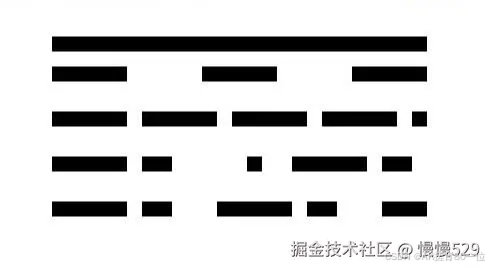
strokeDashArray
strokeDashArray(value: Array)
设置边框间隙。线段相交时可能会出现重叠现象。异常值按照默认值处理。
卡片能力: 从API version 9开始,该接口支持在ArkTS卡片中使用。
元服务API: 从API version 11开始,该接口支持在元服务中使用。
系统能力: SystemCapability.ArkUI.ArkUI.Full
参数:
| 参数名 | 类型 | 必填 | 说明 |
|---|---|---|---|
| value | Array<[Length]> | 是 | 边框间隙。默认值:[] |
strokeDashOffset
strokeDashOffset(value: number | string)
设置边框绘制起点的偏移量。
卡片能力: 从API version 9开始,该接口支持在ArkTS卡片中使用。
元服务API: 从API version 11开始,该接口支持在元服务中使用。
系统能力: SystemCapability.ArkUI.ArkUI.Full
参数:
| 参数名 | 类型 | 必填 | 说明 |
|---|---|---|---|
| value | number | string | 是 |
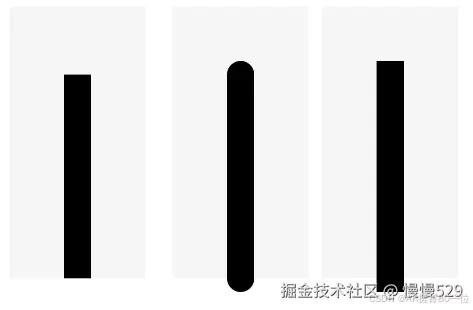
strokeLineCap
strokeLineCap(value: LineCapStyle)
设置边框端点绘制样式。
卡片能力: 从API version 9开始,该接口支持在ArkTS卡片中使用。
元服务API: 从API version 11开始,该接口支持在元服务中使用。
系统能力: SystemCapability.ArkUI.ArkUI.Full
参数:
| 参数名 | 类型 | 必填 | 说明 |
|---|---|---|---|
| value | [LineCapStyle] | 是 | 边框端点绘制样式。默认值:LineCapStyle.Butt |
strokeLineJoin
strokeLineJoin(value: LineJoinStyle)
设置边框拐角绘制样式。Line组件无法形成拐角,该属性设置无效。
卡片能力: 从API version 9开始,该接口支持在ArkTS卡片中使用。
元服务API: 从API version 11开始,该接口支持在元服务中使用。
系统能力: SystemCapability.ArkUI.ArkUI.Full
参数:
| 参数名 | 类型 | 必填 | 说明 |
|---|---|---|---|
| value | [LineJoinStyle] | 是 | 边框拐角绘制样式。默认值:LineJoinStyle.Miter |
strokeMiterLimit
strokeMiterLimit(value: number | string)
设置锐角绘制成斜角的极限值。Line组件无法设置锐角图形,该属性设置无效。
卡片能力: 从API version 9开始,该接口支持在ArkTS卡片中使用。
元服务API: 从API version 11开始,该接口支持在元服务中使用。
系统能力: SystemCapability.ArkUI.ArkUI.Full
参数:
| 参数名 | 类型 | 必填 | 说明 |
|---|---|---|---|
| value | number | string | 是 |
strokeOpacity
strokeOpacity(value: number | string | Resource)
设置边框透明度。该属性的取值范围是[0.0, 1.0],若给定值小于0.0,则取值为0.0;若给定值大于1.0,则取值为1.0,其余异常值按1.0处理 。
卡片能力: 从API version 9开始,该接口支持在ArkTS卡片中使用。
元服务API: 从API version 11开始,该接口支持在元服务中使用。
系统能力: SystemCapability.ArkUI.ArkUI.Full
参数:
| 参数名 | 类型 | 必填 | 说明 |
|---|---|---|---|
| value | number | string | [Resource] |
strokeWidth
strokeWidth(value: Length)
设置边框宽度。该属性若为string类型, 暂不支持百分比,百分比按照1px处理。
卡片能力: 从API version 9开始,该接口支持在ArkTS卡片中使用。
元服务API: 从API version 11开始,该接口支持在元服务中使用。
系统能力: SystemCapability.ArkUI.ArkUI.Full
参数:
| 参数名 | 类型 | 必填 | 说明 |
|---|---|---|---|
| value | [Length] | 是 | 边框宽度。默认值:1 |
antiAlias
antiAlias(value: boolean)
设置是否开启抗锯齿效果。
卡片能力: 从API version 9开始,该接口支持在ArkTS卡片中使用。
元服务API: 从API version 11开始,该接口支持在元服务中使用。
系统能力: SystemCapability.ArkUI.ArkUI.Full
参数:
| 参数名 | 类型 | 必填 | 说明 |
|---|---|---|---|
| value | boolean | 是 | 是否开启抗锯齿效果。默认值:true |
示例
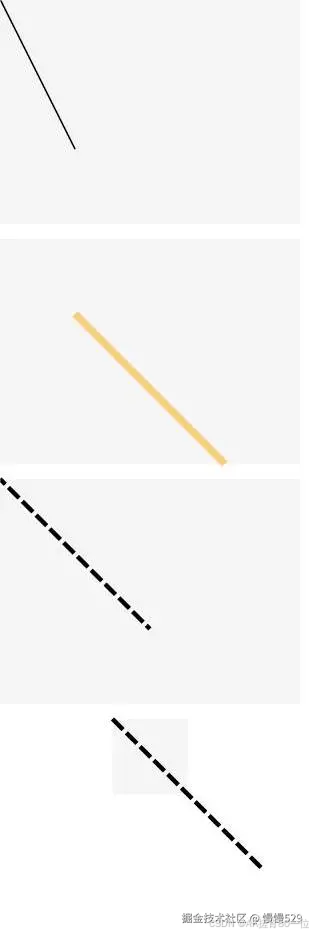
示例1
// xxx.ets
@Entry
@Component
struct LineExample {
  build() {
    Column({ space: 10 }) {
      // 线条绘制的起止点坐标均是相对于Line组件本身绘制区域的坐标
      Line()
        .width(200)
        .height(150)
        .startPoint([0, 0])
        .endPoint([50, 100])
        .stroke(Color.Black)
        .backgroundColor('#F5F5F5')
      Line()
        .width(200)
        .height(150)
        .startPoint([50, 50])
        .endPoint([150, 150])
        .strokeWidth(5)
        .stroke(Color.Orange)
        .strokeOpacity(0.5)
        .backgroundColor('#F5F5F5')
      // strokeDashOffset用于定义关联虚线strokeDashArray数组渲染时的偏移
      Line()
        .width(200)
        .height(150)
        .startPoint([0, 0])
        .endPoint([100, 100])
        .stroke(Color.Black)
        .strokeWidth(3)
        .strokeDashArray([10, 3])
        .strokeDashOffset(5)
        .backgroundColor('#F5F5F5')
      // 当坐标点设置的值超出Line组件的宽高范围时,线条会画出组件绘制区域
      Line()
        .width(50)
        .height(50)
        .startPoint([0, 0])
        .endPoint([100, 100])
        .stroke(Color.Black)
        .strokeWidth(3)
        .strokeDashArray([10, 3])
        .backgroundColor('#F5F5F5')
    }
  }
}
示例2
// xxx.ets
@Entry
@Component
struct LineExample1 {
  build() {
    Row({ space: 10 }) {
      // 当LineCapStyle值为Butt时
      Line()
        .width(100)
        .height(200)
        .startPoint([50, 50])
        .endPoint([50, 200])
        .stroke(Color.Black)
        .strokeWidth(20)
        .strokeLineCap(LineCapStyle.Butt)
        .backgroundColor('#F5F5F5').margin(10)
      // 当LineCapStyle值为Round时
      Line()
        .width(100)
        .height(200)
        .startPoint([50, 50])
        .endPoint([50, 200])
        .stroke(Color.Black)
        .strokeWidth(20)
        .strokeLineCap(LineCapStyle.Round)
        .backgroundColor('#F5F5F5')
      // 当LineCapStyle值为Square时
      Line()
        .width(100)
        .height(200)
        .startPoint([50, 50])
        .endPoint([50, 200])
        .stroke(Color.Black)
        .strokeWidth(20)
        .strokeLineCap(LineCapStyle.Square)
        .backgroundColor('#F5F5F5')
    }
  }
}
示例3
// xxx.ets
@Entry
@Component
struct LineExample {
  build() {
    Column() {
      Line()
        .width(300)
        .height(30)
        .startPoint([50, 30])
        .endPoint([300, 30])
        .stroke(Color.Black)
        .strokeWidth(10)
      // 设置strokeDashArray的数组间隔为 50
      Line()
        .width(300)
        .height(30)
        .startPoint([50, 20])
        .endPoint([300, 20])
        .stroke(Color.Black)
        .strokeWidth(10)
        .strokeDashArray([50])
      // 设置strokeDashArray的数组间隔为 50, 10
      Line()
        .width(300)
        .height(30)
        .startPoint([50, 20])
        .endPoint([300, 20])
        .stroke(Color.Black)
        .strokeWidth(10)
        .strokeDashArray([50, 10])
      // 设置strokeDashArray的数组间隔为 50, 10, 20
      Line()
        .width(300)
        .height(30)
        .startPoint([50, 20])
        .endPoint([300, 20])
        .stroke(Color.Black)
        .strokeWidth(10)
        .strokeDashArray([50, 10, 20])
      // 设置strokeDashArray的数组间隔为 50, 10, 20, 30
      Line()
        .width(300)
        .height(30)
        .startPoint([50, 20])
        .endPoint([300, 20])
        .stroke(Color.Black)
        .strokeWidth(10)
        .strokeDashArray([50, 10, 20, 30])

    }
  }
}

社区规范:仅讨论OpenHarmony相关问题。
更多推荐
 7
7 0
0- 0


 已为社区贡献26条内容

所有评论(0)