KMP OpenHarmony 时间戳转换工具 - Unix时间戳与日期时间相互转换
本文介绍了基于Kotlin Multiplatform (KMP)框架开发的时间戳转换工具系统,支持跨平台时间处理功能。该系统提供完整的时间转换能力,包括Unix时间戳转换、日期格式化、时区处理、日期计算等核心功能。通过KMP实现跨端兼容,同一套Kotlin代码可运行于多个平台。文章详细阐述了各功能模块的实现原理,包括时间戳精度转换、时区偏移计算、日期加减运算等关键技术点,并提供了代码示例说明。该
目录
概述
本文档介绍如何在 Kotlin Multiplatform (KMP) 鸿蒙跨端开发中实现一个功能完整的时间戳转换工具系统。时间戳是计算机系统中表示时间的重要方式,广泛应用于日志记录、数据库存储、API 通信等领域。这个工具提供了对 Unix 时间戳和日期时间格式的全面转换支持,包括时间戳转换、时区处理、日期计算、时间格式化等功能。
在实际应用中,时间戳转换工具广泛应用于以下场景:日志分析系统、数据库管理、API 开发、时间序列数据处理、事件追踪系统、定时任务管理等。通过 KMP 框架的跨端能力,我们可以在不同平台上使用相同的时间处理逻辑,确保时间数据的一致性和准确性。
工具的特点
- 完整的时间转换:支持时间戳、日期、时间的相互转换
- 多格式支持:支持多种日期时间格式
- 时区处理:正确处理不同时区的时间转换
- 日期计算:支持日期的加减和差值计算
- 时间格式化:灵活的时间格式化选项
- 跨端兼容:一份 Kotlin 代码可同时服务多个平台
工具功能
1. Unix 时间戳转换
Unix 时间戳是从 1970 年 1 月 1 日 00:00:00 UTC 开始的秒数。Unix 时间戳是计算机系统中最常见的时间表示方式,具有简洁、通用的特点。Unix 时间戳转换需要考虑秒级和毫秒级的区别。
- 秒级时间戳:表示从 1970 年以来的秒数
- 毫秒级时间戳:表示从 1970 年以来的毫秒数
- 微秒级时间戳:表示从 1970 年以来的微秒数
- 精度转换:支持不同精度的时间戳转换
2. 日期时间格式化
日期时间格式化是将日期时间对象转换为字符串表示。不同的应用和地区使用不同的日期时间格式。日期时间格式化需要支持多种格式模式和本地化。
- 标准格式:ISO 8601 格式等标准格式
- 自定义格式:支持自定义的格式模式
- 本地化格式:支持不同地区的日期时间表示
- 时区显示:显示时区信息
3. 时区处理
时区处理是将时间在不同时区之间进行转换。由于地球不同地区使用不同的时区,时区处理对于全球应用很重要。时区处理需要考虑夏令时等复杂情况。
- 时区转换:在不同时区之间转换时间
- 时区识别:识别和验证时区标识符
- 夏令时处理:正确处理夏令时的变化
- UTC 转换:与 UTC 时间的相互转换
4. 日期计算
日期计算是对日期进行加减操作和计算日期差值。日期计算需要考虑月份天数、闰年等复杂因素。日期计算对于事件调度和时间分析很重要。
- 日期加减:对日期进行天数、月数、年数的加减
- 日期差值:计算两个日期之间的差值
- 工作日计算:计算工作日数量
- 周期计算:计算周期性的日期
5. 相对时间表示
相对时间表示是用相对的语言描述时间,如"刚才"、"1小时前"等。相对时间表示对于用户界面很有用,能够提供更加人性化的时间显示。
- 时间差描述:用自然语言描述时间差
- 模糊时间:支持"今天"、"昨天"等模糊时间
- 国际化支持:支持多种语言的相对时间表示
- 自定义规则:支持自定义的相对时间规则
6. 时间验证
时间验证是检查日期时间是否有效。时间验证需要考虑月份天数、闰年、时间范围等因素。时间验证对于数据质量控制很重要。
- 日期有效性:检查日期是否有效
- 时间有效性:检查时间是否有效
- 范围检查:检查时间是否在指定范围内
- 格式检查:检查时间字符串的格式
7. 时间统计分析
时间统计分析是对时间数据进行统计和分析。时间统计分析对于日志分析和性能监测很有用。
- 时间分布:分析时间数据的分布
- 时间段统计:统计不同时间段的数据
- 趋势分析:分析时间序列的趋势
- 性能指标:计算与时间相关的性能指标
核心实现
1. 时间戳转换
fun timestampToDateTime(timestamp: Long, isMillis: Boolean = false): String {
    val millis = if (isMillis) timestamp else timestamp * 1000
    val calendar = Calendar.getInstance()
    calendar.timeInMillis = millis

    val sdf = SimpleDateFormat("yyyy-MM-dd HH:mm:ss", Locale.getDefault())
    return sdf.format(calendar.time)
}

fun dateTimeToTimestamp(dateTimeString: String, format: String = "yyyy-MM-dd HH:mm:ss"): Long {
    return try {
        val sdf = SimpleDateFormat(format, Locale.getDefault())
        val date = sdf.parse(dateTimeString)
        date?.time?.div(1000) ?: 0L
    } catch (e: Exception) {
        0L
    }
}
代码说明: 时间戳转换需要处理秒级和毫秒级的区别。使用 Calendar 和 SimpleDateFormat 进行转换,确保了时间的准确性。
2. 日期时间格式化
fun formatDateTime(timestamp: Long, format: String = "yyyy-MM-dd HH:mm:ss", isMillis: Boolean = false): String {
    val millis = if (isMillis) timestamp else timestamp * 1000
    val sdf = SimpleDateFormat(format, Locale.getDefault())
    return sdf.format(Date(millis))
}

fun parseDateTime(dateTimeString: String, format: String = "yyyy-MM-dd HH:mm:ss"): Date? {
    return try {
        val sdf = SimpleDateFormat(format, Locale.getDefault())
        sdf.parse(dateTimeString)
    } catch (e: Exception) {
        null
    }
}
代码说明: 日期时间格式化使用 SimpleDateFormat 进行灵活的格式转换。支持自定义格式模式,能够满足各种应用需求。
3. 时区处理
fun convertTimeZone(timestamp: Long, fromTimeZone: String, toTimeZone: String): Long {
    val calendar = Calendar.getInstance()
    calendar.timeInMillis = timestamp * 1000

    val fromTz = TimeZone.getTimeZone(fromTimeZone)
    val toTz = TimeZone.getTimeZone(toTimeZone)

    val fromOffset = fromTz.getOffset(timestamp * 1000)
    val toOffset = toTz.getOffset(timestamp * 1000)

    return timestamp + (toOffset - fromOffset) / 1000
}

fun getCurrentTimeWithTimeZone(timeZoneId: String): String {
    val sdf = SimpleDateFormat("yyyy-MM-dd HH:mm:ss", Locale.getDefault())
    sdf.timeZone = TimeZone.getTimeZone(timeZoneId)
    return sdf.format(Date())
}
代码说明: 时区处理需要考虑时区偏移量的计算。通过获取不同时区的偏移量,可以实现准确的时区转换。
4. 日期计算
fun addDays(timestamp: Long, days: Int): Long {
    val calendar = Calendar.getInstance()
    calendar.timeInMillis = timestamp * 1000
    calendar.add(Calendar.DAY_OF_MONTH, days)
    return calendar.timeInMillis / 1000
}

fun calculateDaysBetween(timestamp1: Long, timestamp2: Long): Long {
    val millis1 = timestamp1 * 1000
    val millis2 = timestamp2 * 1000
    return kotlin.math.abs(millis2 - millis1) / (1000 * 60 * 60 * 24)
}

fun getStartOfDay(timestamp: Long): Long {
    val calendar = Calendar.getInstance()
    calendar.timeInMillis = timestamp * 1000
    calendar.set(Calendar.HOUR_OF_DAY, 0)
    calendar.set(Calendar.MINUTE, 0)
    calendar.set(Calendar.SECOND, 0)
    calendar.set(Calendar.MILLISECOND, 0)
    return calendar.timeInMillis / 1000
}
代码说明: 日期计算使用 Calendar 的 add 方法进行日期的加减。计算日期差值时需要考虑毫秒和秒的转换。
5. 相对时间表示
fun getRelativeTime(timestamp: Long): String {
    val now = System.currentTimeMillis() / 1000
    val diff = now - timestamp

    return when {
        diff < 60 -> "刚才"
        diff < 3600 -> "${diff / 60} 分钟前"
        diff < 86400 -> "${diff / 3600} 小时前"
        diff < 604800 -> "${diff / 86400} 天前"
        diff < 2592000 -> "${diff / 604800} 周前"
        else -> "${diff / 2592000} 月前"
    }
}

fun getDateDescription(timestamp: Long): String {
    val calendar = Calendar.getInstance()
    calendar.timeInMillis = timestamp * 1000

    val today = Calendar.getInstance()
    val yesterday = Calendar.getInstance()
    yesterday.add(Calendar.DAY_OF_MONTH, -1)

    return when {
        calendar.get(Calendar.YEAR) == today.get(Calendar.YEAR) &&
        calendar.get(Calendar.DAY_OF_YEAR) == today.get(Calendar.DAY_OF_YEAR) -> "今天"
        calendar.get(Calendar.YEAR) == yesterday.get(Calendar.YEAR) &&
        calendar.get(Calendar.DAY_OF_YEAR) == yesterday.get(Calendar.DAY_OF_YEAR) -> "昨天"
        else -> SimpleDateFormat("yyyy-MM-dd", Locale.getDefault()).format(Date(timestamp * 1000))
    }
}
代码说明: 相对时间表示通过计算时间差来生成人性化的时间描述。这对于用户界面显示很有用。
Kotlin 源代码
// TimestampConverter.kt
import java.text.SimpleDateFormat
import java.util.*
import kotlin.math.abs

class TimestampConverter {

    fun timestampToDateTime(timestamp: Long, isMillis: Boolean = false): String {
        val millis = if (isMillis) timestamp else timestamp * 1000
        val sdf = SimpleDateFormat("yyyy-MM-dd HH:mm:ss", Locale.getDefault())
        return sdf.format(Date(millis))
    }

    fun dateTimeToTimestamp(dateTimeString: String, format: String = "yyyy-MM-dd HH:mm:ss"): Long {
        return try {
            val sdf = SimpleDateFormat(format, Locale.getDefault())
            val date = sdf.parse(dateTimeString)
            date?.time?.div(1000) ?: 0L
        } catch (e: Exception) {
            0L
        }
    }

    fun formatDateTime(timestamp: Long, format: String = "yyyy-MM-dd HH:mm:ss", isMillis: Boolean = false): String {
        val millis = if (isMillis) timestamp else timestamp * 1000
        val sdf = SimpleDateFormat(format, Locale.getDefault())
        return sdf.format(Date(millis))
    }

    fun parseDateTime(dateTimeString: String, format: String = "yyyy-MM-dd HH:mm:ss"): Date? {
        return try {
            val sdf = SimpleDateFormat(format, Locale.getDefault())
            sdf.parse(dateTimeString)
        } catch (e: Exception) {
            null
        }
    }

    fun convertTimeZone(timestamp: Long, fromTimeZone: String, toTimeZone: String): Long {
        val calendar = Calendar.getInstance()
        calendar.timeInMillis = timestamp * 1000

        val fromTz = TimeZone.getTimeZone(fromTimeZone)
        val toTz = TimeZone.getTimeZone(toTimeZone)

        val fromOffset = fromTz.getOffset(timestamp * 1000)
        val toOffset = toTz.getOffset(timestamp * 1000)

        return timestamp + (toOffset - fromOffset) / 1000
    }

    fun getCurrentTimeWithTimeZone(timeZoneId: String): String {
        val sdf = SimpleDateFormat("yyyy-MM-dd HH:mm:ss", Locale.getDefault())
        sdf.timeZone = TimeZone.getTimeZone(timeZoneId)
        return sdf.format(Date())
    }

    fun addDays(timestamp: Long, days: Int): Long {
        val calendar = Calendar.getInstance()
        calendar.timeInMillis = timestamp * 1000
        calendar.add(Calendar.DAY_OF_MONTH, days)
        return calendar.timeInMillis / 1000
    }

    fun calculateDaysBetween(timestamp1: Long, timestamp2: Long): Long {
        val millis1 = timestamp1 * 1000
        val millis2 = timestamp2 * 1000
        return abs(millis2 - millis1) / (1000 * 60 * 60 * 24)
    }

    fun getStartOfDay(timestamp: Long): Long {
        val calendar = Calendar.getInstance()
        calendar.timeInMillis = timestamp * 1000
        calendar.set(Calendar.HOUR_OF_DAY, 0)
        calendar.set(Calendar.MINUTE, 0)
        calendar.set(Calendar.SECOND, 0)
        calendar.set(Calendar.MILLISECOND, 0)
        return calendar.timeInMillis / 1000
    }

    fun getRelativeTime(timestamp: Long): String {
        val now = System.currentTimeMillis() / 1000
        val diff = now - timestamp

        return when {
            diff < 60 -> "刚才"
            diff < 3600 -> "${diff / 60} 分钟前"
            diff < 86400 -> "${diff / 3600} 小时前"
            diff < 604800 -> "${diff / 86400} 天前"
            diff < 2592000 -> "${diff / 604800} 周前"
            else -> "${diff / 2592000} 月前"
        }
    }

    fun getDateDescription(timestamp: Long): String {
        val calendar = Calendar.getInstance()
        calendar.timeInMillis = timestamp * 1000

        val today = Calendar.getInstance()
        val yesterday = Calendar.getInstance()
        yesterday.add(Calendar.DAY_OF_MONTH, -1)

        return when {
            calendar.get(Calendar.YEAR) == today.get(Calendar.YEAR) &&
            calendar.get(Calendar.DAY_OF_YEAR) == today.get(Calendar.DAY_OF_YEAR) -> "今天"
            calendar.get(Calendar.YEAR) == yesterday.get(Calendar.YEAR) &&
            calendar.get(Calendar.DAY_OF_YEAR) == yesterday.get(Calendar.DAY_OF_YEAR) -> "昨天"
            else -> SimpleDateFormat("yyyy-MM-dd", Locale.getDefault()).format(Date(timestamp * 1000))
        }
    }

    fun validateDateTime(dateTimeString: String, format: String = "yyyy-MM-dd HH:mm:ss"): Pair<Boolean, String> {
        return try {
            val sdf = SimpleDateFormat(format, Locale.getDefault())
            sdf.isLenient = false
            sdf.parse(dateTimeString)
            Pair(true, "日期时间格式正确")
        } catch (e: Exception) {
            Pair(false, "日期时间格式不正确: ${e.message}")
        }
    }

    fun getCurrentTimestamp(isMillis: Boolean = false): Long {
        val now = System.currentTimeMillis()
        return if (isMillis) now else now / 1000
    }
}

fun main() {
    val converter = TimestampConverter()

    println("=== 时间戳转换工具演示 ===\n")

    // 获取当前时间戳
    val currentTimestamp = converter.getCurrentTimestamp()
    println("当前时间戳 (秒): $currentTimestamp")

    // 时间戳转日期时间
    val dateTime = converter.timestampToDateTime(currentTimestamp)
    println("转换为日期时间: $dateTime\n")

    // 日期时间转时间戳
    val timestamp = converter.dateTimeToTimestamp("2024-01-15 10:30:00")
    println("日期时间转时间戳: $timestamp\n")

    // 相对时间
    val relativeTime = converter.getRelativeTime(currentTimestamp - 3600)
    println("1小时前的相对时间: $relativeTime\n")

    // 日期描述
    val dateDesc = converter.getDateDescription(currentTimestamp)
    println("日期描述: $dateDesc\n")

    // 计算日期差
    val daysBetween = converter.calculateDaysBetween(currentTimestamp - 86400 * 5, currentTimestamp)
    println("5天前到现在的天数差: $daysBetween")
}
Kotlin 代码说明: 这个实现提供了完整的时间戳转换功能。TimestampConverter 类包含了时间戳转换、格式化、时区处理、日期计算等多个方法。通过使用 Calendar 和 SimpleDateFormat,确保了时间处理的准确性和灵活性。
JavaScript 编译代码
// TimestampConverter.js
class TimestampConverter {
    timestampToDateTime(timestamp, isMillis = false) {
        const millis = isMillis ? timestamp : timestamp * 1000;
        const date = new Date(millis);
        return this.formatDate(date, "yyyy-MM-dd HH:mm:ss");
    }

    dateTimeToTimestamp(dateTimeString, format = "yyyy-MM-dd HH:mm:ss") {
        try {
            const date = this.parseDate(dateTimeString, format);
            return date ? Math.floor(date.getTime() / 1000) : 0;
        } catch (e) {
            return 0;
        }
    }

    formatDateTime(timestamp, format = "yyyy-MM-dd HH:mm:ss", isMillis = false) {
        const millis = isMillis ? timestamp : timestamp * 1000;
        const date = new Date(millis);
        return this.formatDate(date, format);
    }

    formatDate(date, format) {
        const year = date.getFullYear();
        const month = String(date.getMonth() + 1).padStart(2, '0');
        const day = String(date.getDate()).padStart(2, '0');
        const hours = String(date.getHours()).padStart(2, '0');
        const minutes = String(date.getMinutes()).padStart(2, '0');
        const seconds = String(date.getSeconds()).padStart(2, '0');

        return format
            .replace('yyyy', year)
            .replace('MM', month)
            .replace('dd', day)
            .replace('HH', hours)
            .replace('mm', minutes)
            .replace('ss', seconds);
    }

    parseDate(dateTimeString, format) {
        try {
            const parts = dateTimeString.match(/\d+/g);
            if (!parts || parts.length < 3) return null;

            const year = parseInt(parts[0]);
            const month = parseInt(parts[1]) - 1;
            const day = parseInt(parts[2]);
            const hours = parts.length > 3 ? parseInt(parts[3]) : 0;
            const minutes = parts.length > 4 ? parseInt(parts[4]) : 0;
            const seconds = parts.length > 5 ? parseInt(parts[5]) : 0;

            return new Date(year, month, day, hours, minutes, seconds);
        } catch (e) {
            return null;
        }
    }

    addDays(timestamp, days) {
        const date = new Date(timestamp * 1000);
        date.setDate(date.getDate() + days);
        return Math.floor(date.getTime() / 1000);
    }

    calculateDaysBetween(timestamp1, timestamp2) {
        const millis1 = timestamp1 * 1000;
        const millis2 = timestamp2 * 1000;
        return Math.floor(Math.abs(millis2 - millis1) / (1000 * 60 * 60 * 24));
    }

    getStartOfDay(timestamp) {
        const date = new Date(timestamp * 1000);
        date.setHours(0, 0, 0, 0);
        return Math.floor(date.getTime() / 1000);
    }

    getRelativeTime(timestamp) {
        const now = Math.floor(Date.now() / 1000);
        const diff = now - timestamp;

        if (diff < 60) return "刚才";
        if (diff < 3600) return `${Math.floor(diff / 60)} 分钟前`;
        if (diff < 86400) return `${Math.floor(diff / 3600)} 小时前`;
        if (diff < 604800) return `${Math.floor(diff / 86400)} 天前`;
        if (diff < 2592000) return `${Math.floor(diff / 604800)} 周前`;
        return `${Math.floor(diff / 2592000)} 月前`;
    }

    getDateDescription(timestamp) {
        const date = new Date(timestamp * 1000);
        const today = new Date();
        const yesterday = new Date(today);
        yesterday.setDate(yesterday.getDate() - 1);

        if (date.toDateString() === today.toDateString()) return "今天";
        if (date.toDateString() === yesterday.toDateString()) return "昨天";

        return this.formatDate(date, "yyyy-MM-dd");
    }

    validateDateTime(dateTimeString, format = "yyyy-MM-dd HH:mm:ss") {
        try {
            const date = this.parseDate(dateTimeString, format);
            if (!date) return { valid: false, message: "日期时间格式不正确" };
            return { valid: true, message: "日期时间格式正确" };
        } catch (e) {
            return { valid: false, message: `日期时间格式不正确: ${e.message}` };
        }
    }

    getCurrentTimestamp(isMillis = false) {
        const now = Date.now();
        return isMillis ? now : Math.floor(now / 1000);
    }
}

// 使用示例
const converter = new TimestampConverter();

console.log("=== 时间戳转换工具演示 ===\n");

const currentTimestamp = converter.getCurrentTimestamp();
console.log("当前时间戳 (秒):", currentTimestamp);

const dateTime = converter.timestampToDateTime(currentTimestamp);
console.log("转换为日期时间:", dateTime);

const timestamp = converter.dateTimeToTimestamp("2024-01-15 10:30:00");
console.log("日期时间转时间戳:", timestamp);

const relativeTime = converter.getRelativeTime(currentTimestamp - 3600);
console.log("1小时前的相对时间:", relativeTime);

const dateDesc = converter.getDateDescription(currentTimestamp);
console.log("日期描述:", dateDesc);

const daysBetween = converter.calculateDaysBetween(currentTimestamp - 86400 * 5, currentTimestamp);
console.log("5天前到现在的天数差:", daysBetween);
JavaScript 代码说明: JavaScript 版本是 Kotlin 代码的直接转译。由于 JavaScript 和 Kotlin 在时间处理上有差异,我们使用 Date 对象进行时间操作。整体逻辑和算法与 Kotlin 版本保持一致,确保跨平台的一致性。
ArkTS 调用代码
// TimestampConverterPage.ets
import { TimestampConverter } from './TimestampConverter';

@Entry
@Component
struct TimestampConverterPage {
    @State inputValue: string = '';
    @State conversionType: string = 'timestamp_to_datetime';
    @State result: string = '';
    @State showResult: boolean = false;
    @State isLoading: boolean = false;
    @State selectedFormat: string = 'yyyy-MM-dd HH:mm:ss';

    private converter: TimestampConverter = new TimestampConverter();

    private conversionOptions = [
        { label: '时间戳转日期时间', value: 'timestamp_to_datetime' },
        { label: '日期时间转时间戳', value: 'datetime_to_timestamp' },
        { label: '相对时间', value: 'relative_time' },
        { label: '日期描述', value: 'date_description' },
        { label: '计算日期差', value: 'days_between' },
        { label: '验证日期时间', value: 'validate' }
    ];

    private formatOptions = [
        { label: 'yyyy-MM-dd HH:mm:ss', value: 'yyyy-MM-dd HH:mm:ss' },
        { label: 'yyyy-MM-dd', value: 'yyyy-MM-dd' },
        { label: 'HH:mm:ss', value: 'HH:mm:ss' },
        { label: 'yyyy/MM/dd HH:mm', value: 'yyyy/MM/dd HH:mm' }
    ];

    performConversion() {
        this.isLoading = true;
        try {
            let resultText = '';

            switch (this.conversionType) {
                case 'timestamp_to_datetime':
                    const timestamp = parseInt(this.inputValue);
                    resultText = this.converter.timestampToDateTime(timestamp);
                    break;
                case 'datetime_to_timestamp':
                    const ts = this.converter.dateTimeToTimestamp(this.inputValue, this.selectedFormat);
                    resultText = `时间戳: ${ts}`;
                    break;
                case 'relative_time':
                    const ts2 = parseInt(this.inputValue);
                    resultText = this.converter.getRelativeTime(ts2);
                    break;
                case 'date_description':
                    const ts3 = parseInt(this.inputValue);
                    resultText = this.converter.getDateDescription(ts3);
                    break;
                case 'days_between':
                    const parts = this.inputValue.split(',');
                    if (parts.length === 2) {
                        const ts4 = parseInt(parts[0]);
                        const ts5 = parseInt(parts[1]);
                        const days = this.converter.calculateDaysBetween(ts4, ts5);
                        resultText = `日期差: ${days} 天`;
                    } else {
                        resultText = '请输入两个时间戳,用逗号分隔';
                    }
                    break;
                case 'validate':
                    const validation = this.converter.validateDateTime(this.inputValue, this.selectedFormat);
                    resultText = validation.valid ? '✓ ' + validation.message : '✗ ' + validation.message;
                    break;
                default:
                    resultText = '未知的转换类型';
            }

            this.result = resultText;
            this.showResult = true;
        } catch (error) {
            this.result = '转换失败: ' + (error instanceof Error ? error.message : String(error));
            this.showResult = true;
        } finally {
            this.isLoading = false;
        }
    }

    build() {
        Column() {
            // 标题
            Text('时间戳转换工具')
                .fontSize(28)
                .fontWeight(FontWeight.Bold)
                .margin({ top: 20, bottom: 20 })
                .textAlign(TextAlign.Center)
                .width('100%')

            // 转换类型选择
            Column() {
                Text('转换类型')
                    .fontSize(14)
                    .fontColor('#666666')
                    .margin({ bottom: 10 })

                Select(this.conversionOptions)
                    .value(this.conversionType)
                    .onSelect((index: number, value?: string) => {
                        this.conversionType = value || 'timestamp_to_datetime';
                    })
                    .width('100%')
                    .height(40)
            }
            .width('100%')
            .padding(15)
            .backgroundColor('#ffffff')
            .borderRadius(10)
            .border({ width: 1, color: '#eeeeee' })
            .margin({ bottom: 20 })

            // 格式选择
            Column() {
                Text('日期时间格式')
                    .fontSize(14)
                    .fontColor('#666666')
                    .margin({ bottom: 10 })

                Select(this.formatOptions)
                    .value(this.selectedFormat)
                    .onSelect((index: number, value?: string) => {
                        this.selectedFormat = value || 'yyyy-MM-dd HH:mm:ss';
                    })
                    .width('100%')
                    .height(40)
            }
            .width('100%')
            .padding(15)
            .backgroundColor('#ffffff')
            .borderRadius(10)
            .border({ width: 1, color: '#eeeeee' })
            .margin({ bottom: 20 })

            // 输入框
            Column() {
                Text('输入值')
                    .fontSize(14)
                    .fontColor('#666666')
                    .margin({ bottom: 10 })

                TextInput({ placeholder: '输入时间戳或日期时间' })
                    .value(this.inputValue)
                    .onChange((value: string) => {
                        this.inputValue = value;
                    })
                    .width('100%')
                    .height(45)
                    .padding({ left: 10, right: 10 })
                    .border({ width: 1, color: '#cccccc', radius: 8 })
                    .fontSize(14)
            }
            .width('100%')
            .padding(15)
            .backgroundColor('#ffffff')
            .borderRadius(10)
            .border({ width: 1, color: '#eeeeee' })
            .margin({ bottom: 20 })

            // 转换按钮
            Button('转换')
                .width('100%')
                .height(45)
                .fontSize(16)
                .fontWeight(FontWeight.Bold)
                .backgroundColor('#1B7837')
                .fontColor('#ffffff')
                .onClick(() => {
                    this.performConversion();
                })
                .margin({ bottom: 20 })

            // 结果显示
            if (this.showResult) {
                Column() {
                    Text('转换结果')
                        .fontSize(16)
                        .fontWeight(FontWeight.Bold)
                        .fontColor('#FFFFFF')
                        .width('100%')
                        .padding(12)
                        .backgroundColor('#1B7837')
                        .borderRadius(8)
                        .margin({ bottom: 12 })

                    Scroll() {
                        Text(this.result)
                            .fontSize(14)
                            .fontColor('#333333')
                            .width('100%')
                            .padding(12)
                            .backgroundColor('#f9f9f9')
                            .borderRadius(6)
                            .textAlign(TextAlign.Start)
                            .selectable(true)
                    }
                    .width('100%')
                    .height(100)
                }
                .width('100%')
                .padding(15)
                .backgroundColor('#ffffff')
                .borderRadius(10)
                .border({ width: 1, color: '#eeeeee' })
            }

            Blank()
        }
        .width('100%')
        .height('100%')
        .padding(15)
        .backgroundColor('#f5f5f5')
        .scrollable(ScrollDirection.Vertical)
    }
}
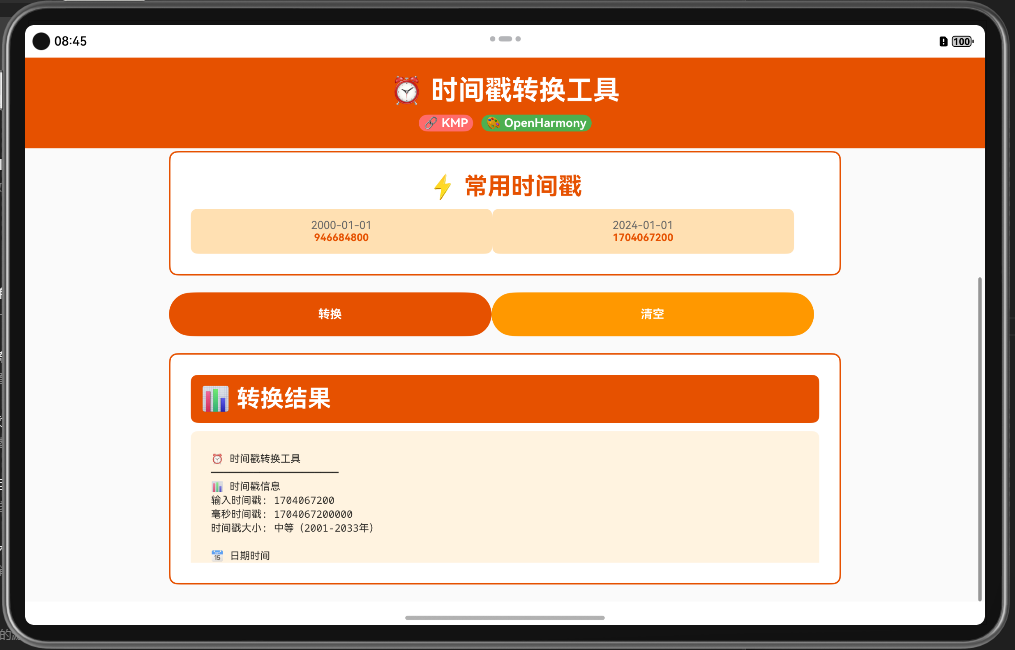
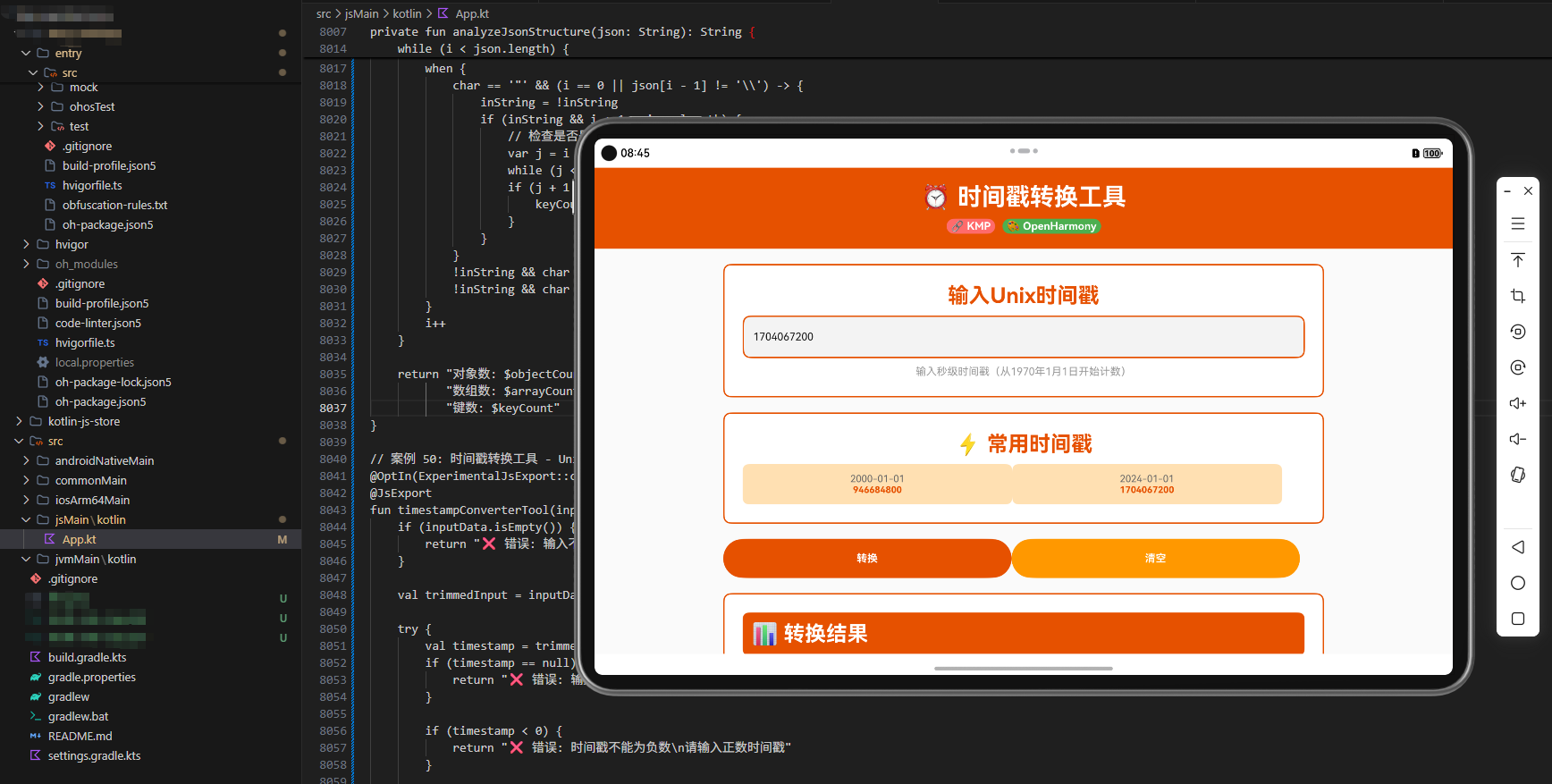
ArkTS 代码说明: ArkTS 调用代码展示了如何在 OpenHarmony 应用中使用时间戳转换工具。页面包含转换类型选择、格式选择、输入框、转换按钮和结果显示等功能。通过 @State 装饰器管理状态,实现了完整的用户交互流程。用户可以选择转换类型、输入数据,然后点击转换按钮获得结果。
实战案例
案例1:日志分析系统
在日志分析系统中,需要将日志中的时间戳转换为可读的日期时间。
fun parseLogEntry(logLine: String): Map<String, Any> {
    val converter = TimestampConverter()
    val parts = logLine.split("|")

    return if (parts.size >= 2) {
        val timestamp = parts[0].toLongOrNull() ?: 0L
        val message = parts[1]

        mapOf(
            "timestamp" to timestamp,
            "dateTime" to converter.timestampToDateTime(timestamp),
            "relativeTime" to converter.getRelativeTime(timestamp),
            "message" to message
        )
    } else {
        mapOf("error" to "日志格式不正确")
    }
}
案例2:定时任务调度
在定时任务调度系统中,需要计算下一个任务执行时间。
fun calculateNextTaskTime(currentTimestamp: Long, intervalDays: Int): Map<String, Any> {
    val converter = TimestampConverter()

    val nextTimestamp = converter.addDays(currentTimestamp, intervalDays)
    val nextDateTime = converter.timestampToDateTime(nextTimestamp)
    val daysBetween = converter.calculateDaysBetween(currentTimestamp, nextTimestamp)

    return mapOf(
        "currentTime" to converter.timestampToDateTime(currentTimestamp),
        "nextTaskTime" to nextDateTime,
        "daysUntilTask" to daysBetween
    )
}
案例3:数据库时间查询
在数据库查询中,需要根据日期范围查询数据。
fun queryDataByDateRange(startDate: String, endDate: String): Map<String, Any> {
    val converter = TimestampConverter()

    val startTimestamp = converter.dateTimeToTimestamp(startDate)
    val endTimestamp = converter.dateTimeToTimestamp(endDate)
    val daysBetween = converter.calculateDaysBetween(startTimestamp, endTimestamp)

    return mapOf(
        "startTimestamp" to startTimestamp,
        "endTimestamp" to endTimestamp,
        "daysInRange" to daysBetween,
        "query" to "SELECT * FROM data WHERE timestamp BETWEEN $startTimestamp AND $endTimestamp"
    )
}
最佳实践
1. 时区处理
始终考虑时区问题。在存储和传输时间时使用 UTC,在显示时转换为本地时区。
2. 时间精度
根据应用需求选择合适的时间精度(秒、毫秒等)。避免不必要的精度转换。
3. 时间验证
在处理用户输入的日期时间时,进行严格的验证。
4. 性能优化
缓存常用的时间格式化结果,避免重复计算。
5. 国际化
支持多种语言和地区的日期时间格式。
6. 错误处理
提供清晰的错误消息,帮助用户理解时间转换失败的原因。
总结
时间戳转换工具是现代应用开发中的重要组件。通过 KMP 框架,我们可以创建一个跨端的时间处理系统,在 Kotlin、JavaScript 和 ArkTS 中使用相同的时间转换逻辑。这不仅提高了代码的可维护性,还确保了不同平台上时间处理的一致性。
在实际应用中,合理使用时间戳转换工具可以提高应用的可靠性和用户体验。无论是日志分析、定时任务还是数据查询,时间戳转换工具都能发挥重要作用。通过提供完整的时间处理功能和灵活的格式化选项,我们可以帮助开发者更好地处理和理解时间数据。
欢迎加入开源鸿蒙跨平台社区:https://openharmonycrossplatform.csdn.net

社区规范:仅讨论OpenHarmony相关问题。
更多推荐
 15
15 0
0- 0


 已为社区贡献15条内容

所有评论(0)