React Native跨平台鸿蒙开发实战系列(bug):找不到cpp目录
摘要:DevEco Studio构建过程中出现CMake错误,主要原因是add_subdirectory命令引用的目录路径不存在。问题分析显示路径配置有误或依赖模块缺失。解决方案包括检查目录是否存在、修改CMakeLists.txt文件、安装缺失依赖模块,并调整CMake命令顺序。实际解决中通过调整路径层级结构解决了该问题。建议开发者检查项目依赖安装情况并正确配置构建路径。
"C:\Program Files\Huawei\DevEco Studio\tools\node\node.exe" "C:\Program Files\Huawei\DevEco Studio\tools\hvigor\bin\hvigorw.js" --mode module -p module=entry@default -p product=default -p pageType=page -p compileResInc=true -p requiredDeviceType=phone -p previewMode=true -p buildRoot=.preview PreviewBuild --watch --analyze=normal --parallel --incremental --daemon
> hvigor UP-TO-DATE :entry:default@PreBuild...
> hvigor Finished :entry:default@CreateModuleInfo... after 2 ms
> hvigor Finished :entry:default@ConfigureCmake... after 24 ms
> hvigor Finished :entry:default@MergeProfile... after 24 ms
> hvigor Finished :entry:default@CreateBuildProfile... after 6 ms
> hvigor Finished :entry:default@PreCheckSyscap... after 1 ms
> hvigor WARN: CMake Warning (dev) at CMakeLists.txt:1 (project):
  cmake_minimum_required() should be called prior to this top-level project()
  call.  Please see the cmake-commands(7) manual for usage documentation of
  both commands.
This warning is for project developers.  Use -Wno-dev to suppress it.


> hvigor WARN: CMake Deprecation Warning at CMakeLists.txt:2 (cmake_minimum_required):
  Compatibility with CMake < 3.5 will be removed from a future version of
  CMake.

  Update the VERSION argument <min> value or use a ...<max> suffix to tell
  CMake that the project does not need compatibility with older versions.

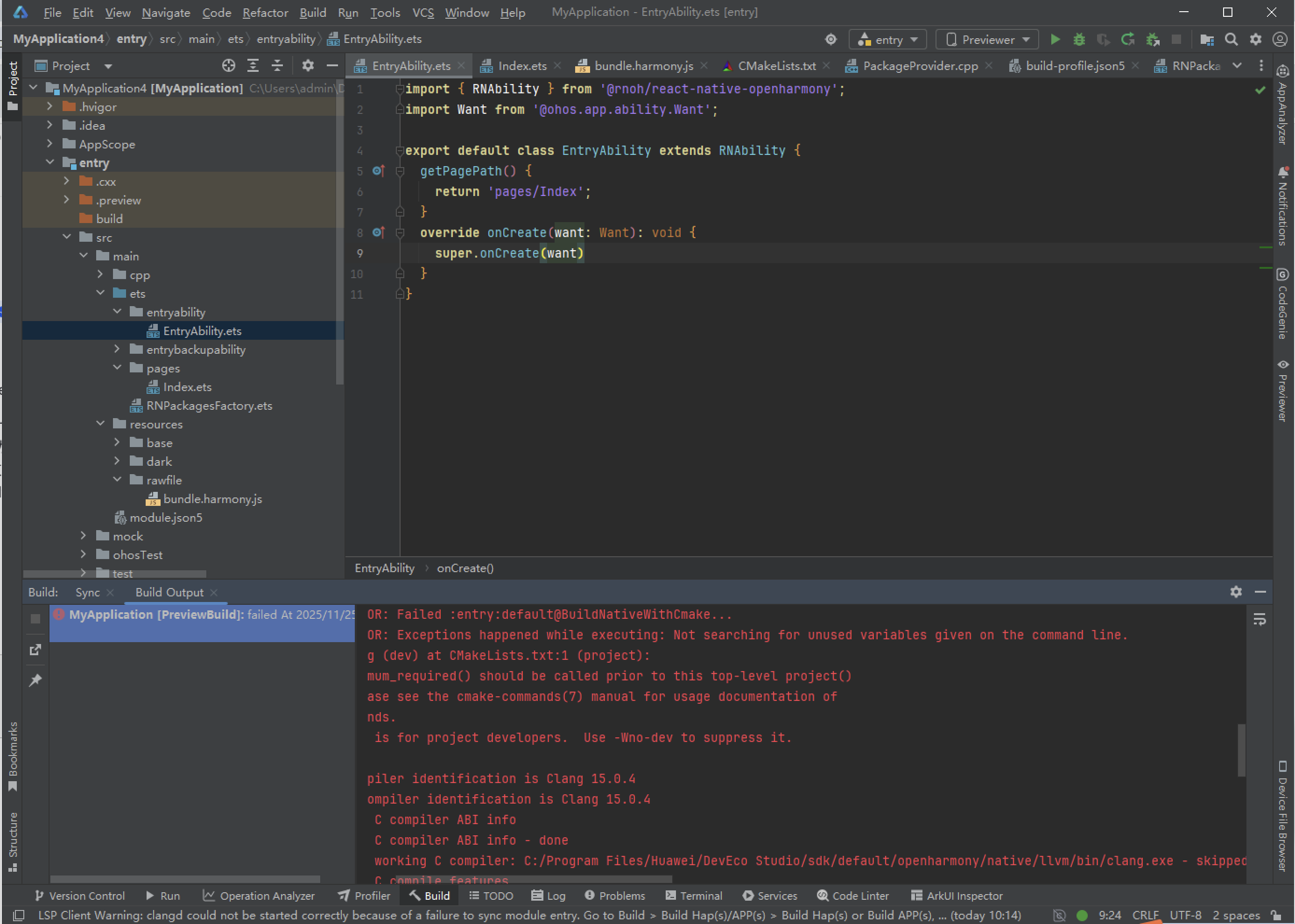
> hvigor WARN: CMake Error at CMakeLists.txt:14 (add_subdirectory):
  add_subdirectory given source
  "C:/Users/admin/DevEcoStudioProjects/MyApplication4/entry/src/main/cpp/../../../oh_modules/@rnoh/react-native-openharmony/src/main/cpp"
  which is not an existing directory.
原因分析:
CMake构建报错是因为add_subdirectory命令指定的源码目录不存在。具体来说,CMakeLists.txt文件的第14行引用了路径C:/Users/admin/DevEcoStudioProjects/MyApplication4/entry/src/main/cpp/…/…/…/oh_modules/@rnoh/react-native-openharmony/src/main/cpp,但这个目录在系统中找不到。
主要问题分析:
-
- 目录不存在:路径oh_modules/@rnoh/react-native-openharmony/src/main/cpp在你的项目中可能没有正确安装或路径配置有误
-
- 路径解析错误:使用了相对路径…/…/…/跳转,可能超出了项目根目录范围
- 3. 依赖模块缺失:@rnoh/react-native-openharmony模块可能未安装或安装位置不正确
- 路径解析错误:使用了相对路径…/…/…/跳转,可能超出了项目根目录范围
解决思路:
- 检查目录是否存在
手动导航到C:/Users/admin/DevEcoStudioProjects/MyApplication4/oh_modules/@rnoh/react-native-openharmony/src/main/cpp,确认该路径是否真实存在。
- 修复CMakeLists.txt文件
如果确认目录不存在,需要修改第14行的add_subdirectory调用
- 确保@rnoh/react-native-openharmony模块已正确安装
或者注释掉该行,如果该依赖不是必需的
- 安装缺失的依赖
在项目根目录下运行相应的包管理命令来安装缺失的模块。
- 调整CMake命令顺序
还需要调整CMakeLists.txt文件开头的命令顺序
将cmake_minimum_required()移到文件最开头,然后才是project()命令
建议操作: 立即检查oh_modules目录下是否存在@rnoh/react-native-openharmony这个包,如果缺失请重新安装依赖。
解决方案:
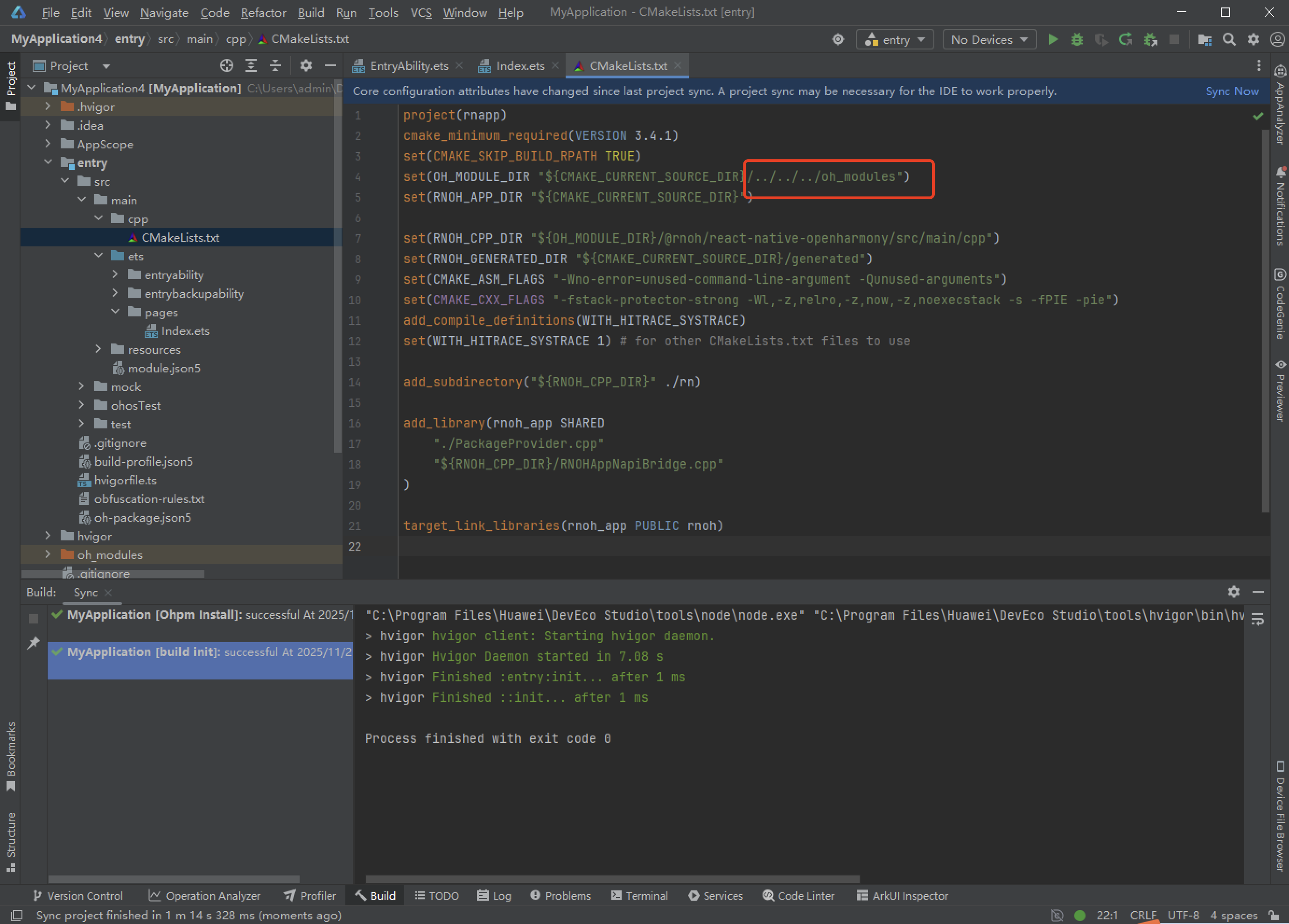
将以下路径再多加一层,按真实的情况来看,确实已经够了,但是我这里是多加了一层就不报错了。
欢迎大家加入开源鸿蒙跨平台开发者社区,一起共建开源鸿蒙跨平台生态。

社区规范:仅讨论OpenHarmony相关问题。
更多推荐
 4
4 0
0- 0



 已为社区贡献8条内容

所有评论(0)