日期选择器 - Flutter OpenHarmony组件库
OpenHarmony钱包应用新增日历视图功能 v1.16.0版本为OpenHarmony钱包应用引入了直观的日历视图功能。用户可通过预算管理页面的日历按钮查看每月交易情况,日历以可视化形式展示每日交易笔数和收支状况。该功能包含三个核心组件: CalendarDayData数据模型:记录日期、交易列表、收支总额和结余 CalendarService服务类:提供月份数据获取、周数计算等功能 日历视图
·
更新概述
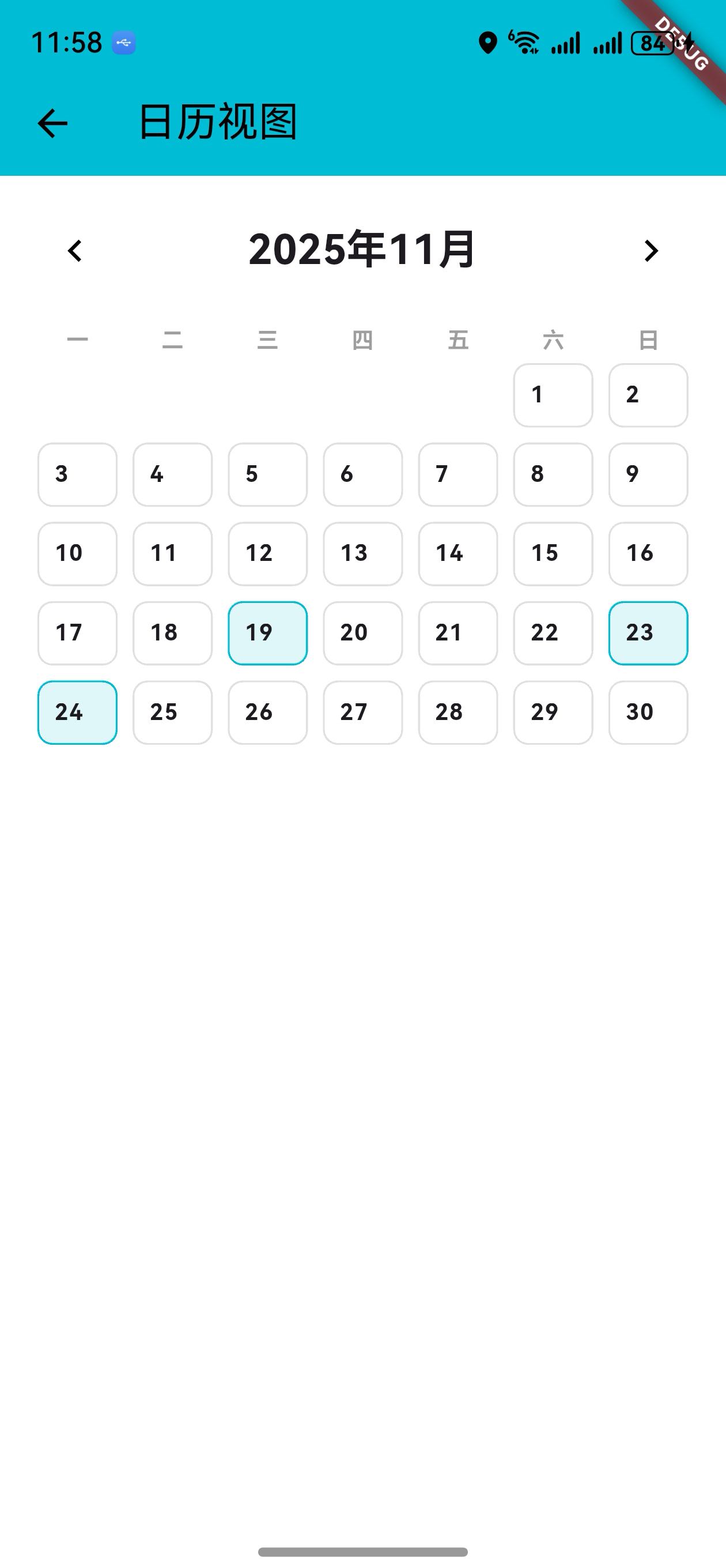
v1.16.0 版本为 OpenHarmony 钱包应用增加了直观的日历视图功能。用户现在可以通过预算管理页面的日历按钮查看每月的交易情况,以日历的形式展示每天的交易笔数和收支情况。这个新功能让用户能够一目了然地了解整个月份的财务状况。
核心功能更新
1. 日历日期数据模型
CalendarDayData 类定义
/// 日历日期数据模型
class CalendarDayData {
  final DateTime date;
  final List<wallet.Transaction> transactions;
  final double totalIncome;
  final double totalExpense;
  final double balance;

  CalendarDayData({
    required this.date,
    required this.transactions,
    required this.totalIncome,
    required this.totalExpense,
  }) : balance = totalIncome - totalExpense;

  /// 是否有交易
  bool get hasTransactions => transactions.isNotEmpty;

  /// 获取交易数
  int get transactionCount => transactions.length;
}
说明:
- 记录日期和该日期的所有交易
- 计算该日期的收入、支出和结余
- 提供便捷的查询方法
2. 日历视图服务
CalendarService 类
/// 日历视图服务
class CalendarService {
  /// 获取指定月份的所有日期数据
  static Map<DateTime, CalendarDayData> getMonthData(
    List<wallet.Transaction> transactions,
    int year,
    int month,
  ) {
    // 初始化所有日期
    // 填充交易数据
    // 返回月份数据
  }

  /// 获取月份的周数
  static int getWeeksInMonth(int year, int month) {
    // 计算月份包含的周数
  }

  /// 获取月份的第一天是星期几
  static int getFirstWeekday(int year, int month) {
    return DateTime(year, month, 1).weekday;
  }
}
说明:
getMonthData: 获取整个月份的日期数据getWeeksInMonth: 计算月份的周数getFirstWeekday: 获取月份第一天的星期数
3. 日历视图页面
月份导航
/// 构建月份头
Widget _buildMonthHeader() {
  return Padding(
    padding: const EdgeInsets.symmetric(horizontal: 16),
    child: Row(
      mainAxisAlignment: MainAxisAlignment.spaceBetween,
      children: [
        IconButton(
          icon: const Icon(Icons.chevron_left),
          onPressed: () {
            setState(() {
              _currentMonth = DateTime(
                _currentMonth.year,
                _currentMonth.month - 1,
              );
            });
          },
        ),
        Text(
          '${_currentMonth.year}年${_currentMonth.month}月',
          style: Theme.of(context).textTheme.titleLarge?.copyWith(
                fontWeight: FontWeight.bold,
              ),
        ),
        IconButton(
          icon: const Icon(Icons.chevron_right),
          onPressed: () {
            setState(() {
              _currentMonth = DateTime(
                _currentMonth.year,
                _currentMonth.month + 1,
              );
            });
          },
        ),
      ],
    ),
  );
}
说明:
- 显示当前月份
- 左右箭头导航到上一月/下一月
- 支持跨年份导航
星期头
/// 构建星期头
Widget _buildWeekdayHeader() {
  final weekdays = ['一', '二', '三', '四', '五', '六', '日'];
  return Padding(
    padding: const EdgeInsets.symmetric(horizontal: 16),
    child: Row(
      children: weekdays.map((day) {
        return Expanded(
          child: Center(
            child: Text(
              day,
              style: Theme.of(context).textTheme.bodySmall?.copyWith(
                    fontWeight: FontWeight.bold,
                    color: Colors.grey,
                  ),
            ),
          ),
        );
      }).toList(),
    ),
  );
}
说明:
- 显示周一到周日
- 作为日期网格的标题行
日历网格
/// 构建日历网格
Widget _buildCalendarGrid(Map<DateTime, CalendarDayData> monthData) {
  final firstWeekday = CalendarService.getFirstWeekday(
    _currentMonth.year,
    _currentMonth.month,
  );
  final lastDay = DateTime(_currentMonth.year, _currentMonth.month + 1, 0).day;

  final List<Widget> days = [];

  // 添加空白日期
  for (int i = 1; i < firstWeekday; i++) {
    days.add(const SizedBox());
  }

  // 添加日期
  for (int i = 1; i <= lastDay; i++) {
    final date = DateTime(_currentMonth.year, _currentMonth.month, i);
    final dayData = monthData[date];

    days.add(
      GestureDetector(
        onTap: dayData?.hasTransactions ?? false
            ? () {
                _showDayTransactions(dayData!);
              }
            : null,
        child: Container(
          margin: const EdgeInsets.all(4),
          padding: const EdgeInsets.all(8),
          decoration: BoxDecoration(
            color: dayData?.hasTransactions ?? false
                ? Colors.cyan.shade50
                : Colors.transparent,
            border: Border.all(
              color: dayData?.hasTransactions ?? false
                  ? Colors.cyan
                  : Colors.grey.shade300,
            ),
            borderRadius: BorderRadius.circular(8),
          ),
          child: Column(
            crossAxisAlignment: CrossAxisAlignment.start,
            children: [
              Text('$i', style: Theme.of(context).textTheme.bodyMedium),
              if (dayData?.hasTransactions ?? false) ...[
                const SizedBox(height: 4),
                Text('${dayData!.transactionCount}笔', style: Theme.of(context).textTheme.bodySmall),
                if (dayData.balance != 0) ...[
                  const SizedBox(height: 2),
                  Text(
                    dayData.balance > 0 ? '+¥${dayData.balance.toStringAsFixed(0)}' : '-¥${dayData.balance.abs().toStringAsFixed(0)}',
                    style: TextStyle(color: dayData.balance > 0 ? Colors.green : Colors.red),
                  ),
                ],
              ],
            ],
          ),
        ),
      ),
    );
  }

  return Padding(
    padding: const EdgeInsets.symmetric(horizontal: 16),
    child: GridView.count(
      crossAxisCount: 7,
      shrinkWrap: true,
      physics: const NeverScrollableScrollPhysics(),
      childAspectRatio: 1.2,
      children: days,
    ),
  );
}
说明:
- 7 列网格布局(周一到周日)
- 显示日期号
- 显示交易笔数
- 显示该日的收支结余
- 有交易的日期高亮显示
- 点击有交易的日期可查看详情
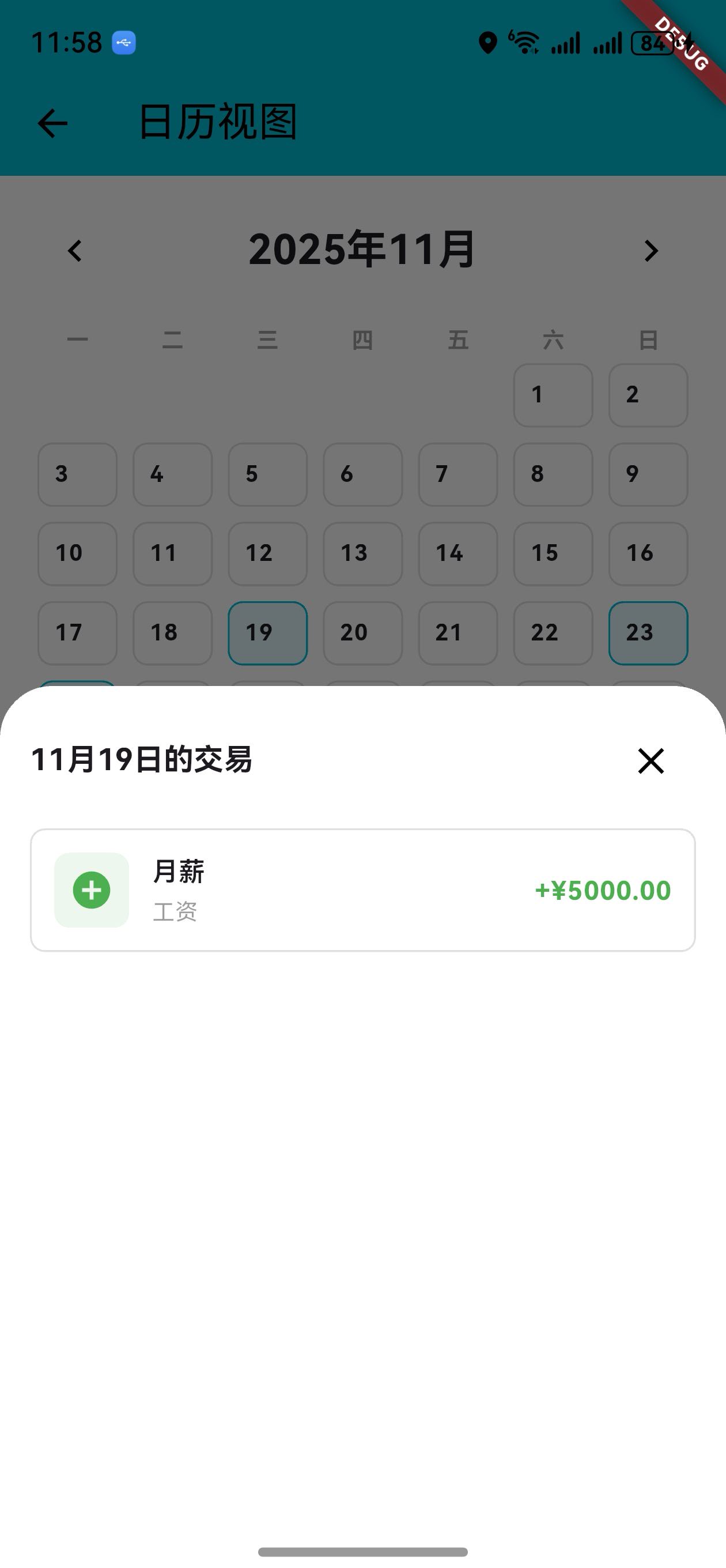
日期交易详情
/// 显示日期的交易
void _showDayTransactions(CalendarDayData dayData) {
  showModalBottomSheet(
    context: context,
    builder: (context) => Container(
      padding: const EdgeInsets.all(16),
      child: Column(
        crossAxisAlignment: CrossAxisAlignment.start,
        mainAxisSize: MainAxisSize.min,
        children: [
          Row(
            mainAxisAlignment: MainAxisAlignment.spaceBetween,
            children: [
              Text('${dayData.date.month}月${dayData.date.day}日的交易'),
              IconButton(icon: const Icon(Icons.close), onPressed: () => Navigator.pop(context)),
            ],
          ),
          const SizedBox(height: 12),
          Expanded(
            child: ListView.builder(
              itemCount: dayData.transactions.length,
              itemBuilder: (context, index) {
                final transaction = dayData.transactions[index];
                // 显示交易详情
              },
            ),
          ),
        ],
      ),
    ),
  );
}
说明:
- 底部弹出式面板显示
- 列出该日期的所有交易
- 显示交易标题、分类、金额
UI 变化
日历视图页面布局
┌─────────────────────────────────┐
│  日历视图                        │
├─────────────────────────────────┤
│  < 2024年12月 >                 │
├─────────────────────────────────┤
│  一  二  三  四  五  六  日      │
├─────────────────────────────────┤
│  [1]  [2]  [3]  [4]  [5]  [6]  [7]
│  [8]  [9] [10] [11] [12] [13] [14]
│ [15] [16] [17] [18] [19] [20] [21]
│ [22] [23] [24] [25] [26] [27] [28]
│ [29] [30] [31]
│
│ 有交易的日期示例:
│ ┌─────────────────────┐
│ │ 25                  │
│ │ 3笔                 │
│ │ +¥500               │
│ └─────────────────────┘
└─────────────────────────────────┘
访问方式
- 进入预算管理页面
- 点击 AppBar 右侧的日历按钮(📅)
- 进入日历视图页面
版本对比
| 功能 | v1.15.0 | v1.16.0 |
|---|---|---|
| 交易统计报告 | ✅ | ✅ |
| 关键指标 | ✅ | ✅ |
| 分类分析 | ✅ | ✅ |
| 日历日期模型 | ❌ | ✅ |
| 日历视图服务 | ❌ | ✅ |
| 月份导航 | ❌ | ✅ |
| 日历网格 | ❌ | ✅ |
| 交易详情展示 | ❌ | ✅ |
| 日期交易统计 | ❌ | ✅ |
使用场景
场景 1:查看某月的交易情况
- 进入预算管理页面
- 点击日历按钮
- 查看当月日历
- 了解每天的交易情况
场景 2:导航到其他月份
- 进入日历视图
- 点击左箭头查看上一月
- 点击右箭头查看下一月
- 跨年份查看历史交易
场景 3:查看特定日期的交易
- 进入日历视图
- 找到有交易的日期(高亮显示)
- 点击该日期
- 查看该日期的所有交易详情
场景 4:快速了解月度财务
- 进入日历视图
- 一目了然地看到整月的交易分布
- 识别交易集中的日期
- 了解月度财务规律
技术亮点
1. 灵活的日期处理
- 支持任意月份的日历生成
- 自动处理月份边界
- 支持跨年份导航
2. 高效的数据组织
- 按日期分组交易
- 快速查询特定日期的交易
- 支持日期范围查询
3. 直观的视觉设计
- 7 列网格布局符合日历习惯
- 有交易的日期高亮显示
- 显示关键信息(笔数、结余)
4. 交互友好
- 点击查看详情
- 底部弹出式面板
- 月份快速导航
欢迎加入开源鸿蒙跨平台社区:https://openharmonycrossplatform.csdn.net

社区规范:仅讨论OpenHarmony相关问题。
更多推荐
 6
6 0
0- 0


 已为社区贡献17条内容

所有评论(0)