Qt for HarmonyOS_PC ComboBox 组件开源鸿蒙开发实践
本文介绍了一个基于Qt Quick Controls 2.15的HarmonyOS应用项目,实现了省份-城市二级联动选择功能。
·
📋 项目概述
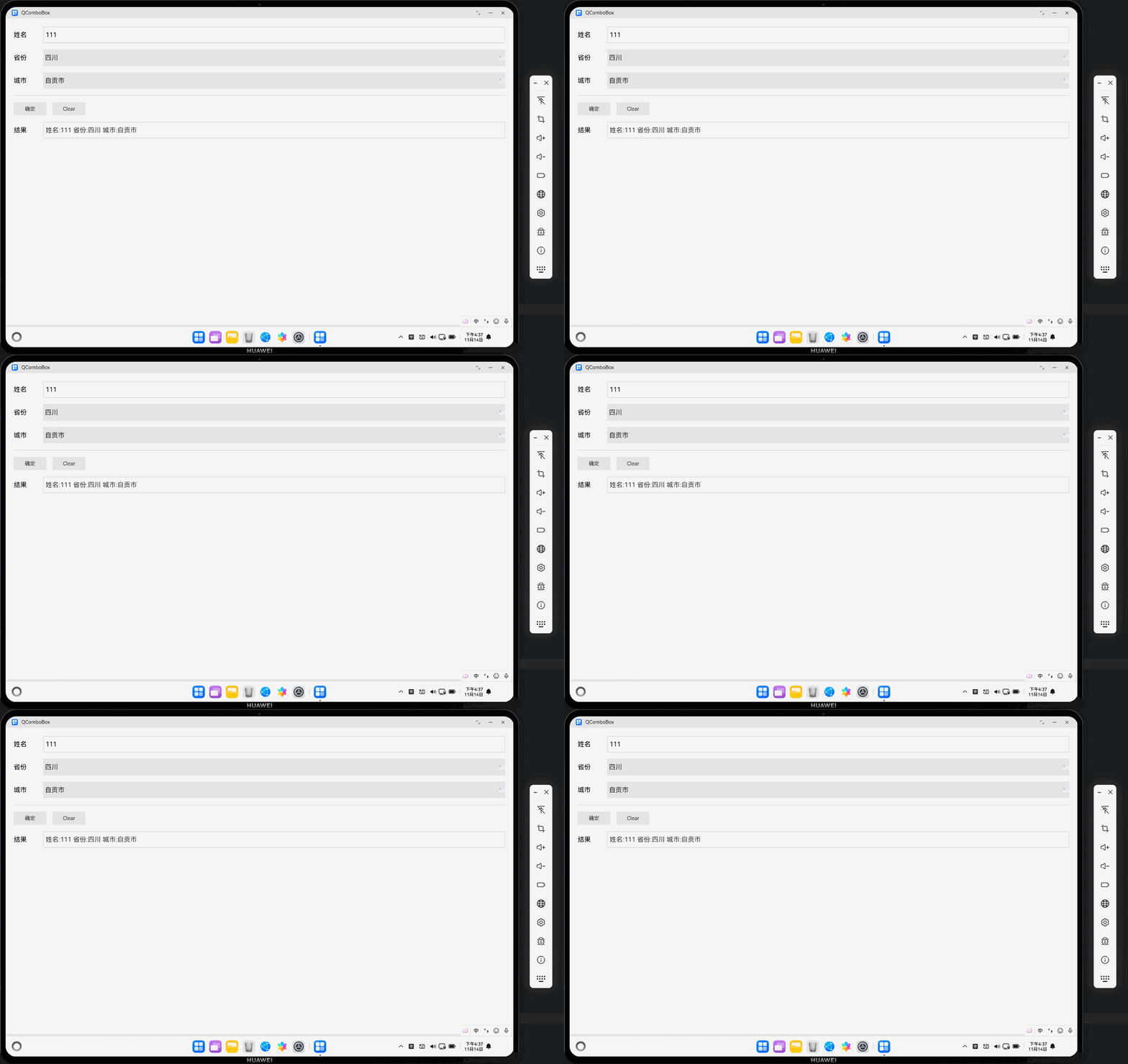
本文档基于一个完整的 QComboBox 项目,详细介绍了如何在 HarmonyOS 平台上使用 Qt 开发包含下拉选择框(ComboBox)的应用程序。项目实现了省份-城市二级联动选择功能,展示了 Qt Quick Controls 2.15 在 HarmonyOS 平台上的实际应用。
欢迎加入开源鸿蒙PC社区:https://harmonypc.csdn.net/
项目功能
- ✅ 姓名输入(TextInput)
- ✅ 省份选择(ComboBox,一级选择)
- ✅ 城市选择(ComboBox,二级联动选择)
- ✅ 结果展示和清空功能
- ✅ 完整的触摸交互支持
🎯 核心技术要点
1. HarmonyOS 入口函数:qtmain()
⚠️ 关键要点:HarmonyOS 真机上必须使用 qtmain() 而不是 main()!
// ✅ 正确写法
extern "C" int qtmain(int argc, char **argv)
{
    // Qt 应用作为共享库加载,生命周期由 HarmonyOS 管理
    QGuiApplication app(argc, argv);
    QQmlApplicationEngine engine;
    engine.load(QUrl(QStringLiteral("qrc:/main.qml")));
    return app.exec();  // ⚠️ 重要:必须调用 exec() 启动事件循环
}

// ❌ 错误写法(桌面应用方式)
int main(int argc, char *argv[])
{
    // 这种方式在 HarmonyOS 上会导致应用无法正常启动
}
原因说明:
- HarmonyOS 将 Qt 应用作为共享库(.so)加载
- 应用生命周期由 HarmonyOS 的 Ability 管理
qtmain()是 HarmonyOS Qt 插件的标准入口点
2. OpenGL ES 表面格式配置
⚠️ 关键要点:必须在创建 QGuiApplication 之前配置 QSurfaceFormat!
// Step 1: 配置 OpenGL ES 表面格式(必须在创建应用之前!)
QSurfaceFormat format;

// 设置 Alpha 通道(透明度)
format.setAlphaBufferSize(8);      // 8 位 Alpha 通道

// 设置颜色通道(RGBA 32 位真彩色)
format.setRedBufferSize(8);        // 8 位红色通道
format.setGreenBufferSize(8);      // 8 位绿色通道
format.setBlueBufferSize(8);       // 8 位蓝色通道

// 设置深度和模板缓冲区
format.setDepthBufferSize(24);     // 24 位深度缓冲
format.setStencilBufferSize(8);    // 8 位模板缓冲

// 指定渲染类型为 OpenGL ES(HarmonyOS要求)
format.setRenderableType(QSurfaceFormat::OpenGLES);

// 指定 OpenGL ES 版本为 3.0(推荐)
format.setVersion(3, 0);

// ⚠️ 关键:必须在创建 QGuiApplication 之前设置默认格式!
QSurfaceFormat::setDefaultFormat(format);

// Step 2: 创建 Qt 应用实例(必须在设置格式之后)
QCoreApplication::setAttribute(Qt::AA_UseOpenGLES);
QCoreApplication::setAttribute(Qt::AA_ShareOpenGLContexts);
QGuiApplication app(argc, argv);
配置说明:
- OpenGL ES 3.0:HarmonyOS 推荐使用 OpenGL ES 3.0
- RGBA 8-8-8-8:32 位真彩色,支持透明度
- 深度缓冲 24 位:用于 3D 渲染和层级管理
- 模板缓冲 8 位:用于复杂图形效果
3. QML ComboBox 组件使用
3.1 基础 ComboBox 定义
ComboBox {
    id: provinceComboBox
    width: parent.width - 180
    height: 100
    model: provinceList  // 数据模型
    enabled: true
    font.pixelSize: 40
    z: 10
    hoverEnabled: false  // HarmonyOS触摸设备不需要hover
    focusPolicy: Qt.ClickFocus  // 明确设置焦点策略

    // 确保popup可以正确显示
    popup {
        width: provinceComboBox.width
        y: provinceComboBox.height
        z: 1000  // 确保popup在最上层
    }

    delegate: ItemDelegate {
        width: provinceComboBox.width
        height: 80  // 明确设置高度,确保触摸区域足够大
        text: modelData
        font.pixelSize: 40
        highlighted: provinceComboBox.highlightedIndex === index
        padding: 10  // 确保ItemDelegate可以接收触摸事件
    }

    onCurrentIndexChanged: {
        console.log("省份选择改变:", currentIndex)
        // 处理选择变化逻辑
    }
}
3.2 二级联动实现
// 省份列表
property var provinceList: ["四川", "陕西", "浙江"]

// 城市数据模型
ListModel {
    id: cityListModel
    ListElement { provinceIndex: 0; cityName: "成都市" }
    ListElement { provinceIndex: 0; cityName: "自贡市" }
    ListElement { provinceIndex: 1; cityName: "西安" }
    ListElement { provinceIndex: 1; cityName: "咸阳" }
    // ...
}

// 当前选中的省份索引
property int currentProvinceIndex: 0

// 当前城市列表(根据省份动态更新)
property var currentCityList: []

// 更新城市列表函数
function updateCityList() {
    var cities = []
    for (var i = 0; i < cityListModel.count; i++) {
        var item = cityListModel.get(i)
        if (item && item.provinceIndex === currentProvinceIndex) {
            cities.push(item.cityName)
        }
    }
    currentCityList = cities

    // 更新 ComboBox 的 model
    if (cityComboBox) {
        cityComboBox.model = currentCityList
        if (currentCityList.length > 0) {
            cityComboBox.currentIndex = 0
        }
    }
}

// 省份选择改变时触发城市列表更新
ComboBox {
    id: provinceComboBox
    // ...
    onCurrentIndexChanged: {
        if (currentIndex >= 0) {
            currentProvinceIndex = currentIndex
            updateCityList()  // 更新城市列表
        }
    }
}
4. ⚠️ 关键配置:deviceTypes 必须包含 “2in1”
这是本文档最重要的发现!
在 entry/src/main/module.json5 文件中,deviceTypes 必须包含 "2in1":
{
  "module": {
    "name": "entry",
    "type": "entry",
    "deviceTypes": [
      "default",
      "tablet",
      "2in1"  // ⚠️ 必须添加!否则打包会失败
    ],
    // ...
  }
}
错误信息:
hvigor ERROR: Failed :entry:default@PackageHap...
Ohos BundleTool [Error]: 10011001 Parse and check args invalid in hap mode.
Error Message: --json-path must be the config.json file or module.json file.
原因分析:
- HarmonyOS PC 设备(如 MateBook)被识别为
"2in1"设备类型 - 如果
deviceTypes中缺少"2in1",打包工具无法正确识别配置文件路径 - 这会导致打包失败,即使应用能在真机上运行
最佳实践:
"deviceTypes": [
  "default",   // 手机
  "tablet",    // 平板
  "2in1"       // ⚠️ PC/2合1设备(必须添加!)
]
🐛 常见问题与解决方案
问题 1:应用启动后点击无响应
症状:界面显示正常,但所有交互(点击、触摸)都没有反应。
原因:
- 窗口未激活
- 事件循环未启动
- 焦点管理问题
解决方案:
// main.cpp - 确保窗口激活
QQuickWindow* window = qobject_cast<QQuickWindow*>(obj);
if (window) {
    window->show();
    window->raise();
    window->requestActivate();  // 请求激活窗口
}
// main.qml - ApplicationWindow 激活
Component.onCompleted: {
    root.show()
    root.requestActivate()
    console.log("Window active:", root.active)
}
问题 2:ComboBox 无法打开下拉菜单
症状:点击 ComboBox 没有反应,下拉菜单不显示。
原因:
MouseArea覆盖了 ComboBox,拦截了事件hoverEnabled设置为true(触摸设备不需要)- Popup 的 z-index 设置不正确
解决方案:
ComboBox {
    id: provinceComboBox
    hoverEnabled: false  // ⚠️ 触摸设备不需要hover
    focusPolicy: Qt.ClickFocus

    popup {
        z: 1000  // 确保popup在最上层
    }

    // ⚠️ 注意:不要使用 MouseArea 覆盖 ComboBox!
    // ComboBox 控件本身已经有内置的鼠标/触摸处理机制
    // 添加 MouseArea 会拦截事件,导致无法正常交互
}
问题 3:应用显示白屏或黑屏
症状:应用启动后只显示白色或黑色背景,没有任何内容。
原因:
- QML 文件加载失败
- OpenGL ES 配置错误
- 使用了不支持的 Window 组件
解决方案:
// 检查 QML 加载结果
if (g_engine->rootObjects().isEmpty()) {
    qWarning() << "ERROR: Failed to load QML file!";
    // 可以加载备用界面
}

// 确保使用 ApplicationWindow 而不是 Window
// ApplicationWindow 在 HarmonyOS 上支持更好
问题 4:打包失败 - json-path 错误
症状:
hvigor ERROR: Failed :entry:default@PackageHap...
Error Message: --json-path must be the config.json file or module.json file.
原因:module.json5 中的 deviceTypes 缺少 "2in1"。
解决方案:
// entry/src/main/module.json5
{
  "module": {
    "deviceTypes": [
      "default",
      "tablet",
      "2in1"  // ⚠️ 必须添加!
    ]
  }
}
💡 最佳实践
1. 窗口和焦点管理
ApplicationWindow {
    id: root
    visible: true

    Component.onCompleted: {
        // 确保窗口激活
        root.show()
        root.requestActivate()
    }
}
2. ComboBox 触摸优化
ComboBox {
    hoverEnabled: false  // 触摸设备不需要
    focusPolicy: Qt.ClickFocus

    delegate: ItemDelegate {
        height: 80  // 确保触摸区域足够大(至少 44px)
        padding: 10
    }
}
3. 事件处理
// ✅ 正确:让控件自己处理事件
ComboBox {
    onClicked: {
        // ComboBox 会自动处理点击打开 popup
    }
}

// ❌ 错误:不要用 MouseArea 覆盖控件
ComboBox {
    MouseArea {  // 这会拦截事件!
        anchors.fill: parent
        onClicked: { /* ... */ }
    }
}
4. 数据模型更新
// 使用 ListModel 存储结构化数据
ListModel {
    id: cityListModel
    ListElement { provinceIndex: 0; cityName: "成都市" }
}

// 动态更新 ComboBox 的 model
function updateCityList() {
    var cities = []
    // 过滤逻辑...
    cityComboBox.model = cities
}
📊 项目结构
QComboBox/
├── AppScope/
│   └── app.json5              # 应用配置
├── entry/
│   ├── build-profile.json5    # 构建配置
│   ├── src/
│   │   ├── main/
│   │   │   ├── cpp/
│   │   │   │   ├── main.cpp   # C++ 入口
│   │   │   │   ├── main.qml   # QML UI
│   │   │   │   ├── qml.qrc    # 资源文件
│   │   │   │   └── CMakeLists.txt
│   │   │   ├── module.json5   # ⚠️ 必须包含 "2in1"
│   │   │   └── ets/           # ArkTS 代码
│   │   └── ohosTest/
│   └── libs/                   # Qt 库文件
└── build-profile.json5        # 根构建配置
🔧 构建配置要点
CMakeLists.txt
cmake_minimum_required(VERSION 3.5.0)
project(QtForHOSample)

set(CMAKE_AUTOMOC ON)
set(CMAKE_AUTOUIC ON)
set(CMAKE_AUTORCC ON)

find_package(QT NAMES Qt5 Qt6 REQUIRED COMPONENTS Core Widgets)
find_package(Qt${QT_VERSION_MAJOR} REQUIRED COMPONENTS
    Concurrent Gui Network Qml Quick QuickControls2
    Widgets QuickTemplates2 QmlWorkerScript)

add_library(entry SHARED main.cpp qml.qrc)

target_link_libraries(entry PRIVATE
    Qt${QT_VERSION_MAJOR}::Concurrent
    Qt${QT_VERSION_MAJOR}::Core
    Qt${QT_VERSION_MAJOR}::Gui
    Qt${QT_VERSION_MAJOR}::Qml
    Qt${QT_VERSION_MAJOR}::Quick
    Qt${QT_VERSION_MAJOR}::Widgets
    Qt${QT_VERSION_MAJOR}::QuickControls2
    Qt${QT_VERSION_MAJOR}::QuickTemplates2
    Qt${QT_VERSION_MAJOR}::QmlWorkerScript
    Qt${QT_VERSION_MAJOR}::QOpenHarmonyPlatformIntegrationPlugin  # HarmonyOS 插件
)
build-profile.json5
{
  "apiType": "stageMode",
  "buildOption": {
    "externalNativeOptions": {
      "path": "./src/main/cpp/CMakeLists.txt",
      "arguments": "-DQT_PREFIX=/path/to/QtForOpenHarmony",
      "abiFilters": ["arm64-v8a"]
    }
  }
}
📚 参考资源
Qt 官方文档
HarmonyOS 文档
🎉 总结
通过本项目的开发实践,我们总结了以下关键要点:
- ✅ 必须使用
qtmain()作为入口函数,而不是main() - ✅ OpenGL ES 配置必须在创建应用之前完成
- ✅
deviceTypes必须包含"2in1",否则打包会失败 - ✅ ComboBox 不要用 MouseArea 覆盖,使用控件自带的事件处理
- ✅ 触摸设备设置
hoverEnabled: false,优化交互体验 - ✅ 确保窗口激活和焦点管理,保证事件正常接收
这些经验对于在 HarmonyOS 平台上开发 Qt 应用至关重要,希望本文档能帮助开发者避免常见陷阱,快速上手 Qt for HarmonyOS 开发。

社区规范:仅讨论OpenHarmony相关问题。
更多推荐
 29
29 0
0- 0


 已为社区贡献13条内容

所有评论(0)