Flutter与OpenHarmony青花瓷知识百科模块开发
青花瓷知识百科系统设计 本文介绍了青花瓷App的知识百科模块实现方案,包含以下核心内容: 数据模型设计:定义了知识分类和文章的数据结构,支持分类层级管理和文章属性存储 页面结构:Flutter端使用ListView展示分类卡片,OpenHarmony端采用List组件实现高性能列表渲染 交互设计:分类卡片包含图标、标题、描述等元素,点击可导航至文章列表页面 多平台适配:分别提供了Dart和ArkT
前言
知识百科模块是青花瓷App的重要组成部分,旨在向用户普及青花瓷的历史、工艺和鉴赏知识。通过图文并茂的内容展示,让用户不仅能欣赏青花瓷的美,还能理解其背后的文化内涵和工艺价值。
青花瓷的知识体系非常丰富,包括历史演变、制作工艺、纹饰寓意、鉴定方法等多个方面。我们将这些内容组织成易于浏览的分类结构,让用户可以根据兴趣选择学习路径。
知识分类数据模型
首先定义知识分类的数据模型,用于组织百科内容的层级结构。
// lib/models/knowledge_category.dart
class KnowledgeCategory {
final String id;
final String title;
final String iconPath;
final String description;
final int articleCount;
const KnowledgeCategory({
required this.id,
required this.title,
required this.iconPath,
required this.description,
required this.articleCount,
});
}
数据模型包含了知识分类的核心属性:`id`是唯一标识,`title`是分类名称,`iconPath`是分类图标路径,`description`是分类描述,`articleCount`记录该分类下的文章数量。这种结构便于在列表中展示分类概览信息。
## 知识百科页面结构
知识百科页面展示所有知识分类,用户点击分类可以进入对应的文章列表。
```dart
// lib/screens/knowledge/knowledge_screen.dart
import 'package:flutter/material.dart';
class KnowledgeScreen extends StatelessWidget {
const KnowledgeScreen({super.key});
Widget build(BuildContext context) {
return Scaffold(
appBar: AppBar(
title: const Text('知识百科'),
actions: [
IconButton(
icon: const Icon(Icons.search),
onPressed: () {},
),
],
),
body: ListView(
padding: const EdgeInsets.all(16),
children: const [
KnowledgeCategoryCard(title: '历史渊源'),
KnowledgeCategoryCard(title: '制作工艺'),
KnowledgeCategoryCard(title: '纹饰图案'),
KnowledgeCategoryCard(title: '鉴赏收藏'),
],
),
);
}
}
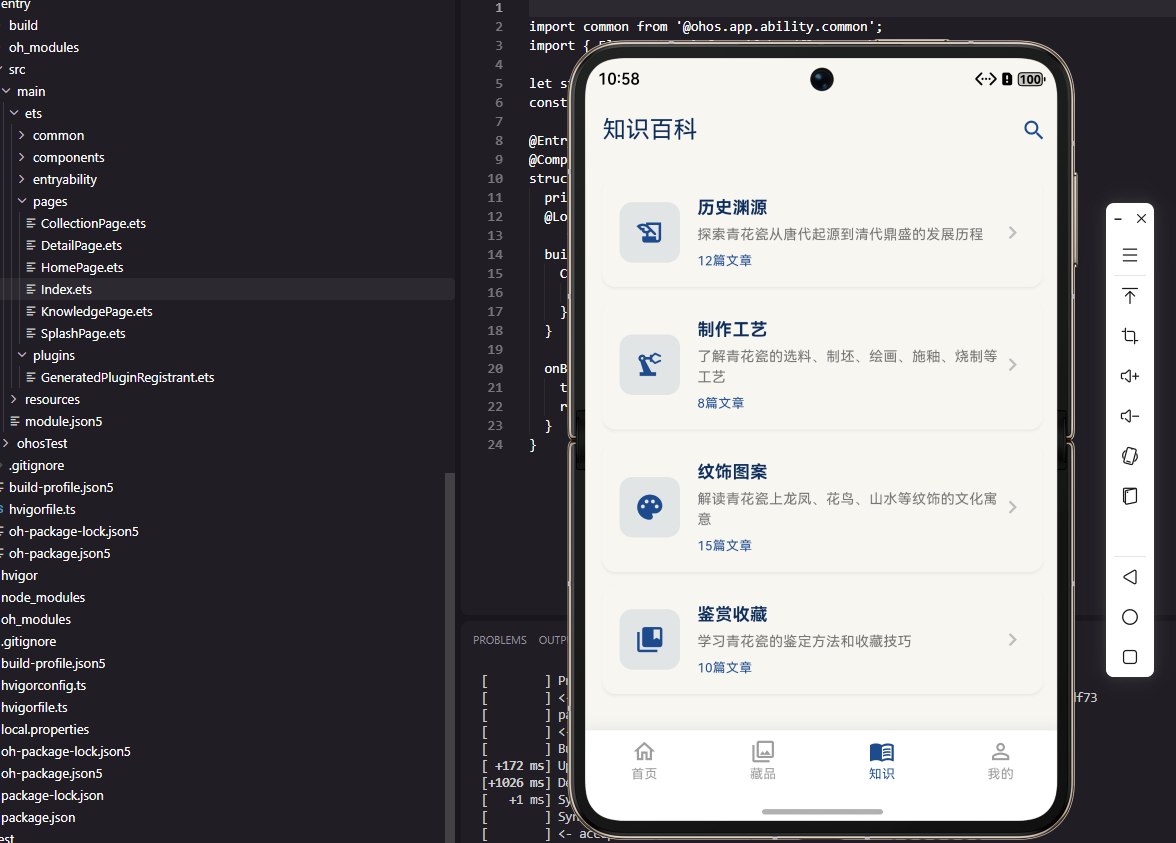
页面使用ListView展示知识分类卡片,每个卡片代表一个知识领域。应用栏提供搜索入口,方便用户直接搜索感兴趣的知识点。四个主要分类涵盖了青花瓷知识的核心领域,从历史到工艺,从艺术到收藏。
OpenHarmony知识页面
在OpenHarmony端实现知识百科页面,使用List组件展示分类列表。
// ohos/entry/src/main/ets/pages/KnowledgePage.ets
@Entry
@Component
struct KnowledgePage {
  private categories: string[] = ['历史渊源', '制作工艺', '纹饰图案', '鉴赏收藏'];

  build() {
    Column() {
      Text('知识百科')
        .fontSize(24)
        .fontWeight(FontWeight.Bold)
        .margin({ top: 16, bottom: 16 })

      List({ space: 12 }) {
        ForEach(this.categories, (item: string) => {
          ListItem() {
            KnowledgeCategoryCard({ title: item })
          }
        })
      }
      .width('100%')
      .layoutWeight(1)
      .padding({ left: 16, right: 16 })
    }
    .backgroundColor('#F8F6F0')
  }
}
ArkTS的List组件提供了高性能的列表渲染,space参数设置列表项之间的间距。layoutWeight(1)使列表占据剩余的垂直空间。背景色使用釉白色,与整体设计风格保持一致。
知识分类卡片
分类卡片展示分类的图标、名称、描述和文章数量,点击可进入文章列表。
// lib/screens/knowledge/widgets/knowledge_category_card.dart
class KnowledgeCategoryCard extends StatelessWidget {
final String title;
const KnowledgeCategoryCard({super.key, required this.title});
Widget build(BuildContext context) {
return Card(
margin: const EdgeInsets.only(bottom: 12),
child: ListTile(
leading: Container(
width: 48,
height: 48,
decoration: BoxDecoration(
color: PorcelainColors.primaryBlue.withOpacity(0.1),
borderRadius: BorderRadius.circular(8),
),
child: const Icon(Icons.book,
color: PorcelainColors.primaryBlue),
),
title: Text(title,
style: const TextStyle(fontWeight: FontWeight.bold)),
subtitle: const Text('12篇文章'),
trailing: const Icon(Icons.chevron_right),
onTap: () {},
),
);
}
}
卡片使用ListTile组件实现标准的列表项布局,leading位置放置分类图标,图标背景使用浅蓝色与主题呼应。trailing位置的箭头图标提示用户可以点击进入。onTap回调处理点击事件,导航到文章列表页面。
知识文章数据模型
定义知识文章的数据模型,包含文章的完整内容信息。
// lib/models/knowledge_article.dart
class KnowledgeArticle {
  final String id;
  final String title;
  final String categoryId;
  final String coverImage;
  final String content;
  final int readCount;
  final DateTime publishedAt;

  const KnowledgeArticle({
    required this.id,
    required this.title,
    required this.categoryId,
    required this.coverImage,
    required this.content,
    required this.readCount,
    required this.publishedAt,
  });
}
文章模型包含了展示和管理文章所需的全部信息:categoryId关联所属分类,coverImage是封面图片,content是文章正文,readCount记录阅读次数,publishedAt是发布时间。这些字段支持文章的排序和统计功能。
文章列表页面
文章列表页面展示某个分类下的所有文章,支持按时间或热度排序。
// lib/screens/knowledge/article_list_screen.dart
class ArticleListScreen extends StatelessWidget {
final String categoryId;
const ArticleListScreen({super.key, required this.categoryId});
Widget build(BuildContext context) {
return Scaffold(
appBar: AppBar(title: const Text('历史渊源')),
body: ListView.builder(
padding: const EdgeInsets.all(16),
itemCount: 10,
itemBuilder: (context, index) {
return ArticleCard(
title: '青花瓷的起源与发展',
summary: '青花瓷起源于唐代,经过宋元的发展...',
coverImage: 'assets/images/article_cover.jpg',
);
},
),
);
}
}
列表使用ListView.builder懒加载文章卡片,每个卡片展示文章的封面、标题和摘要。padding为列表添加边距,使内容不会紧贴屏幕边缘。点击卡片可以进入文章详情页面阅读完整内容。
文章详情页面
文章详情页面展示完整的文章内容,支持图文混排和富文本格式。
// lib/screens/knowledge/article_detail_screen.dart
class ArticleDetailScreen extends StatelessWidget {
final String articleId;
const ArticleDetailScreen({super.key, required this.articleId});
Widget build(BuildContext context) {
return Scaffold(
body: CustomScrollView(
slivers: [
SliverAppBar(
expandedHeight: 200,
pinned: true,
flexibleSpace: FlexibleSpaceBar(
background: Image.asset(
'assets/images/article_cover.jpg',
fit: BoxFit.cover,
),
),
),
SliverToBoxAdapter(
child: Padding(
padding: const EdgeInsets.all(16),
child: Column(
crossAxisAlignment: CrossAxisAlignment.start,
children: const [
Text('青花瓷的起源与发展',
style: TextStyle(fontSize: 24, fontWeight: FontWeight.bold)),
SizedBox(height: 16),
Text('青花瓷是中国陶瓷艺术的瑰宝...'),
],
),
),
),
],
),
);
}
}
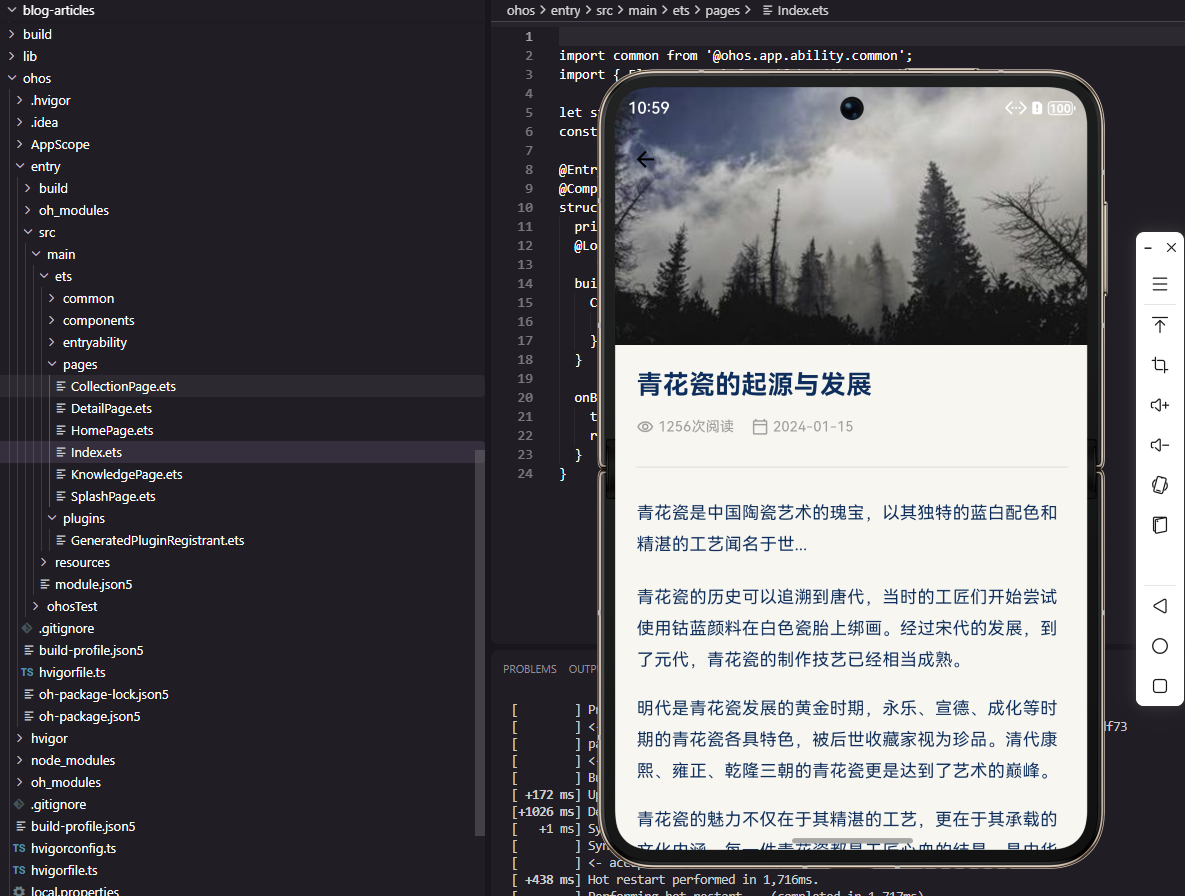
详情页使用SliverAppBar实现封面图片的视差滚动效果,与藏品详情页保持一致的交互模式。文章内容区域使用Column布局,标题使用大号粗体字,正文使用标准字号。这种设计让用户专注于阅读内容。
总结
本篇文章详细介绍了青花瓷App知识百科模块的开发,包括分类展示、文章列表和文章详情三个层级的页面。通过系统化的知识组织,用户可以深入了解青花瓷的历史文化和工艺价值。下一篇文章将介绍图片画廊功能的实现。欢迎加入开源鸿蒙跨平台社区:https://openharmonycrossplatform.csdn.net

社区规范:仅讨论OpenHarmony相关问题。
更多推荐
 5
5 0
0- 0


 已为社区贡献11条内容

所有评论(0)