【OpenHarmony】鸿蒙开发之epublib
·
往期推文全新看点(文中附带全新鸿蒙5.0全栈学习笔录)
✏️ 鸿蒙应用开发与鸿蒙系统开发哪个更有前景?
✏️ 嵌入式开发适不适合做鸿蒙南向开发?看完这篇你就了解了~
✏️ 对于大前端开发来说,转鸿蒙开发究竟是福还是祸?
✏️ 鸿蒙岗位需求突增!移动端、PC端、IoT到底该怎么选?
✏️ 市场巨变,移动开发行业即将迎来“第二春”?
✏️ 记录一场鸿蒙开发岗位面试经历~
✏️ 持续更新中……
简介
Epublib是一个用于读取/写入/操作epub文件的ets库
效果展示:
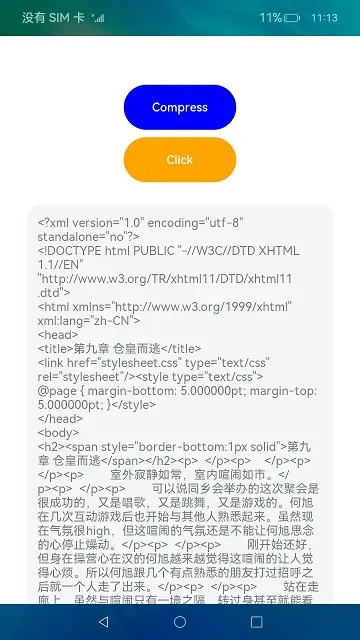
下载安装
ohpm install @ohos/epublib
使用说明
示例代码
1.在entryAbility中引入GlobalContext
import { GlobalContext } from '@ohos/epublib'

onWindowStageCreate(windowStage: window.WindowStage) {
// Main window is created, set main page for this ability
GlobalContext.getContext().setValue('filePath',this.context.filesDir)
}
2.在page页面中引入epublib
import {DOMParser,EpubReader,EpubWriter, Book,Author,EpubResource,MediaType,Metadata,MediatypeService} from "@ohos/epublib"
3.使用
  funcStart(input: string) {
    console.log("-----funcStart----filePath-----------------" + input)
    let result = EpubReader.readEpub(input);
    if (result != undefined) {
      result.then((book) => {
        this.text = book.getResources()
          .getResourceMap()
          .get("chapter_446465249.xhtml")
          .getStrData()
          .toString();
        console.error("----index-result-------" + this.text)
        this.testEpubWriter(book)

      });
    }
  }
接口说明
- 获取Book实例
readEpub(inPath:string, encoding?:string, lazyLoadedTypes?: Array<MediaType>):Book - 通过resources读取电子书
readEpubToBook(resources:Resources, result?:Book):Book - 惰性地从EPUB文件中读取并解析EPUB电子书
readEpubLazy(inPath: string, encoding?: string, lazyLoadedTypes?: Array<MediaType>): Book - 获取构成该书的所有图像、章节、章节、xhtml文件、样式表等的集合
getResources(): Resources - 获取该书内容。
getStrData() - 写入Book内容
write(book: Book, fileName: string) - 获取EPUB电子书的内容顺序
getSpine() - 获取EPUB电子书的元数据
getMetadata() - 向EPUB电子书中添加一个资源
addResource(resource: EpubResource): EpubResource - 获取epub文件在文件夹中的位置
getHref() - 通过压缩文件加载资源
loadResources(ZipFile zipFile, String defaultHtmlEncoding, List<MediaType> lazyLoadedTypes) - 截取输出目录
outFile(inZipPath: string): string - 设置作者
addAuthor(author: Author) - 添加标题
addTitle(title: string): string - 设置语言
setLanguage(language: string)
目录结构
|---- epublib
|     |---- entry  # 示例代码文件夹
|     |---- epublib   # 电子书库文件夹
|         |---- index.ets 提供外部接口文件
|             |---- src
|                 |---- main
|                     |---- ets
|                         |---- components
|                             |---- domain # 相关的book一系列数据model
|                             |---- epub   # 解析处理
|                             |---- service # 定义了支持的媒体类型
|                             |---- util # 通用方法库
|                             |---- Constants.ets # 常量定义
|     |---- README.md  # 安装使用方法


社区规范:仅讨论OpenHarmony相关问题。
更多推荐
 5
5 0
0- 0


 已为社区贡献216条内容

所有评论(0)