HarmonyOS/OpenHarmony应用开发ets仿微信界面
·
开发工具:DEV3.1.0,SDK9
前言:
文中的图标或者字体大小可能不匹配,大家学习完之后可以自己调节
界面展示:
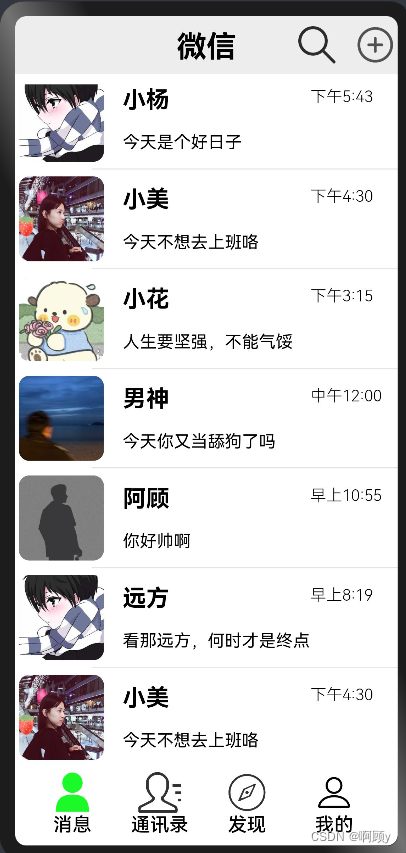
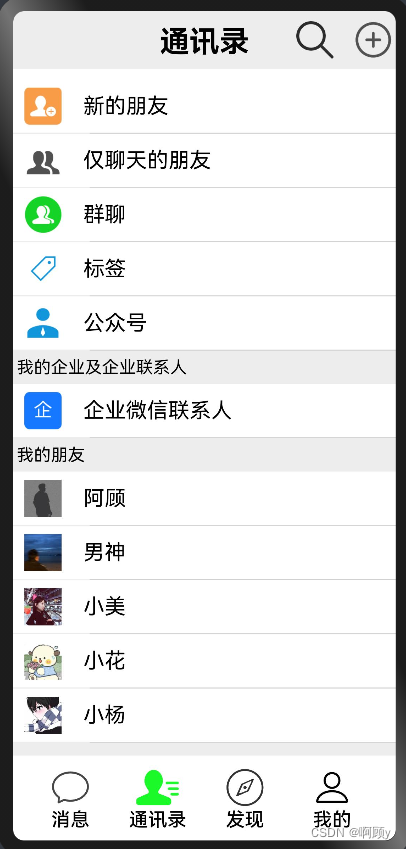
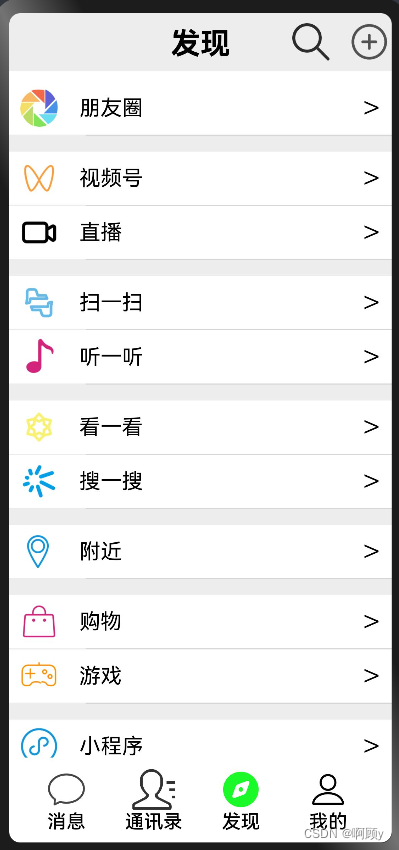
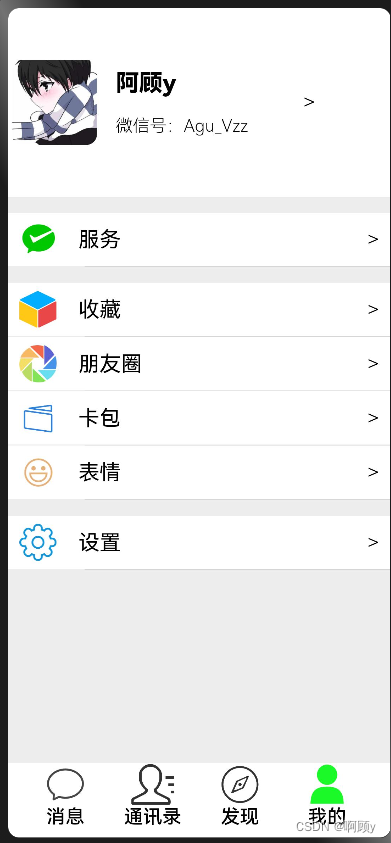
编写主界面:
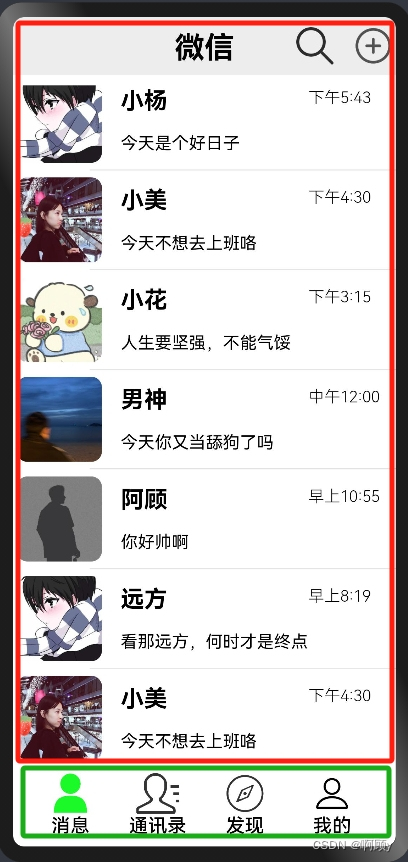
分析:我们上部分红框为内容区,底部绿色框为导航区
我们就可以采用Tabs组件实现效果
//导入组件
import {Message} from './Message'
import {Contacts} from './Contacts'
import {Find} from './Find'
import {My} from './My'
@Entry
@Component
struct Index {

  //定义底部导航栏填充的图标
  private message_ico:Resource = $r('app.media.my_full')
  private contacts_ico:Resource = $r('app.media.contacts_full')
  private find_ico:Resource = $r('app.media.find_full')
  private my_ico:Resource = $r('app.media.my_full')

  //定义底部切换导航栏的索引
  @State current_index :number = 0


  //微信底部tab函数
  @Builder tabBuilder(src:Resource,name:string,index:number,ico:Resource){
    Column(){
      //底部导航栏的图标
        Image(this.current_index == index ? ico : src)
          .width(40).height(40)
      //底部导航栏的文字
      Text(name)
        .fontSize(18)
        .fontWeight(500)
    }.width(60).height(70)
  }

  build() {
   Column(){
      //barPosition:BarPosition.End,将Tabs固定在屏幕底部
      Tabs({barPosition:BarPosition.End}){
        //每一页的内容
        TabContent(){
          //组件引入
          Message()
        }.tabBar(this.tabBuilder($r('app.media.message'),'消息',0,this.message_ico))//用上面定义的函数,控制变量
        TabContent(){
          Contacts()
        }.tabBar(this.tabBuilder($r('app.media.contacts'),'通讯录',1,this.contacts_ico))
        TabContent(){
          Find()
        }.tabBar(this.tabBuilder($r('app.media.find'),'发现',2,this.find_ico))
        TabContent(){
          My()
        }.tabBar(this.tabBuilder($r('app.media.my'),'我的',3,this.my_ico))
      }
     .barWidth('100%').barHeight(70)
      //点击导航,切换内容,将索引赋给current_index
     .onChange((indexs:number)=>{
       this.current_index = indexs
     })
   }
    .width('100%')
    .height('100%')
  }
}
编写聊天页组件:
//引入数据
import {datas} from '../common/data'
@Component
export struct Message{
  build(){
    //采用列布局
    Column({space:10}){
      Row(){//头部区域,可以自己封装成一个组件
        Stack(){//通过堆叠容器,能使文字居中,图标在右边显示
          Text('微信')
            .width('100%')
            .lineHeight(40)
            .fontSize(28)
            .fontWeight(FontWeight.Bold)
            .textAlign(TextAlign.Center)
          Row({space:20}){
            Image($rawfile('images/search.png'))
              .width(35).height(35)
            Image($rawfile('images/add.png'))
              .width(35).height(40)
          }.width('100%').justifyContent(FlexAlign.End)//居右靠齐
        }
      }
      .width('100%').backgroundColor("#EDEDED").padding('1%')
    //用list容器,如果内容超出高度之后,可以通过滑动展示下面的内容
      List(){
        ListItem(){
          Column() {
            //循环数据
            ForEach(datas.message, (item) => {
              Column() {
                Row() {
                  Image(item.url)
                    .width(80).height(80).borderRadius(10)
                  Column() {
                    Text(item.name)
                      .fontSize(22)
                      .fontWeight(800)
                    Text(item.message)
                      .fontSize(16)
                      .fontWeight(400)
                  }
                  .width('50%')
                  .height(80)
                  .margin({ left: '5%' })
                  .alignItems(HorizontalAlign.Start)//居左对齐
                  .justifyContent(FlexAlign.SpaceAround)//felx布局中的SpaceAround
                  Row() {
                    Text(item.time)
                      .fontSize(15)
                      .fontWeight(300)
                  }.height(60).alignItems(VerticalAlign.Top)
                }.width('100%').padding('1%')
                Row(){
                  Divider()
                    .strokeWidth(1)//分割线的粗细
                    .opacity(0.1)//透明度
                    .width('80%')//定义一个长度,然后从右对齐,实现微信中的分割线
                }.width('100%').justifyContent(FlexAlign.End)//将线居右对齐
              }
            })
          }
        }
      }.layoutWeight(1)//定义了头部之后,下面所有的高度都属于List
    }
    .width('100%').height('100%')
  }
}
编写联系人组件:
import {datas} from '../common/data'
@Component
export struct Contacts{
  build(){
    Column({space:10}){
      Row(){
        Stack(){
          Text('通讯录')
            .width('100%')
            .lineHeight(40)
            .fontSize(28)
            .fontWeight(FontWeight.Bold)
            .textAlign(TextAlign.Center)
          Row({space:20}){
            Image($rawfile('images/search.png'))
              .width(35).height(35)
            Image($rawfile('images/add.png'))
              .width(35).height(40)
          }.width('100%').justifyContent(FlexAlign.End)
        }
      }
      .width('100%').backgroundColor("#EDEDED").padding('1%')

      List(){
        ListItem(){
          Column() {
            ForEach(datas.contacts, (item, index: number) => {
              //通过数据和索引判断,当渲染到其内容的时候,就在上面展示一段文字
              if(index == 5||index == 6){
                Row(){
                  //三元表达式判断
                  Text(index == 5 ? '我的企业及企业联系人' : '我的朋友')
                    .fontSize(16)
                    .fontWeight(400)
                }.width('100%').justifyContent(FlexAlign.Start).padding('1%')
              }
              Row() {
                Image(item.url)
                  .width(35).height(35)
                Text(item.name)
                  .fontSize(20)
                  .margin({ left: '6%' })
              }.width('100%').height(50)
              .padding({ left: '3%', right: '3%' })
              .backgroundColor("#FFFFFF")
              .alignItems(VerticalAlign.Center)
              Row(){
                Divider().strokeWidth(1).opacity(0.1).width('80%')
              }.width('100%').justifyContent(FlexAlign.End)
            })
          }
        }
      }.layoutWeight(1).backgroundColor("#EDEDED")
    }
    .width('100%').height('100%')
  }
}
编写发现页组件:
import {datas} from '../common/data'
@Component
export struct Find{

  build(){
    Column({space:10}){
      Row(){
        Stack(){
          Text('发现')
            .width('100%')
            .lineHeight(40)
            .fontSize(28)
            .fontWeight(FontWeight.Bold)
            .textAlign(TextAlign.Center)
          Row({space:20}){
            Image($rawfile('images/search.png'))
              .width(35).height(35)
            Image($rawfile('images/add.png'))
              .width(35).height(40)
          }.width('100%').justifyContent(FlexAlign.End)
        }
      }
      .width('100%').backgroundColor("#EDEDED").padding('1%')

        List(){
          ListItem(){
            Column() {
            ForEach(datas.find, (item, index: number) => {
              //如果索引等于这些,那么就实现空行效果
              if(index == 1||index == 3||index == 5||index == 7||index == 8||index == 10){
                //撑起一个空内容的有宽高的盒子
                Text('')
                  .width('100%')
                  .height(10)
                  .margin({top:5})
              }
              Row() {
                Image(item.url)
                  .width(35).height(35)
                Text(item.name)
                  .fontSize(20)
                  .margin({ left: '6%' })
                Blank()
                Text('>')
                  .fontSize(30)
                  .fontWeight(300)
              }.width('100%').height(50)
              .padding({ left: '3%', right: '3%' })
              .backgroundColor("#FFFFFF")
              .alignItems(VerticalAlign.Center)
              Row(){
                Divider().strokeWidth(1).opacity(0.1).width('80%')
              }.width('100%').justifyContent(FlexAlign.End)
            })
          }
        }
      }.layoutWeight(1).backgroundColor("#EDEDED")
    }
    .width('100%').height('100%')
  }
}
编写我的页面组件:
import {datas} from '../common/data'
@Entry
@Component
export struct My{
  //定义自己的头像
  @State tx:Resource = $rawfile('images/tx1.jpg')

  build(){
    Column(){
      Row(){
        Row() {
          Image(this.tx)
            .width(80).height(80).borderRadius(10)
          Column() {
            Text('阿顾y')
              .fontSize(22)
              .fontWeight(900)
            Text('微信号:Agu_Vzz')
              .fontSize(16)
              .fontWeight(300)
          }
          .width('50%')
          .height(80)
          .margin({ left: '5%' })
          .alignItems(HorizontalAlign.Start)
          .justifyContent(FlexAlign.SpaceAround)
          Row() {
            Text('>')
              .fontSize(20)
              .fontWeight(300)
          }.height(80).alignItems(VerticalAlign.Center)
        }.width('100%').padding('1%')
      }
      .width('100%').layoutWeight(1)//和下面的内容等比例分配高度
      Row(){
        Column() {
          ForEach(datas.my, (item, index: number) => {
            if(index == 0||index == 1||index == 5){
              Text('')
                .width('100%')
                .height(10)
                .margin({top:5})
            }
            Row() {
              Image(item.url)
                .width(35).height(35)
              Text(item.name)
                .fontSize(20)
                .margin({ left: '6%' })
              Blank()
              Text('>')
                .fontSize(20)
                .fontWeight(300)
            }.width('100%').height(50)
            .padding({ left: '3%', right: '3%' })
            .backgroundColor("#FFFFFF")
            .alignItems(VerticalAlign.Center)
            Row(){
              Divider().strokeWidth(1).opacity(0.1).width('80%')
            }.width('100%').justifyContent(FlexAlign.End)
          })
        }
      }
      .width('100%').layoutWeight(3).alignItems(VerticalAlign.Top).backgroundColor("#EDEDED")
    }
    .width('100%')
    .height('100%')
  }
}
总结:
文中的数据,图片,以及完整代码在下列链接中,有需要的可以自行下载使用
https://wwi.lanzoup.com/b0cd6b54h
密码:gk15

社区规范:仅讨论OpenHarmony相关问题。
更多推荐
 12
12 0
0- 0


 已为社区贡献1条内容

所有评论(0)