【OpenHarmony】鸿蒙开发之ohos_beacon_library
本文介绍了鸿蒙蓝牙信标工具库的开发与应用,支持信标区域监控和距离测算功能。通过@ohos/beacon-library库,开发者可快速实现信标扫描、测距及状态监控,适用于IoT场景。文章提供核心接口说明(如startRangingBeacons、addMonitorNotifier)及完整使用样例,并附效果展示图与目录结构。此外,还包含混淆规则配置建议,确保库的稳定性。
·
往期推文全新看点(文中附带全新鸿蒙5.0全栈学习笔录)
✏️ 鸿蒙应用开发与鸿蒙系统开发哪个更有前景?
✏️ 嵌入式开发适不适合做鸿蒙南向开发?看完这篇你就了解了~
✏️ 对于大前端开发来说,转鸿蒙开发究竟是福还是祸?
✏️ 鸿蒙岗位需求突增!移动端、PC端、IoT到底该怎么选?
✏️ 市场巨变,移动开发行业即将迎来“第二春”?
✏️ 记录一场鸿蒙开发岗位面试经历~
✏️ 持续更新中……
简介
蓝牙工具,主要涉及信标区域监控以及信标设备测距
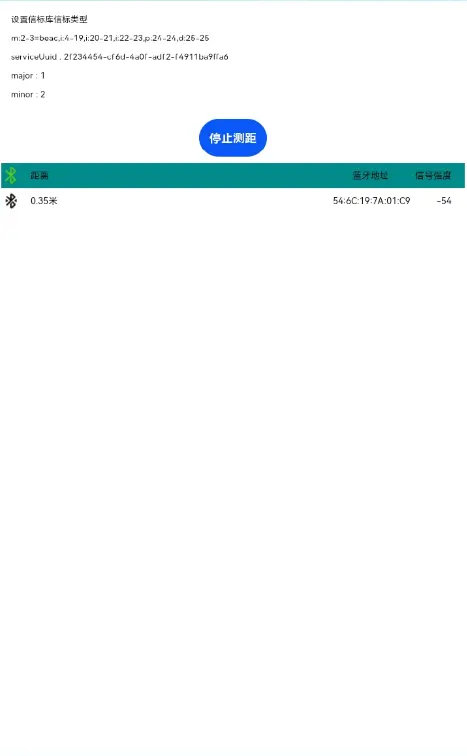
效果展示
下载安装
ohpm install @ohos/beacon-library
使用说明
信标组件使用样例
1.在page页面中引入信标库必要的文件
import { Identifier, Region, BeaconParser, BeaconManager, RangeNotifier,Beacon } from '@ohos/beacon-library'
import bluetooth from '@ohos.bluetooth.ble';
2.使用
- 启动测距
_this.beaconManager.addRangeNotifier(new class implements RangeNotifier {
    didRangeBeaconsInRegion(beacons: Array<Beacon>, region: Region): void {
        _this.beaconList = beacons
    }
});
_this.beaconManager.startRangingBeacons(region);

- 停止测距
this.beaconManager.stopRangingBeacons(new Region("myRangingUniqueId", null, null, null));

- 启动监控
_this.beaconManager.addMonitorNotifier(new class implements MonitorNotifier {
    INSIDE:number = 1
    OUTSIDE:number = 0

    didEnterRegion(region:Region):void {
        _this.enterRegionText = "I just saw a region: " + region.getUniqueId()
    }

    didExitRegion(region:Region):void {
        _this.enterRegionText = "I no longer see an beacon in Region:" + region.getUniqueId()
    }

    didDetermineStateForRegion(state:number, region:Region):void {
        _this.determineStateText = "I have just switched from seeing/not seeing beacons: " + state
    }
});
_this.beaconManager.startMonitoring(region);

- 停止监控
this.beaconManager.stopMonitoring(new Region("myMonitorUniqueId", null, null, null));
接口说明
@State private beaconManager: BeaconManager = BeaconManager.getInstanceForApplication()
- 当扫描到信标时的监控通知处理接口
.beaconManager.addMonitorNotifier(notifier:MonitorNotifier): void - 开启信标监控,查找匹配region的beacons
.beaconManager.startMonitoring(region:Region ):void - 当扫描到信标时的距离通知处理接口
.beaconManager.addRangeNotifier(notifier:RangeNotifier):void - 开启信标距离测算
.beaconManager.startRangingBeacons(region:Region):void - 为信标解释器指定编码规则
new BeaconParser().setBeaconLayout(beaconLayout:String):void - 将常见的数据类型封装为一个Identifier类型。
Identifier.parse(stringValue:String, desiredByteLength?:number):Identifier - 根据uniqueId与其它参数的组合,构造匹配信标的字段条件。
Region(uniqueId: string, id1?: Identifier, id2?: Identifier, id3?: Identifier, identifiers?: Array<Identifier>, bluetoothAddress?: string)
目录结构
|---- ohos_beacon_library
|     |---- entry  # 示例代码文件夹
|     |---- library # beacon库
|	      |----src
|             |----main
|                 |----ets
|                     |----components
|                         |---- beacon # beacon库文件夹
|                             |---- client #客户端三种情况数据处理
|                             |---- distance 设备相关设置及距离配置逻辑
|                             |---- logging #日志相关逻辑
|                             |---- service #服务端处理逻辑
|                             |---- simulator #信标计算
|                             |---- startup #数据发送与接收
|                             |---- utils #工具类
|                             |---- AltBeacon.ets #建立信标通信
|                             |---- BeaconParser.ets #beacon数据包解析
|                         |---- bluetooth      # 蓝牙库
|                             |---- BleAdvertisement.ets #信标广播逻辑
|                             |---- Pdu.ets #蓝牙数据传递单元
|     |---- README.md  # 安装使用方法
关于混淆
- 代码混淆,请查看代码混淆简介
- 如果希望beacon-library库在代码混淆过程中不会被混淆,需要在混淆规则配置文件obfuscation-rules.txt中添加相应的排除规则:
-keep
./oh_modules/@ohos/beacon-library


社区规范:仅讨论OpenHarmony相关问题。
更多推荐
 6
6 0
0- 0


 已为社区贡献216条内容

所有评论(0)