【DevEco Studio创建的第一个应用】(极简)
·
第一页Index.ets(带注释)
// Index.ets
// 导入模块部分
import { router } from '@kit.ArkUI';//从' '中导入{}
import { BusinessError } from '@kit.BasicServicesKit';
//组件定义部分
@Entry
@Component
struct Index {
  @State message: string = 'Hello World'//定义字符串类型的状态变量
//组件构建部分
  build() {
    Row() {//水平布局容器
      Column() {//垂直布局容器
        Text(this.message)//创建Text组件,用于显示message变量表示的文本内容
          .fontSize(50)//设置字体大小
          .fontWeight(FontWeight.Bold)//设置字体加粗
        Button() {//设置按钮组件
          Text('Next')
            .fontSize(30)
            .fontWeight(FontWeight.Bold)
        }
        .type(ButtonType.Capsule)//设置按钮的类型为胶囊型
        .margin({
          top: 20//设置按钮的顶部外边距
        })
        .backgroundColor('#0D9FFB')//设置按钮背景颜色
        .width('40%')//设置该容器宽度为其父容器宽度的40%
        .height('5%')
        .onClick(() => { // 跳转按钮绑定onClick事件,点击时执行箭头函数内代码
          console.info(`Succeeded in clicking the 'Next' button.`)//在控制台输出` `表示成功点击
          router.pushUrl({ url: 'pages/Second' }).then(() => {
            //调用router对象的pushUrl方法,跳转到' ';
            //跳转成功时执行then所指函数代码
            console.info('Succeeded in jumping to the second page.')
          }).catch((err: BusinessError) => {
            //跳转失败时捕获错误并执行catch所指函数代码
            console.error(`Failed to jump to the second page. Code is ${err.code}, message is ${err.message}`)
          })
        })
      }
      .width('100%')
    }
    .height('100%')
  }
}
第二页Second.ets
// Second.ets
// 导入页面路由模块
import { router } from '@kit.ArkUI';
import { BusinessError } from '@kit.BasicServicesKit';

@Entry
@Component
struct Second {
  @State message: string = 'Hi there'

  build() {
    Row() {
      Column() {
        Text(this.message)
          .fontSize(50)
          .fontWeight(FontWeight.Bold)
        Button() {
          Text('Back')
            .fontSize(30)
            .fontWeight(FontWeight.Bold)
        }
        .type(ButtonType.Capsule)
        .margin({
          top: 20
        })
        .backgroundColor('#0D9FFB')
        .width('40%')
        .height('5%')
        // 返回按钮绑定onClick事件,点击按钮时返回到第一页
        .onClick(() => {
          console.info(`Succeeded in clicking the 'Back' button.`)
          try {
            // 返回第一页
            router.back()
            console.info('Succeeded in returning to the first page.')
          } catch (err) {
            let code = (err as BusinessError).code;
            let message = (err as BusinessError).message;
            console.error(`Failed to return to the first page. Code is ${code}, message is ${message}`)
          }
        })
      }
      .width('100%')
    }
    .height('100%')
  }

}
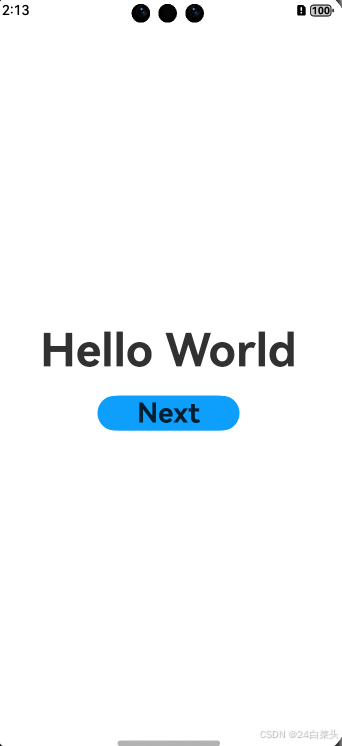
第一页实图
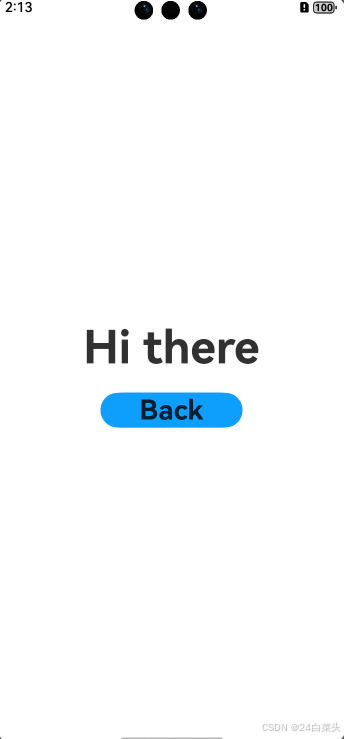
第二页实图
视频效果
第一个DevEco Studio应用

社区规范:仅讨论OpenHarmony相关问题。
更多推荐

 9
9 0
0- 0


 已为社区贡献1条内容

所有评论(0)