inotify验证文档(V8验证)
·
v8验证
1.部署
1.接入c200开发板,进入hdc模式,挂载根目录
hdc shell
mount -o remount,rw /
2.传输三方库到开发板根目录
hdc file send D:\app\inotify.tar.gz /
3.解压缩到开发板根目录,设置环境变量
tar -zxvf inotify.tar.gz
export PATH=/inotify/bin:$PATH
export LD_LIBRARY_PATH=/inotify/lib:$LD_LIBRARY_PATH
2.验证
验证目的:能够监视文件和目录的变化
1. 创建测试目录
mkdir -p /inotify_test
cd /inotify_test
2. 启动实时监控(持续模式)
该终端作为终端1
# 终端1:监控~/inotify_test目录下所有事件(递归监控子目录)
inotifywait -m -r -e create,modify,delete,access ./
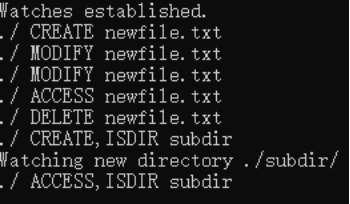
开始检测:

3. 触发多种文件操作
另外打开一个pc终端
作为终端2,执行各种文件操作
hdc shell
cd /inotify_test
依次执行:
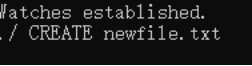
# 创建文件
touch newfile.txt
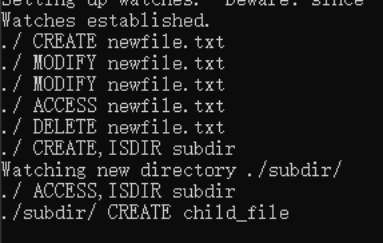
在终端1中可以观察到现象:
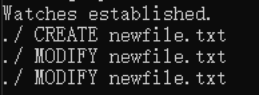
# 修改文件内容
echo "test" > newfile.txt
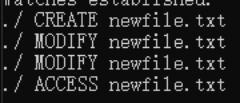
# 读取文件
cat newfile.txt
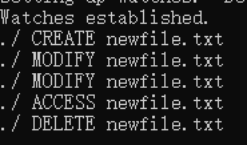
# 删除文件
rm newfile.txt
# 创建子目录并操作
mkdir subdir
touch subdir/child_file

社区规范:仅讨论OpenHarmony相关问题。
更多推荐
 0
0 0
0- 0


 已为社区贡献16条内容

所有评论(0)