Openharmony适配智慧多窗
1 关键字 智慧多窗;分屏; 2 问题描述 设备型号:黄鹂 系统版本:OpenHarmony 4.1 Release 代码版本:OpenHarmony-4.1-Release 问题现象:没有触发分屏功能的入口 3 问题原因 3.1 正常机制 openharmony装饰栏可通过在应用中手势下滑显示出来,
1 关键字
智慧多窗;分屏;
2 问题描述
设备型号:黄鹂
系统版本:OpenHarmony 4.1 Release
代码版本:OpenHarmony-4.1-Release
问题现象:没有触发分屏功能的入口
3 问题原因
3.1 正常机制
openharmony装饰栏可通过在应用中手势下滑显示出来,通过分屏按钮触发分屏功能
3.2 异常机制
无装饰栏,应用中手势下滑无反应。
4 解决方案
4.1.openharmony想要适配智慧多窗,我们首先要装配装饰栏
在window_manager_config.xml文件里面进行以下的适配:
<Configs>
   <!--decor enable is true means app main window show decoration-->
   <decor enable="true"> </decor>
   <maxAppWindowNumber>100</maxAppWindowNumber>
   <minimizeByOther  enable="true"></minimizeByOther>
   <modeChangeHotZones>50 50 50</modeChangeHotZones>
   <stretchable  enable="false"></stretchable>
   <exitSplitRatios>0.1 0.9</exitSplitRatios>
   <splitRatios>0.5 0.33 0.67</splitRatios>
   <defaultWindowMode>1</defaultWindowMode>
   <windowAnimation>
       <timing>
           <!--duration of animation when add/remove window, unit is ms-->
           <duration>350</duration>
           <!--timing curve of animation, config it as below:
           name=ease, easeIn, easeOut, easeInOut, default, linear,
           spring, interactiveSpring, cubic(float float float float)-->
           <curve name="easeOut"></curve>
       </timing>
       <!--scaleX and scaleY of animation start state-->
       <scale>0.7 0.7</scale>
       <!--rotation of animation start state, 4 numbers is axis and angle-->
       <rotation>0 0 1 0</rotation>
       <!--translateX and translateY of animation start state-->
       <translate>0 0</translate>
       <!--opacity of animation start state-->
       <opacity>0</opacity>
   </windowAnimation>
   <!--keyboard animation config-->
   <keyboardAnimation>
       <timing>
           <!--duration of animation when add keyboard, unit is ms-->
           <durationIn>500</durationIn>
           <!--duration of animation when remove keyboard, unit is ms-->
           <durationOut>300</durationOut>
           <!--friction curve-->
           <curve name="cubic">0.2 0.0 0.2 1.0</curve>
       </timing>
   </keyboardAnimation>
   <!--startWindowTransitionAnimation enable is true means startWindow replace with alpha animation-->
<remoteAnimation enable="true"></remoteAnimation>
   <windowEffect>
       <appWindows>
           <cornerRadius>
               <fullScreen>off</fullScreen>
               <split>off</split>
               <float>off</float>
           </cornerRadius>
           <shadow>
               <focused>
                   <elevation>0</elevation>
                   <color>#000000</color>
                   <offsetX>0</offsetX>
                   <offsetY>0</offsetY>
                   <alpha>0</alpha>
               </focused>
               <unfocused>
                   <elevation>0</elevation>
                   <color>#000000</color>
                   <offsetX>0</offsetX>
                   <offsetY>0</offsetY>
                   <alpha>0</alpha>
               </unfocused>
           </shadow>
       </appWindows>
   </windowEffect>
</Configs>
推送命令如下:
hdc shell mount -o remount,rw /
hdc file send window_manager_config.xml /etc/window/resources/
pause
hdc shell reboot
4.2.当应用需要智慧多窗的能力时,可以通过在module.json5配置文件中对应标签添加相关字段声明支持。
声明支持悬浮窗
开发者可以通过在module.json5配置文件中abilities标签下的supportWindowMode属性增加“floating”字段或使用缺省值以声明应用支持悬浮窗。
说明
supportWindowMode缺省值为["fullscreen", "split", "floating"]。
supportWindowMode属性主要标识当前UIAbility所支持的窗口模式,支持的字段及含义如下表所示。
|
字段 |
说明 |
|
fullscreen |
窗口支持全屏显示。 |
|
split |
窗口支持分屏显示。 |
|
floating |
支持悬浮窗显示。 |
5 定位过程
1.装配装饰栏,并在应用中的对应标签添加字段声明,通过手势触发分屏栏,点击分屏按钮触发分屏功能
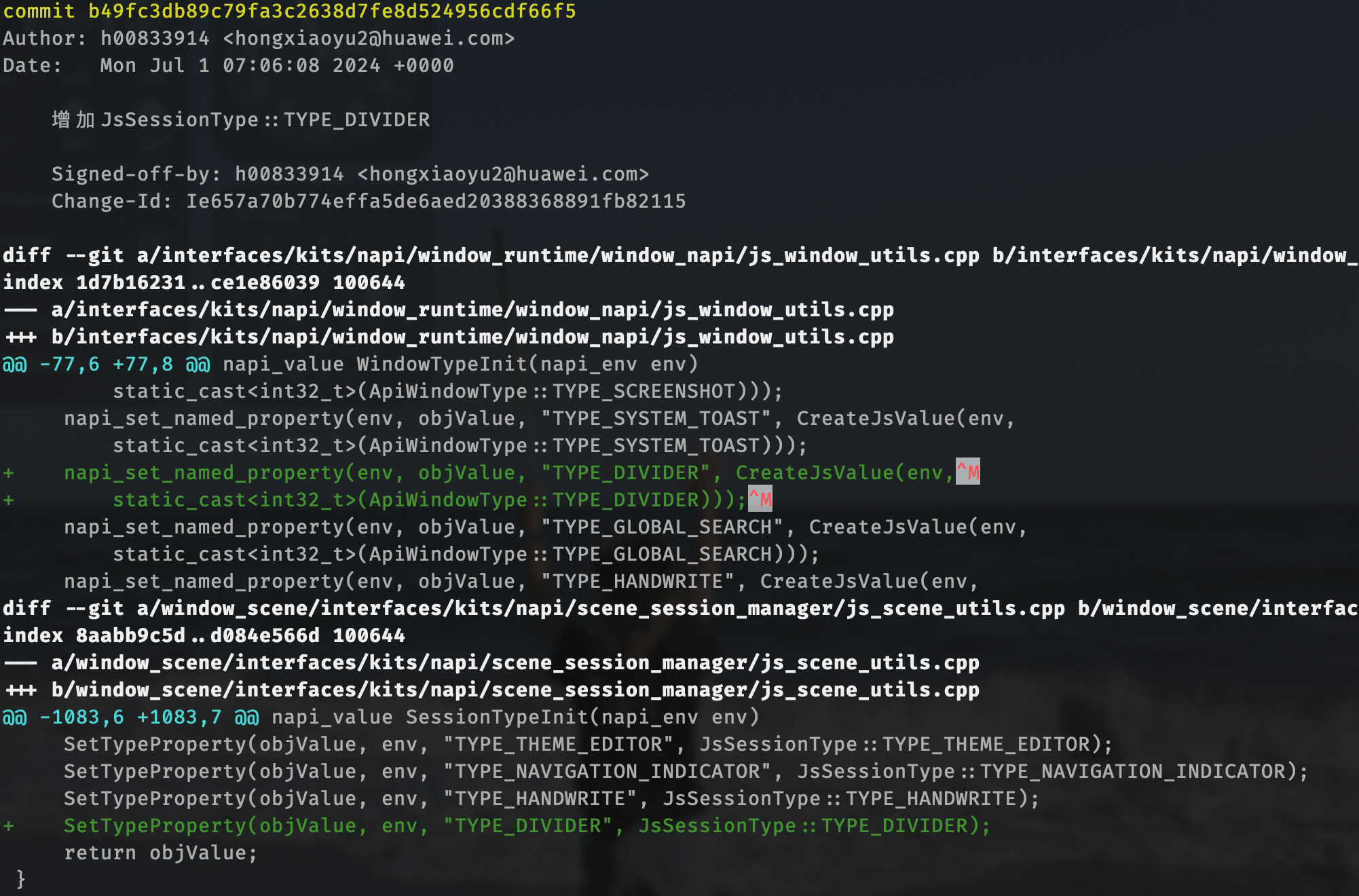
2.分屏之后查看分屏条是否显示,分屏条是通过window_manager中的TYPE_DIVIDER控制的,在4.1的系统中,此值为空,排查发现4.1的WindowManager里缺了主线的这个patch,框架把这笔patch移过来,分屏条可以正常显示和拖动了
3.原生应用图库无法触发分屏
应用中使用了代码规避禁用装饰栏:windowStage.disableWindowDecor()
6 问题分享
有的应用支持分屏,有的应用不支持分屏?
应用中代码规避禁用装饰栏:windowStage.disableWindowDecor()

社区规范:仅讨论OpenHarmony相关问题。
更多推荐
 0
0 0
0- 0


 已为社区贡献7条内容

所有评论(0)