【求助】openharmony4.1调用官方的api接口更换壁纸报错"failed to setImage because: {}"
wallpaper.setCustomWallpaper10+
setCustomWallpaper(source: string, wallpaperType: WallpaperType, callback: AsyncCallback<void>): void
将指定uri的内容设置为壁纸资源,仅当com.ohos.sceneboard存在时,支持使用该接口。使用callback异步回调。
需要权限:ohos.permission.SET_WALLPAPER
系统能力: SystemCapability.MiscServices.Wallpaper
系统接口:此接口为系统接口。
参数:
| 参数名 | 类型 | 必填 | 说明 |
|---|---|---|---|
| source | string | 是 | 自定义壁纸的Uri路径。 |
| wallpaperType | WallpaperType | 是 | 壁纸类型。 |
| callback | AsyncCallback<void> | 是 | 回调函数,设置壁纸成功,error为undefined,否则返回error信息。 |
示例:
import { BusinessError } from '@ohos.base';

let wallpaperPath = "/data/storage/el2/base/haps/entry/files/test.zip";
try {
  wallpaper.setCustomWallpaper(wallpaperPath, wallpaper.WallpaperType.WALLPAPER_SYSTEM, (error: BusinessError) => {
    if (error) {
      console.error(`failed to setCustomWallpaper because: ${JSON.stringify(error)}`);
      return;
    }
    console.log(`success to setCustomWallpaper.`);
  });
} catch (error) {
  console.error(`failed to setCustomWallpaper because: ${JSON.stringify(error)}`);
}
wallpaper.setImage9+
setImage(source: string | image.PixelMap, wallpaperType: WallpaperType): Promise<void>
将指定资源设置为指定类型的壁纸。使用promise异步回调。
需要权限:ohos.permission.SET_WALLPAPER
系统能力: SystemCapability.MiscServices.Wallpaper
系统接口:此接口为系统接口。
参数:
| 参数名 | 类型 | 必填 | 说明 |
|---|---|---|---|
| source | string | image.PixelMap | 是 | JPEG或PNG文件的Uri路径,或者PNG格式文件的位图。 |
| wallpaperType | WallpaperType | 是 | 壁纸类型。 |
返回值:
| 类型 | 说明 |
|---|---|
| Promise<void> | 无返回结果的Promise对象。 |
官方api示例:
import { BusinessError } from '@ohos.base';
import image from '@ohos.multimedia.image';
// source类型为string
let wallpaperPath = "/data/storage/el2/base/haps/entry/files/js.jpeg";
wallpaper.setImage(wallpaperPath, wallpaper.WallpaperType.WALLPAPER_SYSTEM).then(() => {
console.log(`success to setImage.`);
}).catch((error: BusinessError) => {
console.error(`failed to setImage because: ${JSON.stringify(error)}`);
});
// source类型为image.PixelMap
let imageSource = image.createImageSource("file://" + wallpaperPath);
let opts: image.DecodingOptions = {
desiredSize: {
height: 3648,
width: 2736
}
};
imageSource.createPixelMap(opts).then((pixelMap: image.PixelMap) => {
wallpaper.setImage(pixelMap, wallpaper.WallpaperType.WALLPAPER_SYSTEM).then(() => {
console.log(`success to setImage.`);
}).catch((error: BusinessError) => {
console.error(`failed to setImage because: ${JSON.stringify(error)}`);
});
}).catch((error: BusinessError) => {
console.error(`failed to createPixelMap because: ${JSON.stringify(error)}`);
});
(wallpaper.setImage)9+和(wallpaper.setCustomWallpaper)10+这两个api接口都长尝试调用过报错都是一样的,权限也根据官方的文档做了配置了的。
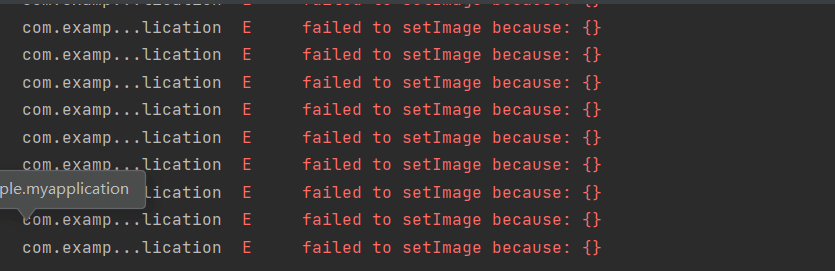
调用官方的api接口更换壁纸报错,如下图:
测试代码:
Button("更换壁纸").onClick(() => {
  let wallpaperPath = "/data/app/el2/100/base/com.example.myapplication/haps/entry/files/ty.jpg";
  wallpaper.setImage(wallpaperPath, wallpaper.WallpaperType.WALLPAPER_SYSTEM, (error: BusinessError) => {
    if (error) {
      console.error(`failed to setImage because: ${JSON.stringify(error)}`);
      return;
    }
    console.log(`success to setImage.`);
  });
})
wallpaperPath资源图片的路径尝试过在项目中的路径和按照官方提供的沙箱路径对应的实际路径(沙箱路径:/data/storage/el2/base/haps/entry/files/ty.jpg 实际路径:/data/app/el2/100/base/com.example.myapplication/haps/entry/files/ty.jpg)都报一样的错但是具体什么错误没有,如上图所示。
请哪位高人相助,十分感谢。【抱拳-江湖最高礼仪】

社区规范:仅讨论OpenHarmony相关问题。
更多推荐

 0
0 0
0- 0


 已为社区贡献6条内容

所有评论(0)