OpenHarmony 3.2 Beta多媒体系列——视频录制
一、简介
媒体子系统为开发者提供了媒体相关的很多功能,本文针对其中的视频录制功能做个详细的介绍。首先,我将通过媒体子系统提供的视频录制Test代码作为切入点,给大家梳理一下整个录制的流程。
二、目录
foundation/multimedia/camera_framework
├── frameworks
│   ├── js
│   │   └── camera_napi                            #napi实现
│   │       └── src
│   │           ├── input                          #Camera输入
│   │           ├── output                         #Camera输出
│   │           └── session                        #会话管理
│   └── native                                     #native实现
│       └── camera
│           ├── BUILD.gn
│           ├── src
│           │   ├── input                          #Camera输入
│           │   ├── output                         #Camera输出
│           │   └── session                        #会话管理
├── interfaces                                     #接口定义
│   ├── inner_api                                  #内部native实现
│   │   └── native
│   │       ├── camera
│   │       │   └── include
│   │       │       ├── input
│   │       │       ├── output
│   │       │       └── session
│   └── kits                                       #napi接口
│       └── js
│           └── camera_napi
│               ├── BUILD.gn
│               ├── include
│               │   ├── input
│               │   ├── output
│               │   └── session
│               └── @ohos.multimedia.camera.d.ts
└── services                                       #服务端
    └── camera_service
        ├── binder
        │   ├── base
        │   ├── client                             #IPC的客户端
        │   │   └── src
        │   └── server                             #IPC的服务端
        │       └── src
        └── src
三、录制的总体流程
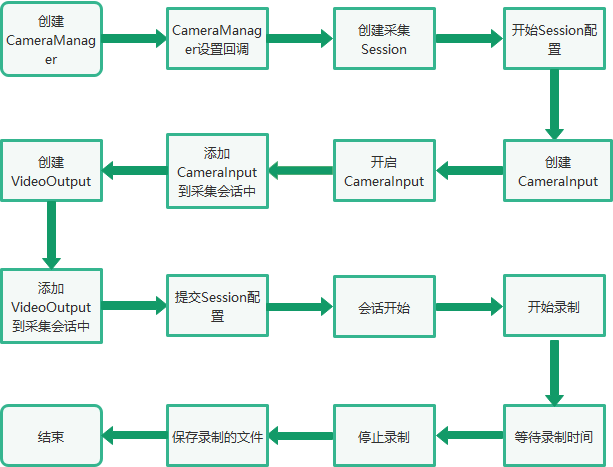
四、Native接口使用
在OpenAtom OpenHarmony(以下简称“OpenHarmony”)系统中,多媒体子系统通过N-API接口提供给上层JS调用,N-API相当于是JS和Native之间的桥梁,在OpenHarmony源码中,提供了C++直接调用视频录制功能的例子,foundation/multimedia/camera_framework/interfaces/inner_api/native/test目录中。本文章主要参考了camera_video.cpp文件中的视频录制流程。
首先根据camera_video.cpp的main方法,了解下视频录制的主要流程代码。
int main(int argc, char **argv)
{
    ......

// 创建CameraManager实例
sptr<CameraManager> camManagerObj = CameraManager::GetInstance();

// 设置回调
camManagerObj->SetCallback(std::make_shared<TestCameraMngerCallback>(testName));

// 获取支持的相机设备列表
std::vector<sptr<CameraDevice>> cameraObjList = camManagerObj->GetSupportedCameras();

// 创建采集会话
sptr<CaptureSession> captureSession = camManagerObj->CreateCaptureSession();

// 开始配置采集会话
captureSession->BeginConfig();

// 创建CameraInput
sptr<CaptureInput> captureInput = camManagerObj->CreateCameraInput(cameraObjList[0]);
sptr<CameraInput> cameraInput = (sptr<CameraInput> &)captureInput;

// 开启CameraInput
cameraInput->Open();

// 设置CameraInput的Error回调
cameraInput->SetErrorCallback(std::make_shared<TestDeviceCallback>(testName));

// 添加CameraInput实例到采集会话中
ret = captureSession->AddInput(cameraInput);

sptr<Surface> videoSurface = nullptr;
std::shared_ptr<Recorder> recorder = nullptr;

// 创建Video的Surface
videoSurface = Surface::CreateSurfaceAsConsumer();

sptr<SurfaceListener> videoListener = new SurfaceListener("Video", SurfaceType::VIDEO, g_videoFd, videoSurface);

// 注册Surface的事件监听
videoSurface->RegisterConsumerListener((sptr<IBufferConsumerListener> &)videoListener);

// 视频的配置
VideoProfile videoprofile = VideoProfile(static_cast<CameraFormat>(videoFormat), videosize, videoframerates);

// 创建VideoOutput实例
sptr<CaptureOutput> videoOutput = camManagerObj->CreateVideoOutput(videoprofile, videoSurface);

// 设置VideoOutput的回调
((sptr<VideoOutput> &)videoOutput)->SetCallback(std::make_shared<TestVideoOutputCallback>(testName));

// 添加videoOutput到采集会话中
ret = captureSession->AddOutput(videoOutput);

// 提交会话配置
ret = captureSession->CommitConfig();

// 开始录制
ret = ((sptr<VideoOutput> &)videoOutput)->Start();


sleep(videoPauseDuration);
MEDIA_DEBUG_LOG("Resume video recording");
// 暂停录制
ret = ((sptr<VideoOutput> &)videoOutput)->Resume();

MEDIA_DEBUG_LOG("Wait for 5 seconds before stop");
sleep(videoCaptureDuration);
MEDIA_DEBUG_LOG("Stop video recording");
// 停止录制
ret = ((sptr<VideoOutput> &)videoOutput)->Stop();

MEDIA_DEBUG_LOG("Closing the session");
// 停止采集会话
ret = captureSession->Stop();

MEDIA_DEBUG_LOG("Releasing the session");
// 释放会话采集
captureSession->Release();

// Close video file
TestUtils::SaveVideoFile(nullptr, 0, VideoSaveMode::CLOSE, g_videoFd);
cameraInput->Release();
camManagerObj->SetCallback(nullptr);
return 0;

}
以上是视频录制的整体流程,其过程主要通过Camera模块支持的能力来实现,其中涉及几个重要的类:CaptureSession、CameraInput、VideoOutput。CaptureSession是整个过程的控制者,CameraInput和VideoOutput相当于是设备的输入和输出。
五、调用流程
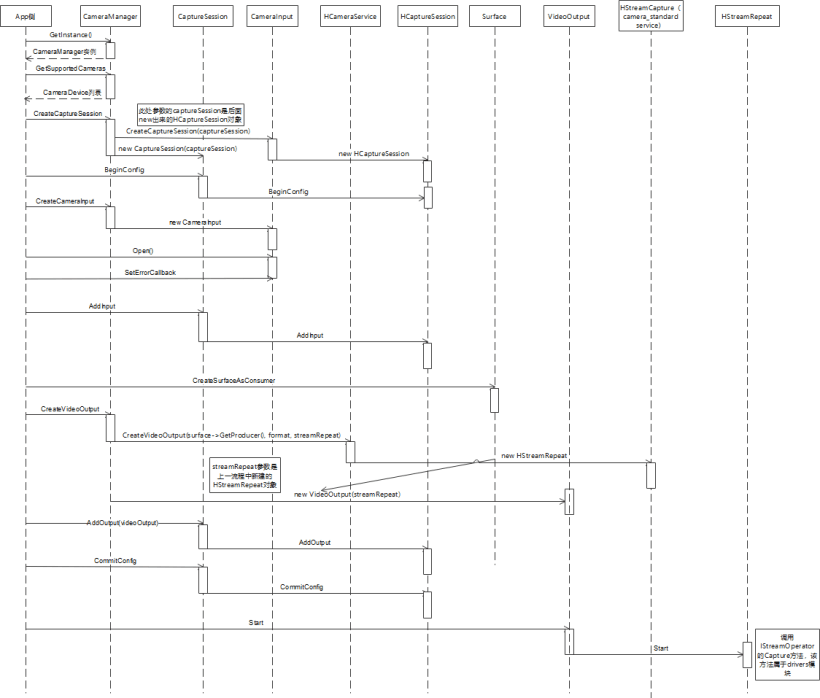
后续主要针对上面的调用流程,梳理具体的调用流程,方便我们对了解视频录制的整理架构有一个更加深入的了解。
1. 创建CameraManager实例
通过CameraManager::GetInstance()获取CameraManager的实例,后续的一些接口都是通过该实例进行调用的。GetInstance使用了单例模式,在OpenHarmony代码中这种方式很常见。
sptr<CameraManager> &CameraManager::GetInstance()
{
    if (CameraManager::cameraManager_ == nullptr) {
        MEDIA_INFO_LOG("Initializing camera manager for first time!");
        CameraManager::cameraManager_ = new(std::nothrow) CameraManager();
        if (CameraManager::cameraManager_ == nullptr) {
            MEDIA_ERR_LOG("CameraManager::GetInstance failed to new CameraManager");
        }
    }
    return CameraManager::cameraManager_;
}
2. 获取支持的相机设备列表
通过调用CameraManager的GetSupportedCameras()接口,获取设备支持的CameraDevice列表。跟踪代码可以发现serviceProxy_->GetCameras最终会调用到Camera服务端的对应接口。
std::vector<sptr<CameraDevice>> CameraManager::GetSupportedCameras()
{
CAMERA_SYNC_TRACE;
std::lock_guard<std::mutex> lock(mutex_);
std::vector<std::string> cameraIds;
std::vector<std::shared_ptr<Camera::CameraMetadata>> cameraAbilityList;
int32_t retCode = -1;
sptr<CameraDevice> cameraObj = nullptr;
int32_t index = 0;
if (cameraObjList.size() > 0) {
cameraObjList.clear();
}
if (serviceProxy_ == nullptr) {
MEDIA_ERR_LOG("CameraManager::GetCameras serviceProxy_ is null, returning empty list!");
return cameraObjList;
}
std::vector<sptr<CameraDevice>> supportedCameras;
retCode = serviceProxy_->GetCameras(cameraIds, cameraAbilityList);
if (retCode == CAMERA_OK) {
for (auto& it : cameraIds) {
cameraObj = new(std::nothrow) CameraDevice(it, cameraAbilityList[index++]);
if (cameraObj == nullptr) {
MEDIA_ERR_LOG("CameraManager::GetCameras new CameraDevice failed for id={public}%s", it.c_str());
continue;
}
supportedCameras.emplace_back(cameraObj);
}
} else {
MEDIA_ERR_LOG("CameraManager::GetCameras failed!, retCode: %{public}d", retCode);
}
ChooseDeFaultCameras(supportedCameras);
return cameraObjList;
}
3. 创建采集会话
下面是比较重要的环节,通过调用CameraManager的CreateCaptureSession接口创建采集会话。CameraManager创建采集会话,是通过serviceProxy_->CreateCaptureSession方式进行调用,这里涉及到了OpenHarmony中的IPC的调用,serviceProxy_是远端服务在本地的代理,通过这个代理可以调用到具体的服务端,这里是HCameraService。
sptr<CaptureSession> CameraManager::CreateCaptureSession()
{
CAMERA_SYNC_TRACE;
sptr<ICaptureSession> captureSession = nullptr;
sptr<CaptureSession> result = nullptr;
int32_t retCode = CAMERA_OK;
if (serviceProxy_ == nullptr) {
MEDIA_ERR_LOG("CameraManager::CreateCaptureSession serviceProxy_ is null");
return nullptr;
}
retCode = serviceProxy_->CreateCaptureSession(captureSession);
if (retCode == CAMERA_OK && captureSession != nullptr) {
result = new(std::nothrow) CaptureSession(captureSession);
if (result == nullptr) {
MEDIA_ERR_LOG("Failed to new CaptureSession");
}
} else {
MEDIA_ERR_LOG("Failed to get capture session object from hcamera service!, %{public}d", retCode);
}
return result;
}
代码最终来到HCameraService::CreateCaptureSession中,该方法中new了一个HCaptureSession对象,并且将该对象传递给了参数session,所以前面的captureSession对象就是这里new出来的HCaptureSession,前面的CameraManager的CreateCaptureSession()方法中将captureSession封装成CaptureSession对象返回给应用层使用。
int32_t HCameraService::CreateCaptureSession(sptr<ICaptureSession> &session)
{
CAMERA_SYNC_TRACE;
sptr<HCaptureSession> captureSession;
if (streamOperatorCallback_ == nullptr) {
streamOperatorCallback_ = new(std::nothrow) StreamOperatorCallback();
if (streamOperatorCallback_ == nullptr) {
MEDIA_ERR_LOG("HCameraService::CreateCaptureSession streamOperatorCallback_ allocation failed");
return CAMERA_ALLOC_ERROR;
}
}
std::lock_guard<std::mutex> lock(mutex_);
OHOS::Security::AccessToken::AccessTokenID callerToken = IPCSkeleton::GetCallingTokenID();
captureSession = new(std::nothrow) HCaptureSession(cameraHostManager_, streamOperatorCallback_, callerToken);
if (captureSession == nullptr) {
MEDIA_ERR_LOG("HCameraService::CreateCaptureSession HCaptureSession allocation failed");
return CAMERA_ALLOC_ERROR;
}
session = captureSession;
return CAMERA_OK;
}
4. 开始配置采集会话
调用CaptureSession的BeginConfig进行采集会话的配置工作。这个工作最终调用到被封装的HCaptureSession中。
int32_t HCaptureSession::BeginConfig()
{
    CAMERA_SYNC_TRACE;
    if (curState_ == CaptureSessionState::SESSION_CONFIG_INPROGRESS) {
        MEDIA_ERR_LOG("HCaptureSession::BeginConfig Already in config inprogress state!");
        return CAMERA_INVALID_STATE;
    }
    std::lock_guard<std::mutex> lock(sessionLock_);
    prevState_ = curState_;
    curState_ = CaptureSessionState::SESSION_CONFIG_INPROGRESS;
    tempCameraDevices_.clear();
    tempStreams_.clear();
    deletedStreamIds_.clear();
    return CAMERA_OK;
}
5. 创建CameraInput
应用层通过camManagerObj->CreateCameraInput(cameraObjList[0])的方式进行CameraInput的创建,cameraObjList[0]就是前面获取支持设备的第一个。根据CameraDevice创建对应的CameraInput对象。
sptr<CameraInput> CameraManager::CreateCameraInput(sptr<CameraDevice> &camera)
{
CAMERA_SYNC_TRACE;
sptr<CameraInput> cameraInput = nullptr;
sptr<ICameraDeviceService> deviceObj = nullptr;
if (camera != nullptr) {
deviceObj = CreateCameraDevice(camera->GetID());
if (deviceObj != nullptr) {
cameraInput = new(std::nothrow) CameraInput(deviceObj, camera);
if (cameraInput == nullptr) {
MEDIA_ERR_LOG("failed to new CameraInput Returning null in CreateCameraInput");
return cameraInput;
}
} else {
MEDIA_ERR_LOG("Returning null in CreateCameraInput");
}
} else {
MEDIA_ERR_LOG("CameraManager::CreateCameraInput: Camera object is null");
}
return cameraInput;
}
6. 开启CameraInput
调用了CameraInput的Open方法,进行输入设备的启动打开。
void CameraInput::Open()
{
    int32_t retCode = deviceObj_->Open();
    if (retCode != CAMERA_OK) {
        MEDIA_ERR_LOG("Failed to open Camera Input, retCode: %{public}d", retCode);
    }
}
7. 添加CameraInput实例到采集会话中
通过调用captureSession的AddInput方法,将创建的CameraInput对象添加到采集会话的输入中,这样采集会话就知道采集输入的设备。
int32_t CaptureSession::AddInput(sptr<CaptureInput> &input)
{
    CAMERA_SYNC_TRACE;
    if (input == nullptr) {
        MEDIA_ERR_LOG("CaptureSession::AddInput input is null");
        return CAMERA_INVALID_ARG;
    }
    input->SetSession(this);
    inputDevice_ = input;
    return captureSession_->AddInput(((sptr<CameraInput> &)input)->GetCameraDevice());
}
最终调用到HCaptureSession的AddInput方法,该方法中核心的代码是tempCameraDevices_.emplace_back(localCameraDevice),将需要添加的CameraDevice插入到tempCameraDevices_容器中。
int32_t HCaptureSession::AddInput(sptr<ICameraDeviceService> cameraDevice)
{
CAMERA_SYNC_TRACE;
sptr<HCameraDevice> localCameraDevice = nullptr;
if (cameraDevice == nullptr) {
MEDIA_ERR_LOG("HCaptureSession::AddInput cameraDevice is null");
return CAMERA_INVALID_ARG;
}
if (curState_ != CaptureSessionState::SESSION_CONFIG_INPROGRESS) {
MEDIA_ERR_LOG("HCaptureSession::AddInput Need to call BeginConfig before adding input");
return CAMERA_INVALID_STATE;
}
if (!tempCameraDevices_.empty() || (cameraDevice_ != nullptr && !cameraDevice_->IsReleaseCameraDevice())) {
MEDIA_ERR_LOG("HCaptureSession::AddInput Only one input is supported");
return CAMERA_INVALID_SESSION_CFG;
}
localCameraDevice = static_cast<HCameraDevice*>(cameraDevice.GetRefPtr());
if (cameraDevice_ == localCameraDevice) {
cameraDevice_->SetReleaseCameraDevice(false);
} else {
tempCameraDevices_.emplace_back(localCameraDevice);
CAMERA_SYSEVENT_STATISTIC(CreateMsg("CaptureSession::AddInput"));
}
sptr<IStreamOperator> streamOperator;
int32_t rc = localCameraDevice->GetStreamOperator(streamOperatorCallback_, streamOperator);
if (rc != CAMERA_OK) {
MEDIA_ERR_LOG("HCaptureSession::GetCameraDevice GetStreamOperator returned %{public}d", rc);
localCameraDevice->Close();
return rc;
}
return CAMERA_OK;
}
8. 创建Video的Surface
通过Surface::CreateSurfaceAsConsumer创建Surface。
sptr<Surface> Surface::CreateSurfaceAsConsumer(std::string name, bool isShared)
{
    sptr<ConsumerSurface> surf = new ConsumerSurface(name, isShared);
    GSError ret = surf->Init();
    if (ret != GSERROR_OK) {
        BLOGE("Failure, Reason: consumer surf init failed");
        return nullptr;
    }
    return surf;
}
9. 创建VideoOutput实例
通过调用CameraManager的CreateVideoOutput来创建VideoOutput实例。
sptr<VideoOutput> CameraManager::CreateVideoOutput(VideoProfile &profile, sptr<Surface> &surface)
{
CAMERA_SYNC_TRACE;
sptr<IStreamRepeat> streamRepeat = nullptr;
sptr<VideoOutput> result = nullptr;
int32_t retCode = CAMERA_OK;
camera_format_t metaFormat;
metaFormat = GetCameraMetadataFormat(profile.GetCameraFormat());
retCode = serviceProxy_->CreateVideoOutput(surface->GetProducer(), metaFormat,
profile.GetSize().width, profile.GetSize().height, streamRepeat);
if (retCode == CAMERA_OK) {
result = new(std::nothrow) VideoOutput(streamRepeat);
if (result == nullptr) {
MEDIA_ERR_LOG("Failed to new VideoOutput");
} else {
std::vector<int32_t> videoFrameRates = profile.GetFrameRates();
if (videoFrameRates.size() >= 2) { // vaild frame rate range length is 2
result->SetFrameRateRange(videoFrameRates[0], videoFrameRates[1]);
}
POWERMGR_SYSEVENT_CAMERA_CONFIG(VIDEO,
profile.GetSize().width,
profile.GetSize().height);
}
} else {
MEDIA_ERR_LOG("VideoOutpout: Failed to get stream repeat object from hcamera service! %{public}d", retCode);
}
return result;
}
该方法中通过IPC的调用最终调用到了HCameraService的CreateVideoOutput(surface->GetProducer(), format, streamRepeat)。
int32_t HCameraService::CreateVideoOutput(const sptr<OHOS::IBufferProducer> &producer, int32_t format,
int32_t width, int32_t height,
sptr<IStreamRepeat> &videoOutput)
{
CAMERA_SYNC_TRACE;
sptr<HStreamRepeat> streamRepeatVideo;
if ((producer == nullptr) || (width == 0) || (height == 0)) {
MEDIA_ERR_LOG("HCameraService::CreateVideoOutput producer is null");
return CAMERA_INVALID_ARG;
}
streamRepeatVideo = new(std::nothrow) HStreamRepeat(producer, format, width, height, true);
if (streamRepeatVideo == nullptr) {
MEDIA_ERR_LOG("HCameraService::CreateVideoOutput HStreamRepeat allocation failed");
return CAMERA_ALLOC_ERROR;
}
POWERMGR_SYSEVENT_CAMERA_CONFIG(VIDEO, producer->GetDefaultWidth(),
producer->GetDefaultHeight());
videoOutput = streamRepeatVideo;
return CAMERA_OK;
}
HCameraService的CreateVideoOutput方法中主要创建了HStreamRepeat,并且通过参数传递给前面的CameraManager使用,CameraManager通过传递的HStreamRepeat对象,进行封装,创建出VideoOutput对象。
10. 添加videoOutput到采集会话中,并且提交采集会话
该步骤类似添加CameraInput到采集会话的过程,可以参考前面的流程。
11. 开始录制
通过调用VideoOutput的Start进行录制的操作。
int32_t VideoOutput::Start()
{
    return static_cast<IStreamRepeat *>(GetStream().GetRefPtr())->Start();
}
该方法中会调用到HStreamRepeat的Start方法。
int32_t HStreamRepeat::Start()
{
    CAMERA_SYNC_TRACE;

if (streamOperator_ == nullptr) {
    return CAMERA_INVALID_STATE;
}
if (curCaptureID_ != 0) {
    MEDIA_ERR_LOG("HStreamRepeat::Start, Already started with captureID: %{public}d", curCaptureID_);
    return CAMERA_INVALID_STATE;
}
int32_t ret = AllocateCaptureId(curCaptureID_);
if (ret != CAMERA_OK) {
    MEDIA_ERR_LOG("HStreamRepeat::Start Failed to allocate a captureId");
    return ret;
}
std::vector<uint8_t> ability;
OHOS::Camera::MetadataUtils::ConvertMetadataToVec(cameraAbility_, ability);
CaptureInfo captureInfo;
captureInfo.streamIds_ = {streamId_};
captureInfo.captureSetting_ = ability;
captureInfo.enableShutterCallback_ = false;
MEDIA_INFO_LOG("HStreamRepeat::Start Starting with capture ID: %{public}d", curCaptureID_);
CamRetCode rc = (CamRetCode)(streamOperator_->Capture(curCaptureID_, captureInfo, true));
if (rc != HDI::Camera::V1_0::NO_ERROR) {
    ReleaseCaptureId(curCaptureID_);
    curCaptureID_ = 0;
    MEDIA_ERR_LOG("HStreamRepeat::Start Failed with error Code:%{public}d", rc);
    ret = HdiToServiceError(rc);
}
return ret;

}
核心的代码是streamOperator_->Capture,其中最后一个参数true,表示采集连续数据。
12. 录制结束,保存录制文件
六、总结
本文主要对OpenHarmony 3.2 Beta多媒体子系统的视频录制进行介绍,首先梳理了整体的录制流程,然后对录制过程中的主要步骤进行了详细地分析。视频录制主要分为以下几个步骤:
(1) 获取CameraManager实例。
(2) 创建采集会话CaptureSession。
(3) 创建CameraInput实例,并且将输入设备添加到CaptureSession中。
(4) 创建Video录制需要的Surface。
(5) 创建VideoOutput实例,并且将输出添加到CaptureSession中。
(6) 提交采集会话的配置。
(7) 调用VideoOutput的Start方法,进行视频的录制。
(8) 录制结束,保存录制的文件。

社区规范:仅讨论OpenHarmony相关问题。
更多推荐
 1
1 0
0- 0


 已为社区贡献6条内容

所有评论(0)