OpenHarmony通知模块在SystemUI中的实现及其使用说明
简介
OpenHarmony通过ANS(Advanced Notification Service,通知系统服务)对通知类型的消息进行管理,支持多种通知类型,包括文本,长文本,多文本,图片,社交,媒体等。所有系统服务以及应用都可以通过通知接口发送通知消息,用户可以通过SystemUI查看所有通知消息。
通知常见的使用场景:
-
显示接收到短消息、即时消息等。
-
-
显示当前正在进行的事件,如导航、下载等。
通知流程
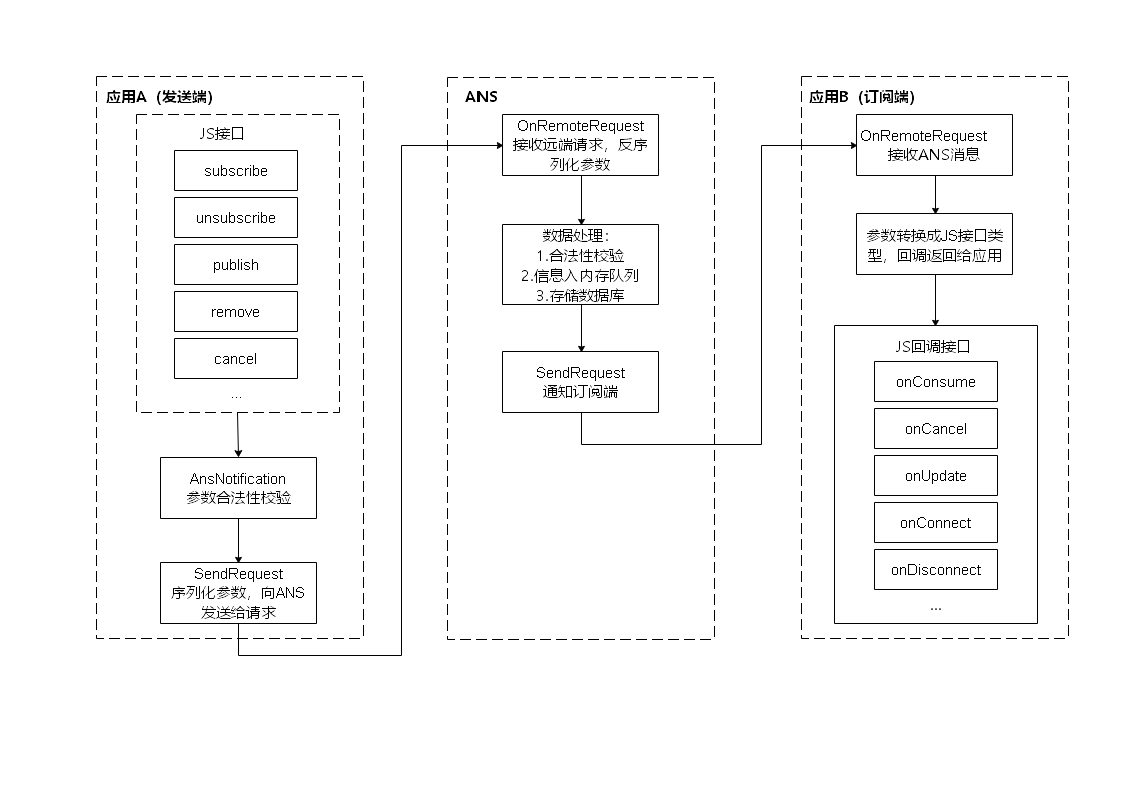
通知业务流程由ANS通知子系统、通知发送端、通知订阅端组成。一条通知从通知发送端产生,通过IPC通信发送到ANS,ANS再分发给通知订阅端。

接口说明
Notification模块的接口说明可以参考
-
通知使能开关接口介绍
| 接口名 | 描述 |
|---|---|
| isNotificationEnabled(bundle: BundleOption, callback: AsyncCallback<boolean>): void | 查询通知使能开关 |
| enableNotification(bundle: BundleOption, enable: boolean, callback: AsyncCallback<void>): void | 设置使能开关 |
-
通知订阅接口介绍
| 接口名 | 描述 |
|---|---|
| subscribe(subscriber: NotificationSubscriber, info: NotificationSubscribeInfo, callback: AsyncCallback<void>): void | 订阅指定应用通知 |
| subscribe(subscriber: NotificationSubscriber, callback: AsyncCallback<void>): void | 订阅所有通知 |
| unsubscribe(subscriber: NotificationSubscriber, callback: AsyncCallback<void>): void | 取消订阅通知 |
-
通知订阅回调接口介绍
| 接口名 | 描述 |
|---|---|
| onConsume?:(data: SubscribeCallbackData) => void | 通知回调 |
| onCancel?:(data: SubscribeCallbackData) => void | 通知取消回调 |
| onUpdate?:(data: NotificationSortingMap) => void | 通知排序更新回调 |
| onConnect?:() => void; | 订阅成功回调 |
| onDisconnect?:() => void; | 取消订阅回调 |
-
发送通知接口介绍
| 接口名 | 描述 |
|---|---|
| publish(request: NotificationRequest, callback: AsyncCallback<void>): void | 发布通知 |
| publish(request: NotificationRequest, userId: number, callback: AsyncCallback<void>): void | 指定用户发布通知 |
| cancel(id: number, label: string, callback: AsyncCallback<void>): void | 取消指定的通知 |
| cancelAll(callback: AsyncCallback<void>): void; | 取消所有该应用发布的通知 |
SystemUI通知
通知管理
-
ViewModel.ts是SystemUI通知管理的主模块,在构造函数中会执行注册的回调函数。
SwitchUserManager.getInstance() .getCurrentUserInfo() //注册回调 .then((userInfo) => this.registerCallback(userInfo.userId)) .catch((err) => Log.showError(TAG, `Can't get current user, err: ${err}`));
-
在registerCallback函数中定义了通知的subscriber函数,同时在NotificationService模块中也进行回调注册。
registerCallback(userId) { //subscriber this.mCallback = { userId: userId, onNotificationConsume: this.onNotificationConsume.bind(this), onNotificationCancel: this.onNotificationCancel.bind(this) } NotificationService.register(this.mCallback); }
-
在NotificationService模块中的构造函数中会执行订阅通知方法。
//订阅通知 this.subscribeNotification(this.getSubscriber()); //获取subscriber getSubscriber() { if (!this.mSubscriber) { this.mSubscriber = { //最终执行ViewModel中subscriber的回调函数:onNotificationConsume onConsume: this.handleNotificationAddAndSortMap.bind(this), //最终执行ViewModel中subscriber的回调函数:onNotificationCancel onCancel: this.handleNotificationCancel.bind(this), } } return this.mSubscriber; } //执行订阅 subscribeNotification(subscriber) { let callback = (err, data) => { Log.showInfo(TAG, `subscribeCallback finished err: ${JSON.stringify(err)} data: ${JSON.stringify(data)}`) }; //最终调用Notification.subscribe(subscriber, asyncCallback)方法进行订阅通知 NotificationManager.subscribeNotification(TAG, subscriber, callback); }
-
接收到通知时执行onNotificationConsume方法,该方法最终调用updateNotification方法。
//通知处理 onNotificationConsume(notificationItemData) { ... ... this.updateNotification(); } //通知更新 updateNotification() { Log.showInfo(TAG, `updateNotification list: ${JSON.stringify(this.mNotificationList)}`); Log.showInfo(TAG, `updateNotification length: ${this.mNotificationList.length}`); //对通知进行排序 this.sortNotification() //将通知进行分组 let notificationList = this.groupByGroupName(); //更新通知列表 AppStorage.SetOrCreate('notificationList', notificationList); }
-
对通知进行排序。
sortNotification() { Log.showInfo(TAG, `sortNotification`); if (this.mNotificationList == undefined || this.mNotificationList == null || this.mNotificationList.length < 1) { return } this.mNotificationList.sort((itemA, itemB) => { //long term notification come first if (itemA.source == SourceType.TYPE_CONTINUOUS && itemB.source != SourceType.TYPE_CONTINUOUS) { return -1 } //long term notification come first if (itemA.source != SourceType.TYPE_CONTINUOUS && itemB.source == SourceType.TYPE_CONTINUOUS) { return 1 } if ((itemA.source == SourceType.TYPE_CONTINUOUS && itemB.source == SourceType.TYPE_CONTINUOUS) || (itemA.source != SourceType.TYPE_CONTINUOUS && itemB.source != SourceType.TYPE_CONTINUOUS) ) { return -1 * (itemA.timestamp - itemB.timestamp) } }) }
-
将通知进行分组。
groupByGroupName(): any[]{ Log.showInfo(TAG, `groupByGroupName`); if (!this.mNotificationList || this.mNotificationList.length < 1) { return []; } let groupArr: any[] = []; let groups = {}; //根据bundleName_groupName形式进行分组 this.mNotificationList.forEach((item) => { const groupName = `${item.bundleName}_${item.groupName}`; Log.showInfo(TAG, `groupByGroupName groupName:${groupName}`); if (!groups[groupName] || groups[groupName].length < 1) { groups[groupName] = []; groupArr.push(groups[groupName]); } groups[groupName].push(item) }) Log.showInfo(TAG, `groupByGroupName groupArr:${JSON.stringify(groupArr)}`); return groupArr; }
通知展示
SystemUI默认订阅所有通知,并根据通知类型的不同调用不同组件进行展示。
-
在NotificationListComponent.ets组件中获取通知列表,并根据通知数量调用不同的组件进行展示。
@StorageLink('notificationList') notificationList: any[] = [] if (item.length > 1) { GroupNotificationItem({ groupData: item }) } else { NotificationItem({ itemData: item[0] }) }
-
当通知数量大于1时,调用GroupItem.ets组件,以发送通知的bundleName进行分组,当点击展开通知时调用NotificationItem.ets组件展示通知。
-
NotificationItem.ets组件会判断通知是否带有wantAgent,若有wantAgent则会获取want,然后调用GeneralItem.ets组件区分不同类型的通知,并对通知加上点击事件。
GeneralItem({ itemData: this.itemData, clickAction: () => this.showDevicesDialog(), isSubItem: this.isSubItem }); //获取want let wantAgent = this.itemData?.want; if (!!wantAgent) { WantAgent.getWant(wantAgent).then((want) => { this.nowWant = want Log.showInfo(TAG, `showDevicesDialog want: ${JSON.stringify(this.nowWant)}`) if (!want?.deviceId) { this.devicesDialogController.open() } else { ViewModel.clickItem(this.itemData); } }) } else { ViewModel.clickItem(this.itemData); }
-
GeneralItem.ets组件会针对不同类型的通知,调用不同的组件进行通知展示
//普通文本通知 if (this.itemData.contentType === Constants.NOTIFICATION_TYPE_BASIC) { basicItem({ itemData: this.itemData }); } //长文本通知 if (this.itemData.contentType === Constants.NOTIFICATION_TYPE_LONG) { longItem({ itemData: this.itemData, isExpand: this.isExpand }); } //多行文本通知 if (this.itemData.contentType === Constants.NOTIFICATION_TYPE_MULTILINE) { multiItem({ itemData: this.itemData, isExpand: this.isExpand }); } //图片通知 if (this.itemData.contentType === Constants.NOTIFICATION_TYPE_PICTURE) { pictureItem({ itemData: this.itemData, isExpand: this.isExpand }); }
SystemUI自定义通知模板
说明
对于常规通知SystemUI提供了基础文本、长文本、社交消息、图片四种通知展示模板。如果想自定义通知展示模板,需要在发送通知时指定NotificationRequest的template,并且需要在SystemUI中实现该展示模板。
| 参数 | 类型 | 注释 |
|---|---|---|
| name | String | 定义当前的模板的名称,value为一个字符串 |
| data | Object | 定义当前的模板的数据,以key-value的形式进行数据封装(key为唯一性) |
在SystemUI中自定义接收模板通知
-
在 features/noticeitem/src/main/ets/com/ohos/noticeItem/view/item/notificationItem.ets目录下将以下内容
if (this.itemData.template?.name) { CustomItem({ customItemData: this.itemData, clickAction: () => this.showDevicesDialog(), isSubItem: this.isSubItem }) } else { GeneralItem({ itemData: this.itemData, clickAction: () = > this.showDevicesDialog(), isSubItem: this.isSubItem }) }
替换为
GeneralItem({ itemData: this.itemData, clickAction: () => this. (), isSubItem: this.isSubItem })
-
在features/noticeitem/src/main/ets/com/ohos/noticeItem/view/item/generalItem.ets目录下,在进行contentType区分之前先判断是否为模板通知。
//判断是否为模板通知:常规定义的通知中没有模板名称(或者说模板名称为空)因此可以根据当前通知的template是否为空,不为空,则该通知需要使用自定义模板展示 if (this.itemData.template?.name) { customisedItem({ itemData: this.itemData, isExpand: this.isExpand }); } else{ //区分通知的contentType if (this.itemData.contentType === Constants.NOTIFICATION_TYPE_BASIC) { basicItem({ itemData: this.itemData }); } if (this.itemData.contentType === Constants.NOTIFICATION_TYPE_LONG) { longItem({ itemData: this.itemData, isExpand: this.isExpand }); } if (this.itemData.contentType === Constants.NOTIFICATION_TYPE_MULTILINE) { multiItem({ itemData: this.itemData, isExpand: this.isExpand }); } if (this.itemData.contentType === Constants.NOTIFICATION_TYPE_PICTURE) { pictureItem({ itemData: this.itemData, isExpand: this.isExpand }); } };
-
将checkItemNeedExpand方法进行修改。
checkItemNeedExpand() { if (this.itemData.template?.name) { return true; } else{ if (this.itemData.contentType === Constants.NOTIFICATION_TYPE_BASIC && (!(this.itemData.actionButtons?.length > 0))) { return false; } else { return true; } } }
-
创建自定义通知展示组件,根据自己需求进修UI样式的设计更改。
import Constants, {NotificationItemData, NotificationLayout as Layout} from '../../common/constants'; @Component export default struct CustomisedItem { @State itemData: NotificationItemData = undefined @Prop isExpand: boolean build() { Column() { Text(this.itemData.template.name) .maxLines(Constants.SINGLE_LINE) .textOverflow({ overflow: TextOverflow.Ellipsis }) .fontColor($r("sys.color.ohos_fa_text_primary")) //.fontColor("#00ffff") .fontSize($r("sys.float.ohos_id_text_size_body2")) .fontWeight(FontWeight.Medium) .lineHeight(Layout.TEXT_LINE_HEIGHT) Text(this.itemData.template.data.key1) .maxLines(Constants.SINGLE_LINE) .textOverflow({ overflow: TextOverflow.Ellipsis }) .fontColor($r("sys.color.ohos_fa_text_secondary")) //.fontColor("#00ff00") .fontSize($r("sys.float.ohos_id_text_size_body2")) .fontWeight(FontWeight.Regular) .lineHeight(Layout.TEXT_LINE_HEIGHT) Text(this.isExpand ? this.itemData.template.data.key2 : this.itemData.template.data.key3) .maxLines(this.isExpand ? Constants.EXPENDED_MAX_LINES : Constants.SINGLE_LINE) .textOverflow({ overflow: TextOverflow.Ellipsis }) .fontColor($r("sys.color.ohos_fa_text_secondary")) .fontSize($r("sys.float.ohos_id_text_size_body2")) .fontWeight(FontWeight.Regular) .lineHeight(Layout.TEXT_LINE_HEIGHT) Text(this.isExpand ? this.itemData.template.data.key6 : this.itemData.template.data.key1) .maxLines(this.isExpand ? Constants.EXPENDED_MAX_LINES : Constants.SINGLE_LINE) .textOverflow({ overflow: TextOverflow.Ellipsis }) .fontColor($r("sys.color.ohos_fa_text_secondary")) .fontSize($r("sys.float.ohos_id_text_size_body2")) .fontWeight(FontWeight.Regular) .lineHeight(Layout.TEXT_LINE_HEIGHT) if (this.isExpand) { ForEach(this.itemData.template.data.key4, (item: string) => { Text(item) .maxLines(Constants.SINGLE_LINE) .textOverflow({ overflow: TextOverflow.Ellipsis }) .fontColor($r("sys.color.ohos_fa_text_secondary")) .fontSize($r("sys.float.ohos_id_text_size_body2")) .fontWeight(FontWeight.Regular) .lineHeight(Layout.TEXT_LINE_HEIGHT) }, (item: string) => item.toString() ) } else { Text(this.itemData.template.data.key5) .maxLines(Constants.SINGLE_LINE) .textOverflow({ overflow: TextOverflow.Ellipsis }) .fontColor($r("sys.color.ohos_fa_text_secondary")) .fontSize($r("sys.float.ohos_id_text_size_body2")) .fontWeight(FontWeight.Regular) .lineHeight(Layout.TEXT_LINE_HEIGHT) } } .alignItems(HorizontalAlign.Start) } }
效果图展示
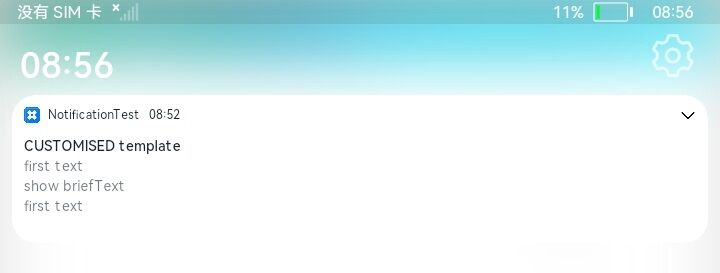
文本展开前效果图

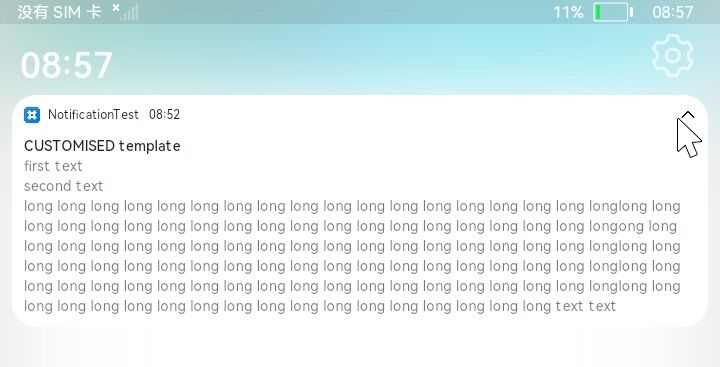
文本展开后效果图

通知开发示例
下面将展示通知的发送、订阅、接收到通知后的处理,本示例需要授予ohos.permission.NOTIFICATION_CONTROLLER权限,该权限是system_core级别的权限。
示例环境
开发模型:Stage
API版本:api 9
示例代码
//导入通知模块 import Notification from '@ohos.notification'; import WantAgent from '@ohos.wantAgent'; import image from '@ohos.multimedia.image'; const TAG = "NotificationCourse___Log" let wantAgentInfo = { wants: [ { bundleName: 'com.example.testdemo', abilityName: 'MainAbility', } ], operationType: WantAgent.OperationType.START_ABILITY, requestCode: 0, wantAgentFlags:[WantAgent.WantAgentFlags.UPDATE_PRESENT_FLAG] } let notificationRequestText = { content: { contentType: Notification.ContentType.NOTIFICATION_CONTENT_BASIC_TEXT, normal: { title: "NOTIFICATION COURSE", text: "send notification text message" } }, id: 0 } let notificationRequestWithWantAgent = { content: { contentType: Notification.ContentType.NOTIFICATION_CONTENT_BASIC_TEXT, normal: { title: "NOTIFICATION COURSE", text: "send notification with wantAgent message" }, }, id: 0, wantAgent: undefined } @Entry @Component struct Index { @State message: string = 'Notification Demo'; //发送的通知是否带有wantAgent @State isWantAgent: boolean = false; @State mShowText: any = { showId: 0, showNormalTitle: "", showNormalText: "" } //存放通知hashCode的数组 private hashCodeArr = []; //存放通知的数组 private showTextArr = []; private index = 1; private want; private fdNumber; private pixelMap; private resourceManager = globalThis.context.resourceManager; private subscriber = { onConsume: (data) => { console.log(TAG, `subscriber onConsume execute, request = ${JSON.stringify(data.request)}`) let normal = data.request.content.normal; let showId = data.request.id; let showNormalTitle = normal.title; let showNormalText = normal.text; this.hashCodeArr.push(data.request.hashCode); this.showTextArr.push({showId, showNormalTitle, showNormalText}); this.mShowText = this.showTextArr[this.showTextArr.length-1]; if(data.request.wantAgent){ console.log(TAG, `notification with wantAgent, want = ${JSON.stringify(data.request.wantAgent)}`); this.want = data.request.wantAgent; this.isWantAgent = true; }else{ this.isWantAgent = false; this.want = null; } } }; //发送模板通知的数据 private list : Array<string> = ["first first first first first", "second second second second second", "third third third third third", "fourth fourth fourth fourth fourth"] aboutToAppear(){ Notification.requestEnableNotification() .then(() => { console.log(TAG, `aboutToAppear enable send notification success`); }) .catch((err) => { console.log(TAG, `aboutToAppear enable send notification fail, err = ${JSON.stringify(err)}`) }) this.resourceManager.getRawFileDescriptor("zero.png") .then((value) => { this.fdNumber = value.fd; console.log(TAG, `get resourceManager success, mgr = ${JSON.stringify(value)}`); this.imageSource = image.createImageSource(fdNumber); console.log(TAG, `image source = ${JSON.stringify(this.imageSource)}`); }) .catch((err) => {console.log(TAG, `get resourceManager fail, err = ${JSON.stringify(err)}`)}); } build() { Row() { Column() { Text(this.message) .fontSize(50) .fontWeight(FontWeight.Bold) Button("发送普通文本通知") .fontSize(30) .onClick(() => { console.log(TAG, `send text notification Button click`); notificationRequestText.id = this.index; Notification.publish(notificationRequestText) .then(() => { this.index ++; console.log(TAG, `send text notification success`); }) .catch((err) => { console.log(TAG, `send text notification fial, err = ${JSON.stringify(err)}`); }) }) Button("发送wantAgent通知") .fontSize(30) .onClick(() => { console.log(TAG, `send wantAgent notification Button click`); wantAgentInfo.requestCode = this.index; WantAgent.getWantAgent(wantAgentInfo) .then((data) => { console.log(TAG, `getWantAgent success, data = ${JSON.stringify(data)}`); notificationRequestWithWantAgent.wantAgent = data; notificationRequestWithWantAgent.id = this.index; Notification.publish(notificationRequestWithWantAgent) .then(() => { this.index ++; console.log(TAG, `send wantAgent notification success`); }) .catch((err) => { console.log(TAG, `send wantAgent notification fial, err = ${JSON.stringify(err)}`); }) }) .catch((err) => { console.log(TAG, `getWantAgent fail, err = ${JSON.stringify(err)}`) }) }) Button("get image source") .fontSize(30) .onClick(() => { console.log(TAG, `get pixelMap button click`); this.imageSource.createPixelMap() .then((mPixelMap) => { this.pixelMap = mPixelMap; console.log(TAG, `get pixelMap sucess, pixelMap = ${JSON.stringify(this.pixelMap)}`); }) .catch((err) => {console.log(TAG, `get pixelMap fail, err = ${JSON.stringify(err)}`)}) }) Button("send notification") .fontSize(30) .onClick(() => { console.log(TAG, `send notification button click`); notification.publish({ id: this.index, content: { contentType: notification.ContentType.NOTIFICATION_CONTENT_PICTURE, picture: { title: "picture title", text: "picture text", briefText: "picture briefText", expandedTitle: "picture expandedTitle", picture: this.pixelMap } } }) .then(() => {console.log(TAG, "send picture success")}) .catch((err) => {console.log(TAG, `send picture fail, err =${JSON.stringify(err)}`)}) }) Button("发送自定义类型通知内容") .fontSize(30) .onClick(() => { console.log(TAG,`click Customization`); let notificationRequest_Customization = { id: this.index, content: { contentType: Notification.ContentType.NOTIFICATION_CONTENT_BASIC_TEXT, normal: { title: "BASIC_TEXT", text: "basic text text" } }, template: { name : "CUSTOMISED template", data: { "key1" : "first text", "key2" : "second text", "key3" : "show briefText ", "key4" : "show lineText", "key5" : this.list, "key6" : "long long long long long long long long long long long long long long long long long long long long long long long long long long long long long long long long long long long long long long text text" } } } console.log(TAG,`click Customization here`); Notification.publish(notificationRequest_Customization) .then(() => { console.log(TAG,`send customised notification succees, id = ${this.index}`); this.index ++; }) .catch((err) => {console.log(TAG, `send customised notification fail, err = ${JSON.stringify(err)}`)}) }) } Button("订阅通知") .fontSize(30) .onClick(() => { Notification.subscribe(this.subscriber) .then(() => { console.log(TAG, `subscribe success`); }) .catch((err) => { console.log(TAG, `subscribe fail, err = ${JSON.stringify(err)}`) }) }) Button("删除上一条通知") .fontSize(30) .onClick(() => { Notification.remove(this.hashCodeArr[this.hashCodeArr.length-1]) .then(() => { console.log(TAG, `remove notification success, id = ${JSON.stringify(this.index)}`); this.index --; this.hashCodeArr.pop(); this.showTextArr.pop(); if(this.showTextArr.length > 0){ this.mShowText = this.showTextArr[this.showTextArr.length-1]; }else{ this.mShowText.showId = 0; this.mShowText.showNormalTitle = "", this.mShowText.showNormalText = "" } console.log(TAG, `hashCodeArr = ${JSON.stringify(this.hashCodeArr)}`); console.log(TAG, `showTextArr = ${JSON.stringify(this.showTextArr)}`); }) .catch((err) => { console.log(TAG, `remove notification fail, err = ${JSON.stringify(err)}`) }) }) Button("删除所有通知") .fontSize(30) .onClick(() => { Notification.removeAll() .then(() => { console.log(TAG, `remove all notification success`) this.index = 1; this.hashCodeArr = []; this.showTextArr = []; this.mShowText.showId = 0; this.mShowText.showNormalTitle = "", this.mShowText.showNormalText = "" console.log(TAG, `hashCodeArr = ${JSON.stringify(this.hashCodeArr)}`); console.log(TAG, `showTextArr = ${JSON.stringify(this.showTextArr)}`); }) .catch((err) => {console.log(TAG, `remove all notification fail, err = ${JSON.stringify(err)}`)}) }) Button("取消订阅") .fontSize(30) .onClick(() => { Notification.unsubscribe(this.subscriber) .then(() => {console.log(TAG, `unsubscribe success`)}) .catch((err) => {console.log(TAG, `unsubscribe fail, err = ${JSON.stringify(err)}`)}) }) Column(){ Text(`最新获取到的订阅信息的 id: ${this.mShowText.showId}`) .fontSize(20) .fontColor("#ff0000") Text(`最新获取到的订阅信息的 title: ${this.mShowText.showNormalTitle}`) .fontSize(20) .fontColor("#00ff00") Text(`最新获取到的订阅信息的 text: ${this.mShowText.showNormalText}`) .fontSize(20) .fontColor("#0000ff") } //对带有wantAgent的通知进行底色渲染 .backgroundColor(this.isWantAgent ? "#00ffff" : "") .onClick(() => { if(this.isWantAgent){ //点击时启动want WantAgent.trigger(this.want, {code: 0}, (CompleteData) => { console.log(TAG, `trigger success, CompleteData = ${JSON.stringify(CompleteData)}`); }) } }) } .width('100%') } .height('100%') } }
开发说明
订阅通知
-
定义一个subscriber用来订阅、取消订阅通知,subscriber中onConsume函数作用:当订阅通知成功后,接收到通知时会触发该回调函数并返回data,这个data就是接收到的通知,一般用到的需要用到的信息都在data.request中。
private subscriber = { onConsume: (data) => { console.log(TAG, `subscriber onConsume execute, request = ${JSON.stringify(data.request)}`) let normal = data.request.content.normal; //用来接收这条通知的id let showId = data.request.id; //用来接收这条通知的title let showNormalTitle = normal.title; //用来接收这条通知的text let showNormalText = normal.text; //将这条通知的hashCode存入数组中 this.hashCodeArr.push(data.request.hashCode); //将这条通知(只包含:id、title、text)存入数组中 this.showTextArr.push({showId, showNormalTitle, showNormalText}); //展示最新的通知 this.mShowText = this.showTextArr[this.showTextArr.length-1]; //判断通知是否带有wantAgent if(data.request.wantAgent){ console.log(TAG, `notification with wantAgent, want = ${JSON.stringify(data.request.wantAgent)}`); this.want = data.request.wantAgent; this.isWantAgent = true; }else{ this.isWantAgent = false; this.want = null; } } }
-
调用Notification.subscribe(subscriber)方法订阅通知。
Button("订阅通知") .fontSize(30) .onClick(() => { Notification.subscribe(this.subscriber) .then(() => { console.log(TAG, `subscribe success`); }) .catch((err) => { console.log(TAG, `subscribe fail, err = ${JSON.stringify(err)}`) }) })
发送通知
调用Notification.requestEnableNotification()方法,请求使能发送通知。
Notification.requestEnableNotification() .then(() => { console.log(TAG, `aboutToAppear enable send notification success`); }) .catch((err) => { console.log(TAG, `aboutToAppear enable send notification fail, err = ${JSON.stringify(err)}`) })
普通文本通知
-
定义普通文本类型NotificationRequest.contentType选择NOTIFICATION_CONTENT_BASIC_TEXT。
let notificationRequestText = { content: { contentType: Notification.ContentType.NOTIFICATION_CONTENT_BASIC_TEXT, normal: { title: "NOTIFICATION COURSE", text: "send notification text message" } }, id: 0 }
-
调用Notification.publish()发送通知。
notificationRequestText.id = this.index; Notification.publish(notificationRequestText) .then(() => { this.index ++; console.log(TAG, `send text notification success`); }) .catch((err) => { console.log(TAG, `send text notification fial, err = ${JSON.stringify(err)}`); })
带wantAgent通知
-
定义wantAgentInfo,wants必须包含要启动的bundleName和abilityName。
let wantAgentInfo = { wants: [ { bundleName: 'com.example.testdemo', abilityName: 'MainAbility', } ], operationType: WantAgent.OperationType.START_ABILITY, requestCode: 0, wantAgentFlags:[WantAgent.WantAgentFlags.UPDATE_PRESENT_FLAG] }
-
定义带wantAgent类型的NotificationRequest,需定义wantAgent,在后面可为其赋值。
let notificationRequestWithWantAgent = { content: { contentType: Notification.ContentType.NOTIFICATION_CONTENT_BASIC_TEXT, normal: { title: "NOTIFICATION COURSE", text: "send notification with wantAgent message" }, }, id: 0, wantAgent: undefined }
-
调用WantAgent.getWantAgent(wantAgentInfo)获取WantAgent示例,获取成功后赋给NotificationRequest中的wantAgent,再调用Notification.publish()发送通知
wantAgentInfo.requestCode = this.index; WantAgent.getWantAgent(wantAgentInfo) .then((data) => { console.log(TAG, `getWantAgent success, data = ${JSON.stringify(data)}`); notificationRequestWithWantAgent.wantAgent = data; notificationRequestWithWantAgent.id = this.index; Notification.publish(notificationRequestWithWantAgent) .then(() => { this.index ++; console.log(TAG, `send wantAgent notification success`); }) .catch((err) => { console.log(TAG, `send wantAgent notification fial, err = ${JSON.stringify(err)}`); }) }) .catch((err) => { console.log(TAG, `getWantAgent fail, err = ${JSON.stringify(err)}`) })
社区规范:仅讨论OpenHarmony相关问题。
更多推荐
 2
2 1
1- 0



 已为社区贡献54条内容

所有评论(0)